Data Models
Overview
Bausteinsicht works with three data formats that must be kept in sync:
| Format | Purpose | Location |
|---|---|---|
JSON Model (JSONC) |
Single source of truth for the architecture |
|
JSON Schema |
Validation and IDE support for the model |
Published schema file |
draw.io XML (mxGraph) |
Visual representation of architecture views |
|
Entity Model
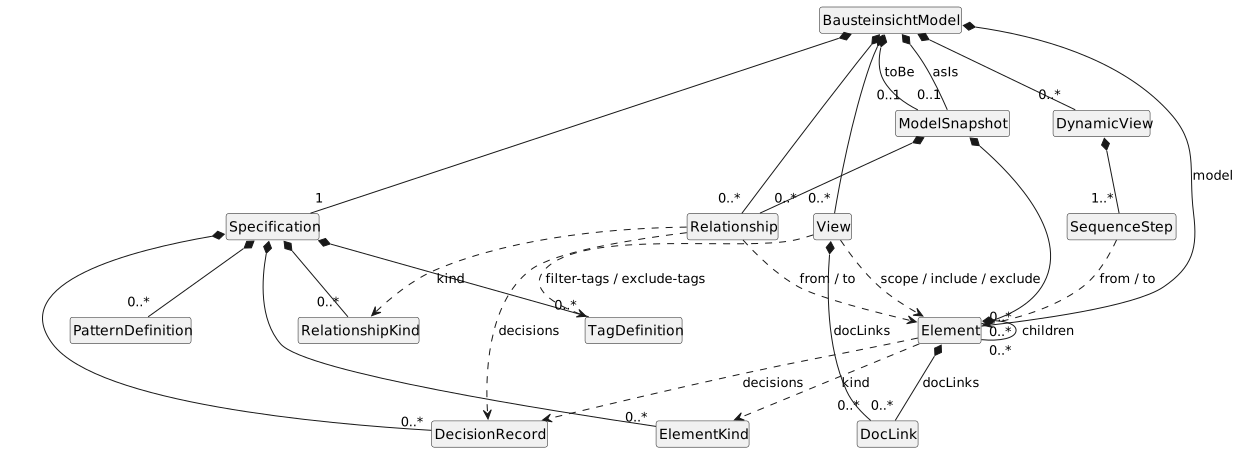
The JSON model is a tree of entities rooted at BausteinsichtModel. The diagram shows composition (filled diamond — the parent owns the child) and references (dashed arrow — one entity refers to another by ID). Cardinalities use UML notation.
The element ID (the key in the model map, dot-pathed for nested children) is the model’s primary key: relationships, view scope, and dynamic-view steps reference elements by that ID, while a view’s include/exclude match element IDs by literal value or wildcard pattern (e.g. webshop., *). The kind, decisions, and tag references must resolve to entries defined in the specification. These referential constraints are enforced at validation time — see Validation Rules.
JSON Model Structure
The model has these top-level sections. specification, model, relationships, and views are the core; the rest are optional: $schema (points the IDE at the JSON Schema for validation and autocompletion), config (project metadata/legend), meta (e.g. staleDetection settings), dynamicViews (sequence diagrams), constraints (lint rules), and asIs/toBe (for the diff command).
{
  "$schema": "https://raw.githubusercontent.com/docToolchain/Bausteinsicht/main/schemas/bausteinsicht.schema.json",

  // Define available element and relationship kinds
  "specification": {
    "elements": {
      "actor": {
        "notation": "Actor",
        "description": "A person or external system that interacts with the system"
      },
      "system": {
        "notation": "Software System",
        "description": "A top-level software system",
        "container": true
      },
      "container": {
        "notation": "Container",
        "description": "A deployable unit within a system",
        "container": true
      },
      "component": {
        "notation": "Component",
        "description": "A logical grouping within a container",
        "container": true
      }
    },
    "relationships": {
      "uses": { "notation": "uses" },
      "async": { "notation": "async", "dashed": true }
    }
  },

  // The actual architecture elements and their hierarchy
  "model": {
    "customer": {
      "kind": "actor",
      "title": "Customer",
      "description": "End user of the webshop"
    },
    "webshop": {
      "kind": "system",
      "title": "Webshop",
      "description": "Online shopping platform",
      "children": {
        "api": {
          "kind": "container",
          "title": "REST API",
          "technology": "Spring Boot",
          "description": "Handles all HTTP requests",
          "children": {
            "auth": {
              "kind": "component",
              "title": "Auth Module",
              "technology": "Spring Security"
            }
          }
        },
        "db": {
          "kind": "container",
          "title": "Database",
          "technology": "PostgreSQL",
          "description": "Stores all persistent data"
        }
      }
    }
  },

  // Connections between elements
  "relationships": [
    {
      "from": "customer",
      "to": "webshop.api",
      "label": "uses",
      "kind": "uses",
      "description": "Sends HTTP requests"
    },
    {
      "from": "webshop.api",
      "to": "webshop.db",
      "label": "reads/writes",
      "kind": "uses"
    }
  ],

  // View definitions
  "views": {
    "context": {
      "title": "System Context",
      "include": ["customer", "webshop"],
      "description": "High-level system overview"
    },
    "containers": {
      "title": "Container View",
      "scope": "webshop",
      "include": ["customer", "webshop.*"],
      "description": "Webshop internals"
    }
  },

  // Dynamic views: sequence diagrams describing runtime behaviour
  "dynamicViews": [
    {
      "key": "login-flow",
      "title": "Login Flow",
      "description": "Customer logs in to the webshop",
      "steps": [
        { "index": 1, "from": "customer",    "to": "webshop.api", "label": "POST /login",  "type": "sync" },
        { "index": 2, "from": "webshop.api", "to": "webshop.db",  "label": "findUser()",   "type": "sync" },
        { "index": 3, "from": "webshop.db",  "to": "webshop.api", "label": "user record",  "type": "return" },
        { "index": 4, "from": "webshop.api", "to": "customer",    "label": "200 OK + JWT", "type": "return" }
      ]
    }
  ]
}
Element Properties
| Property | Type | Required | Description |
|---|---|---|---|
|
string |
yes |
Element kind as defined in specification |
|
string |
yes |
Display name shown in diagrams |
|
string |
no |
Detailed description (shown in tooltips) |
|
string |
no |
Technology/framework used |
|
string[] |
no |
Tags for filtering and styling |
|
string |
no |
Lifecycle status: |
|
string[] |
no |
ADR IDs that govern this element |
|
string |
no |
RFC3339 timestamp; overrides git-derived last-modified for stale detection |
|
string |
no |
Hyperlink on the draw.io shape and in SVG export. Accepts any URL or document anchor (e.g. |
|
object |
no |
Nested child elements (only if kind has |
|
object |
no |
Arbitrary key-value metadata |
|
DocLink[] |
no |
Typed documentation links (arc42 chapter, ADR, PRD/persona, spec, …), rendered as clickable icons next to the element in HTML/SVG export — independent of |
The key of each element in the model object (e.g., "customer", "api") serves as its unique ID.
Nested elements are referenced using dot notation: "webshop.api.auth".
[[DocLink Properties]] ==== DocLink Properties
A DocLink is a typed link to an external documentation artifact, usable on both Element.docLinks and View.docLinks.
| Property | Type | Required | Description |
|---|---|---|---|
|
string |
yes |
Free string, not a closed schema enum. Conventional values: |
|
string |
yes |
Target URL or document anchor, same conventions as |
|
string |
no |
Icon tooltip text. Defaults to |
Element Lifecycle
An element’s optional status follows this intended progression (the status command groups elements by it):

The transitions themselves are not enforced — status is a plain string — but validation does check the following:
-
An unknown
statusvalue (not one of the six above) produces a warning listing the valid values. -
An archived element should have no outgoing relationships (archived elements are no longer active).
-
A deprecated element should have an outgoing relationship to a deployed successor of the same kind (a migration target); otherwise a warning is emitted.
Relationship Properties
| Property | Type | Required | Description |
|---|---|---|---|
|
string |
yes |
Source element ID (dot notation for nested) |
|
string |
yes |
Target element ID (dot notation for nested) |
|
string |
no |
Display label on the connector |
|
string |
no |
Relationship kind as defined in specification |
|
string |
no |
Detailed description |
|
string[] |
no |
ADR IDs that govern this relationship |
|
string |
no |
One of |
|
string |
no |
One of |
View Properties
| Property | Type | Required | Description |
|---|---|---|---|
|
string |
yes |
View title displayed as tab/page name |
|
string |
no |
Parent element whose children are shown |
|
string[] |
no |
Element IDs to include (supports wildcard patterns, see [Wildcard Patterns]) |
|
string[] |
no |
Element IDs to exclude from the view (supports wildcard patterns, see [Wildcard Patterns]) |
|
string[] |
no |
Include only elements that carry all of these tags |
|
string[] |
no |
Exclude elements that carry any of these tags |
|
string |
no |
View description |
|
string |
no |
Auto-layout mode for new pages: |
|
DocLink[] |
no |
View-level documentation links (e.g. the page’s PRD), rendered as a clickable icon row on the page itself. See [DocLink Properties]. |
[[Wildcard Patterns]] ==== Wildcard Patterns
The include and exclude arrays support the following patterns for matching elements:
| Pattern | Description |
|---|---|
|
Exact match — includes only the element with the given ID |
|
All top-level elements only (IDs without dots) |
|
All elements at all levels (entire model) |
|
Direct children of |
|
All descendants of |
Dynamic View Properties
Dynamic views are defined as a top-level dynamicViews array.
Each entry describes a sequence diagram for one runtime scenario.
| Property | Type | Required | Description |
|---|---|---|---|
|
string |
yes |
Unique identifier for the view (used as filename and CLI filter key) |
|
string |
yes |
Displayed heading in the rendered diagram |
|
string |
no |
Optional prose description of the scenario |
|
SequenceStep[] |
yes |
Ordered list of message steps (at least one required) |
Sequence Step Properties
| Property | Type | Required | Description |
|---|---|---|---|
|
integer |
yes |
Sort order of the step (must be unique within a view, starts at 1) |
|
string |
yes |
Sender element ID (must exist in the flat model) |
|
string |
yes |
Receiver element ID (must exist in the flat model) |
|
string |
yes |
Message label displayed on the arrow |
|
string |
no |
Arrow style: |
JSONC Comment Support
Model files use the JSONC (JSON with Comments) format. Both comment styles are supported:
-
//— single-line comments -
/\* … */— block comments (can span multiple lines)
Validation Rules
bausteinsicht validate enforces the model’s integrity constraints. The complete, code-traceable catalogue — each rule’s exact statement, severity, and source function — is in the Business Rules section of 01_use_cases (BR-001–BR-034). The constraints on the data model group as follows:
-
Structural (errors): required fields —
kind/titleon elements,titleon views,key/titleon dynamic views, at least one step per dynamic view, andtype/hrefondocLinksentries (BR-001, BR-004, BR-013, BR-018, BR-019, BR-020, BR-034); known kinds (BR-002, BR-009, BR-024, BR-025); container nesting and depth limit (BR-003, BR-006); non-empty element IDs (BR-005). -
Referential integrity (errors): relationship
from/to, viewscope, non-wildcardinclude/exclude,filter-tags/exclude-tags, dynamic-view stepfrom/to, anddecisionsreferences all resolve into the model or specification (BR-007, BR-008, BR-015, BR-016, BR-017, BR-021, BR-026). -
Enumerations (errors):
cardinality,dataFlow, viewlayout, and steptypetake only their fixed defined values (BR-010, BR-011, BR-014, BR-022). -
Uniqueness (errors): no fully-duplicate relationships; unique step indices (BR-012, BR-023).
-
Lifecycle & advisory (warnings): valid
status, archived/deprecated lifecycle rules, orphan and superseded decision references, and empty-model checks (BR-027–BR-033).
Errors abort the command (exit code 1); warnings are reported with a WARNING: prefix and are non-blocking (exit code 0).
draw.io XML Structure
Bausteinsicht generates and reads uncompressed draw.io XML (compressed="false") for Git-friendliness.
File Structure
<?xml version="1.0" encoding="UTF-8"?>
<mxfile host="bausteinsicht" compressed="false">

  <!-- One <diagram> per view -->
  <diagram id="view-context" name="System Context">
    <mxGraphModel dx="1422" dy="794" grid="1" gridSize="10"
                  page="1" pageWidth="1169" pageHeight="827"
                  background="#ffffff">
      <root>
        <!-- Mandatory base cells (always present) -->
        <mxCell id="0" />
        <mxCell id="1" parent="0" />

        <!-- All diagram content goes here -->
      </root>
    </mxGraphModel>
  </diagram>

</mxfile>
Mandatory Base Cells
Every page requires exactly two base cells:
-
id="0"— root cell, no parent -
id="1" parent="0"— default drawing layer, parent for all top-level content
These are never modified by Bausteinsicht.
Elements as <object> with Custom Properties
Every Bausteinsicht element is wrapped in an <object> element to carry custom metadata.
The nested <mxCell> has no id — the <object> owns the ID.
The parent <mxCell> uses container=1 so that child text sub-cells are grouped inside it.
<object label=""
        id="containers--webshop.api"
        bausteinsicht_id="webshop.api"
        bausteinsicht_kind="container"
        technology="Spring Boot"
        tooltip="Handles all HTTP requests">
  <mxCell style="rounded=1;whiteSpace=wrap;html=1;
                 fillColor=#438DD5;strokeColor=#3C7FC0;fontSize=13;container=1;"
          vertex="1"
          parent="1">
    <mxGeometry x="200" y="150" width="240" height="150" as="geometry" />
  </mxCell>
</object>

<!-- Text sub-cells: separate mxCell children for title, technology, description -->
<mxCell id="containers--webshop.api-title" value="REST API"
        style="text;html=1;fontSize=14;fontStyle=1;fontColor=#ffffff;fillColor=none;strokeColor=none;align=center;verticalAlign=middle;movable=0;resizable=0;deletable=0;editable=0;"
        vertex="1" parent="containers--webshop.api">
  <mxGeometry x="0" y="20" width="240" height="30" as="geometry" />
</mxCell>
<mxCell id="containers--webshop.api-tech" value="[Spring Boot]"
        style="text;html=1;fontSize=11;fontStyle=2;fontColor=#CCCCCC;fillColor=none;strokeColor=none;align=center;verticalAlign=middle;movable=0;resizable=0;deletable=0;editable=0;"
        vertex="1" parent="containers--webshop.api">
  <mxGeometry x="0" y="55" width="240" height="20" as="geometry" />
</mxCell>
<mxCell id="containers--webshop.api-desc" value="Handles all HTTP requests"
        style="text;html=1;fontSize=10;fontColor=#BBBBBB;fillColor=none;strokeColor=none;align=center;verticalAlign=middle;movable=0;resizable=0;deletable=0;editable=0;"
        vertex="1" parent="containers--webshop.api">
  <mxGeometry x="0" y="80" width="240" height="40" as="geometry" />
</mxCell>
Custom properties on <object>:
| Property | Purpose |
|---|---|
|
Empty string ( |
|
Cell ID — page-scoped for file-wide uniqueness: |
|
The canonical element ID from the model (e.g., |
|
Element kind (actor, system, container, component) |
|
Technology string from the model |
|
Element description — shown on hover in draw.io |
|
Drill-down navigation link (see Navigation section) |
Text Sub-Cells (Grouped Labels)
Each element’s display text is decomposed into independent child <mxCell> elements, giving full control over font size, color, weight, and vertical positioning. The parent element has label="" and container=1.
Three child cell types exist, identified by their ID suffix:
| Sub-Cell | ID Suffix | Style |
|---|---|---|
Title |
|
Bold, larger font (14px), element’s font color |
Technology |
|
Italic, smaller font (11px), |
Description |
|
Smallest font (10px), lighter color |
Child cells use movable=0;resizable=0;deletable=0;editable=0; to prevent accidental manipulation in draw.io.
Technology and description sub-cells are only created when the corresponding field is non-empty. Actor elements have only a title sub-cell.
HTML Labels (Backward Compatible)
Legacy draw.io files may still use HTML-formatted label attributes instead of sub-cells. Bausteinsicht reads both formats: it checks for child text sub-cells first, and falls back to parsing the HTML label if none are found.
The legacy label format has up to three lines:
-
Title — bold (
<b>Title</b>) -
Technology — grey, wrapped in square brackets, italic
-
Description — lighter grey, smaller font
Entity escaping rules for HTML labels:
| Character | Escaped |
|---|---|
|
|
|
|
|
|
|
|
Containers (Nested Elements)
Systems and containers that hold children use the swimlane style.
Child elements set parent to the container’s ID.
Child coordinates are relative to the container’s top-left corner (below the header).
<!-- Container (system boundary) -->
<object label="Webshop" id="webshop"
        bausteinsicht_id="webshop"
        bausteinsicht_kind="system">
  <mxCell style="swimlane;startSize=30;fillColor=#f5f5f5;
                 strokeColor=#666666;fontColor=#333333;
                 whiteSpace=wrap;html=1;rounded=1;container=1;"
          vertex="1" parent="1">
    <mxGeometry x="100" y="100" width="500" height="300" as="geometry" />
  </mxCell>
</object>

<!-- Child element — parent references the container -->
<object label=""
        id="containers--webshop.api"
        bausteinsicht_id="webshop.api"
        bausteinsicht_kind="container"
        technology="Spring Boot">
  <mxCell style="rounded=1;whiteSpace=wrap;html=1;
                 fillColor=#438DD5;strokeColor=#3C7FC0;container=1;"
          vertex="1"
          parent="webshop">
    <mxGeometry x="30" y="60" width="240" height="150" as="geometry" />
  </mxCell>
</object>
<!-- Sub-cells for the child element (parent = child's cell ID) -->
<mxCell id="containers--webshop.api-title" value="REST API"
        style="text;html=1;fontSize=14;fontStyle=1;..." vertex="1"
        parent="containers--webshop.api">
  <mxGeometry x="0" y="20" width="240" height="30" as="geometry" />
</mxCell>
Connectors (Relationships)
Connectors use edge="1" and reference source/target by their page-scoped cell IDs.
Connectors always use parent="1" (the layer), even when connecting shapes inside containers.
<mxCell id="rel-containers--customer-containers--webshop.api-0"
        value="uses"
        style="edgeStyle=orthogonalEdgeStyle;rounded=1;html=1;
               endArrow=block;endFill=1;strokeColor=#666666;"
        edge="1"
        source="containers--customer"
        target="containers--webshop.api"
        parent="1">
  <mxGeometry relative="1" as="geometry" />
</mxCell>
Connection point strategy:
By omitting exitX/exitY/entryX/entryY style properties, draw.io auto-routes connectors from the nearest perimeter point. This ensures connectors look correct when elements are moved by the user.
Connector ID convention: rel-<scopedSource>-<scopedTarget>-<index> where scoped IDs use the <viewID>--<elementID> format and <index> is a zero-based integer for disambiguation when multiple relationships exist between the same pair (e.g., rel-containers—customer-containers—webshop.api-0).
Cross-Page Navigation (Drill-Down)
Elements link to detail views using the link attribute on <object>:
<!-- System element with link to container view -->
<object label="Webshop" id="webshop"
        bausteinsicht_id="webshop"
        bausteinsicht_kind="system"
        link="data:page/id,view-containers">
  <mxCell style="..." vertex="1" parent="1">
    <mxGeometry ... />
  </mxCell>
</object>
Link format: data:page/id,<diagram-id> where <diagram-id> matches the id attribute of the target <diagram> element.
Back-navigation buttons are generated in detail views:
<object label="&larr; System Context" id="nav-back-context"
link="data:page/id,view-context">
<mxCell style="rounded=1;fillColor=#f8cecc;strokeColor=#b85450;html=1;fontSize=10;"
vertex="1" parent="1">
<mxGeometry x="20" y="20" width="140" height="30" as="geometry" />
</mxCell>
</object>Documentation Link Icons (#543)
link, decisions, and docLinks each render as their own small clickable icon — independent <object> cells (never a bare <mxCell>, which cannot carry a link attribute), positioned via mxGraph’s parent ID attribute rather than XML nesting:
<!-- Element-level icons: parented to the element's own on-page cell ID -->
<object id="doclink-webshop.api-link" label="🔗" link="architecture.adoc#sec-api" tooltip="Open linked document">
<mxCell style="rounded=1;fillColor=#dae8fc;strokeColor=#6c8ebf;..."
vertex="1" parent="webshop.api">
<mxGeometry x="..." y="2" width="18" height="18" as="geometry" />
</mxCell>
</object>
<object id="doclink-webshop.api-decision-0" label="⚖" link="ADRs/ADR-001-DSL-Format.html" tooltip="ADR-001: Use JSONC">
<mxCell style="..." vertex="1" parent="webshop.api">
<mxGeometry ... />
</mxCell>
</object>
<!-- View-level icons: parented to "1" (page-absolute) -->
<object id="doclink-view-overview-0" label="📋" link="docs/prd.html" tooltip="Product Requirements">
<mxCell style="..." vertex="1" parent="1">
<mxGeometry ... />
</mxCell>
</object>|
Important
|
The glyph must be the <object>’s own `label attribute, not a value attribute on the inner <mxCell>. A value set directly on the mxCell still renders visually (confirmed against a real draw.io export: the glyph shows, rasterized to an embedded image) but silently breaks the SVG <a href> export — draw.io’s exporter only wraps a shape in a clickable anchor when the cell’s displayed value resolves through the <object> wrapper’s own attributes, matching every other link-bearing <object> in this codebase (the element shape itself, the back-navigation button, the metadata/legend boxes).
|
|
Caution
|
A relative href/link (e.g. "ADRs/ADR-001-DSL-Format.html") resolves differently in SVG export depending on whether it carries a #fragment. A fragment-bearing href (e.g. "architecture.adoc#sec-api") exports as just the bare fragment (#sec-api), which is portable and resolves correctly when the SVG is embedded in that same HTML/AsciiDoc page. A fragment-less relative href exports as a full file://<local draw.io install path>/<original relative path> URL — anchored to wherever draw.io itself is installed on the machine that ran the export, not to the project or the exported SVG’s own location. This is not portable across machines and will not resolve for other readers. Until this is addressed, prefer #fragment-only anchors or absolute URLs (https://…;) for docLinks/decisions[].file/link values that need to survive SVG export unchanged.
|
Icon cells are identified by the doclink- ID prefix and excluded from reverse-sync element/relationship extraction, the same way nav-back- buttons are (#205) — model is authoritative, icon state is never read back from draw.io. See ADR-009’s "Extension: Doc/ADR Drilldown Icons (#543)" for the full rationale, including why decision badges are clickable now and why PNG export still shows the icon glyph without the click behavior.
Multi-Page Structure
Each view is a separate <diagram> element. The id attribute uses the format view-<viewKey> (e.g., view-context for a view with key "context").
The name attribute is the view title displayed as the tab label.
<mxfile host="bausteinsicht" compressed="false">
  <diagram id="view-context" name="System Context">
    <mxGraphModel ...>...</mxGraphModel>
  </diagram>
  <diagram id="view-containers" name="Container View">
    <mxGraphModel ...>...</mxGraphModel>
  </diagram>
</mxfile>
Base cells (id="0" and id="1") exist on every page with the same IDs — this is standard draw.io convention.
Element cell IDs are page-scoped using <viewID>--<elementID> to ensure file-wide uniqueness (e.g., context—customer and containers—customer for the same element on different pages). The bausteinsicht_id attribute always holds the canonical element ID.
Go Struct Mappings
// Top-level model file
type BausteinsichtModel struct {
    Schema        string                 `json:"$schema,omitempty"`
    Config        Config                 `json:"config,omitempty"`
    Meta          map[string]interface{} `json:"meta,omitempty"`
    Specification Specification          `json:"specification"`
    Model         map[string]Element     `json:"model"`
    Relationships []Relationship         `json:"relationships"`
    Views         map[string]View        `json:"views"`
    DynamicViews  []DynamicView          `json:"dynamicViews,omitempty"`
    Constraints   []Constraint           `json:"constraints,omitempty"`
    AsIs          *ModelSnapshot         `json:"asIs,omitempty"`
    ToBe          *ModelSnapshot         `json:"toBe,omitempty"`
}

// Specification defines available element and relationship kinds
type Specification struct {
    Elements      map[string]ElementKind       `json:"elements"`
    Relationships map[string]RelationshipKind  `json:"relationships,omitempty"`
    Tags          []TagDefinition              `json:"tags,omitempty"`
    Patterns      map[string]PatternDefinition `json:"patterns,omitempty"`
    Decisions     []DecisionRecord             `json:"decisions,omitempty"`
}

type ElementKind struct {
    Notation    string `json:"notation"`
    Description string `json:"description,omitempty"`
    Container   bool   `json:"container,omitempty"`
}

type RelationshipKind struct {
    Notation string `json:"notation"`
    Dashed   bool   `json:"dashed,omitempty"`
}

// Element represents an architecture building block
type Element struct {
    Kind         string             `json:"kind"`
    Title        string             `json:"title"`
    Description  string             `json:"description,omitempty"`
    Technology   string             `json:"technology,omitempty"`
    Tags         []string           `json:"tags,omitempty"`
    Status       string             `json:"status,omitempty"`       // proposed|design|implementation|deployed|deprecated|archived
    Decisions    []string           `json:"decisions,omitempty"`    // linked ADR IDs
    LastModified string             `json:"lastModified,omitempty"` // RFC3339; overrides git-based staleness
    Children     map[string]Element `json:"children,omitempty"`
    Metadata     map[string]string  `json:"metadata,omitempty"`
    Link         string             `json:"link,omitempty"`     // hyperlink on the draw.io shape and in SVG export
    DocLinks     []DocLink          `json:"docLinks,omitempty"` // typed documentation links, rendered as clickable icons (#543)
}

// DocLink is a typed link to an external documentation artifact (#543)
type DocLink struct {
    Type  string `json:"type"`  // free string; conventional: arc42|adr|persona|prd|spec
    Href  string `json:"href"`
    Title string `json:"title,omitempty"` // icon tooltip; defaults to Type when omitted
}

// Relationship connects two elements
type Relationship struct {
    From        string   `json:"from"`
    To          string   `json:"to"`
    Label       string   `json:"label,omitempty"`
    Kind        string   `json:"kind,omitempty"`
    Description string   `json:"description,omitempty"`
    Decisions   []string `json:"decisions,omitempty"`   // linked ADR IDs
    Cardinality string   `json:"cardinality,omitempty"` // 1:1|1:N|N:N
    DataFlow    string   `json:"dataFlow,omitempty"`    // sync|async|request/response|publish/subscribe
}

// View defines which elements appear in a diagram
type View struct {
    Title       string   `json:"title"`
    Scope       string   `json:"scope,omitempty"`
    Include     []string `json:"include,omitempty"`
    Exclude     []string `json:"exclude,omitempty"`
    FilterTags  []string `json:"filter-tags,omitempty"`  // include only elements with ALL of these tags
    ExcludeTags []string `json:"exclude-tags,omitempty"` // exclude elements with ANY of these tags
    Description string   `json:"description,omitempty"`
    Layout      string   `json:"layout,omitempty"`   // layered (default)|grid|none
    DocLinks    []DocLink `json:"docLinks,omitempty"` // view-level documentation links (#543)
}

// DynamicView describes a sequence diagram scenario
type DynamicView struct {
    Key         string         `json:"key"`
    Title       string         `json:"title"`
    Description string         `json:"description,omitempty"`
    Steps       []SequenceStep `json:"steps"`
}

// SequenceStep is one message in a dynamic view
type SequenceStep struct {
    Index int      `json:"index"`
    From  string   `json:"from"`
    To    string   `json:"to"`
    Label string   `json:"label"`
    Type  StepType `json:"type,omitempty"`
}

type StepType string

const (
    StepSync   StepType = "sync"
    StepAsync  StepType = "async"
    StepReturn StepType = "return"
)

// Constraint defines an architectural rule enforced via `bausteinsicht lint`.
// no-relationship/allowed-relationship endpoint selectors (from/to) and the
// required-field element selector (tag/element-kind) are checked in order of
// specificity — exact ID > tag > kind — whichever field is non-empty wins.
// The allow-list forms (from-tags/from-kinds) rank with their singular
// counterpart: tag/from-tags outrank kind/from-kinds, but not exact ID.
type Constraint struct {
    ID          string `json:"id"`
    Description string `json:"description"`
    Rule        string `json:"rule"` // no-relationship|allowed-relationship|required-field|max-depth|no-circular-dependency|technology-allowed

    // no-relationship / allowed-relationship: "from" endpoint selector
    From      string   `json:"from,omitempty"`       // exact element ID
    FromTag   string   `json:"from-tag,omitempty"`   // element must have this tag
    FromKind  string   `json:"from-kind,omitempty"`  // element must have this kind
    FromTags  []string `json:"from-tags,omitempty"`  // allow-list: element must have ANY of these tags (allowed-relationship only)
    FromKinds []string `json:"from-kinds,omitempty"` // allow-list: element must have this kind (allowed-relationship only)

    // no-relationship / allowed-relationship: "to" endpoint selector
    To     string `json:"to,omitempty"`
    ToTag  string `json:"to-tag,omitempty"`
    ToKind string `json:"to-kind,omitempty"`

    // required-field: element selector (Tag takes precedence over ElementKind if both are set)
    ElementKind string `json:"element-kind,omitempty"`
    Tag         string `json:"tag,omitempty"`
    Field       string `json:"field,omitempty"` // description|technology|title

    Max          int      `json:"max,omitempty"`          // max-depth
    Technologies []string `json:"technologies,omitempty"` // technology-allowed
}

// Config holds top-level configuration for diagram generation
type Config struct {
    Metadata *bool  `json:"metadata,omitempty"`
    Legend   *bool  `json:"legend,omitempty"`
    Author   string `json:"author,omitempty"`
    Repo     string `json:"repo,omitempty"`
}

// ModelSnapshot is an as-is or to-be capture used by the diff command
type ModelSnapshot struct {
    Elements      map[string]Element `json:"elements"`
    Relationships []Relationship     `json:"relationships"`
}
Feedback
Was this page helpful?
Glad to hear it! Please tell us how we can improve.
Sorry to hear that. Please tell us how we can improve.