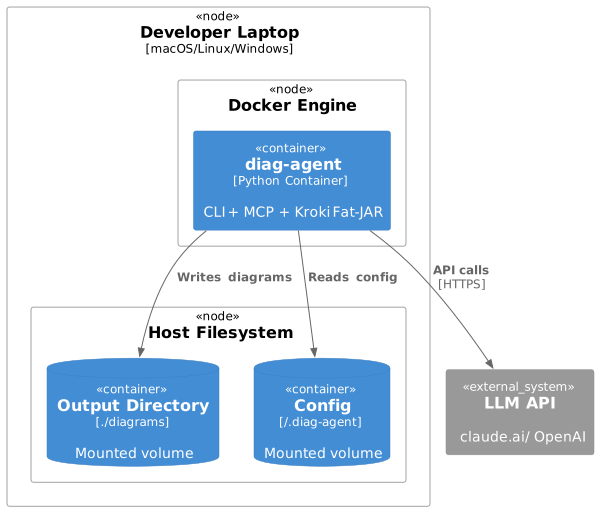
Deployment View
Deployment Scenario 1: Local Development (Docker)
Docker Command:
docker run -it \
  -v $(pwd)/diagrams:/diagrams \
  -v ~/.diag-agent:/root/.diag-agent \
  -e ANTHROPIC_API_KEY=$ANTHROPIC_API_KEY \
  diag-agent:latest \
  create "System context diagram" --type c4
Deployment Scenario 2: CI/CD Pipeline
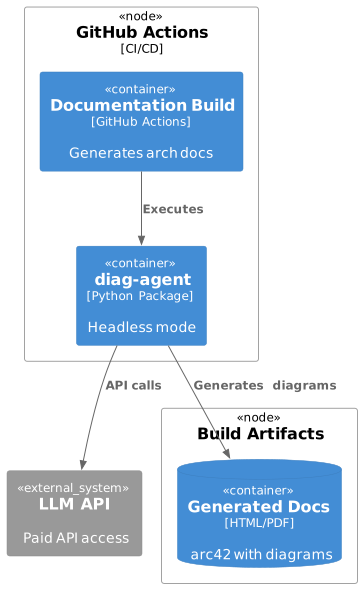
GitHub Actions Example:
- name: Generate Architecture Diagrams
  env:
    ANTHROPIC_API_KEY: ${{ secrets.ANTHROPIC_API_KEY }}
    DIAG_AGENT_HEADLESS: true
  run: |
    uvx diag-agent create-batch --input arch-requirements.txt --output ./docs/diagrams
Current (v0.1.0 - source distribution):
- name: Generate Architecture Diagrams
  env:
    ANTHROPIC_API_KEY: ${{ secrets.ANTHROPIC_API_KEY }}
    DIAG_AGENT_HEADLESS: true
  run: |
    git clone https://github.com/docToolchain/diag-agent.git
    cd diag-agent
    uv pip install .
    uv run diag-agent create-batch --input arch-requirements.txt --output ./docs/diagrams
Future (when published to PyPI):
- name: Generate Architecture Diagrams
  env:
    ANTHROPIC_API_KEY: ${{ secrets.ANTHROPIC_API_KEY }}
    DIAG_AGENT_HEADLESS: true
  run: |
    uvx diag-agent create-batch --input arch-requirements.txt --output ./docs/diagrams
Deployment Scenario 3: MCP Server for LLM Applications
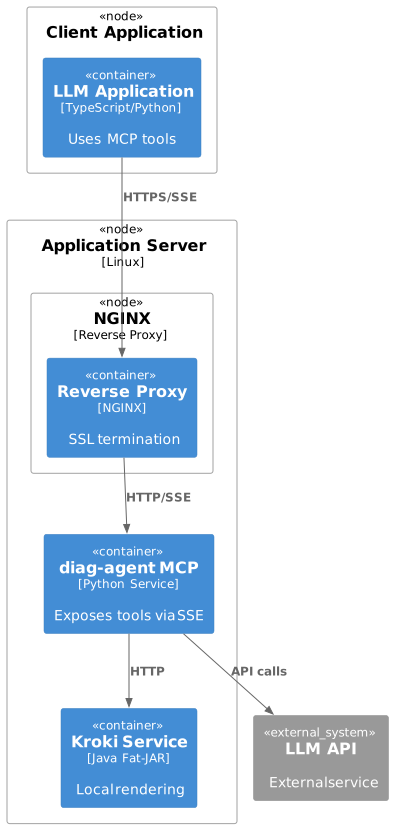
Startup Command:
diag-agent serve \
  --mcp \
  --host 0.0.0.0 \
  --port 8080 \
  --url-mode \
  --cors-origins "https://my-llm-app.com"
Infrastructure Requirements
| Component | Resource Requirements | Scaling | Availability |
|---|---|---|---|
diag-agent (CLI) |
Minimal (single invocation) |
N/A |
N/A |
diag-agent (MCP) |
512MB RAM, 1 CPU |
Horizontal (stateless) |
99.9% (load balanced) |
Kroki Fat-JAR |
1GB RAM, 2 CPU |
Single instance sufficient |
99% (restart on failure) |
LLM API |
External service |
N/A |
Provider SLA |
Feedback
Was this page helpful?
Glad to hear it! Please tell us how we can improve.
Sorry to hear that. Please tell us how we can improve.