Use Cases
Actors
| Actor | Description |
|---|---|
Software Architect |
Primary user who maintains the architecture model and draw.io diagrams. Edits both the JSON DSL and draw.io visually. |
Developer |
Reads architecture diagrams in draw.io. May occasionally add elements or relationships in draw.io. |
LLM Agent |
AI assistant that manipulates the architecture model via CLI commands. Reads and writes JSON model files. |
UC-1: Initialize Architecture Model
Primary Actor: Software Architect
Level: User Goal
Scope: Bausteinsicht (CLI + sync engine)
Trigger: The architect starts a new project and runs bausteinsicht init.
Preconditions
-
Bausteinsicht CLI is installed
-
A project directory exists
Main Success Scenario
-
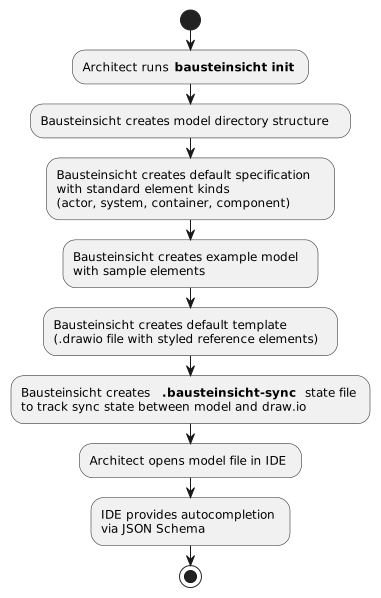
The architect runs
bausteinsicht initin an empty project directory. -
Bausteinsicht creates the sample specification — eight element kinds:
actor,system,external_system,container,datastore,ui,queue,component. -
Bausteinsicht creates an example model with sample elements using those kinds.
-
Bausteinsicht creates the default draw.io template (
template.drawio). -
Bausteinsicht runs an initial forward sync to generate
architecture.drawio. -
Bausteinsicht writes the
.bausteinsicht-syncstate file. -
The architect opens the model in an IDE, which provides autocompletion and validation via the JSON Schema.
Activity Diagram
Extensions
1a. One of architecture.jsonc, architecture.drawio, or template.drawio already exists: Bausteinsicht aborts with exit code 2 (an existing .bausteinsicht-sync is not checked).
Postconditions
Success guarantee: A valid model (architecture.jsonc), a template (template.drawio), an initial diagram (architecture.drawio), and a .bausteinsicht-sync state file exist; the generated sample satisfies BR-032 and BR-033.
Minimal guarantee: If any of architecture.jsonc, architecture.drawio, or template.drawio already exists, none of those three is created or overwritten.
UC-2: Define Architecture Elements
Primary Actor: Software Architect
Level: User Goal
Scope: Bausteinsicht (model file)
Trigger: The architect needs to add or change elements and relationships in the model.
Preconditions
-
An initialized architecture model exists
-
IDE has JSON Schema support active
Main Success Scenario
-
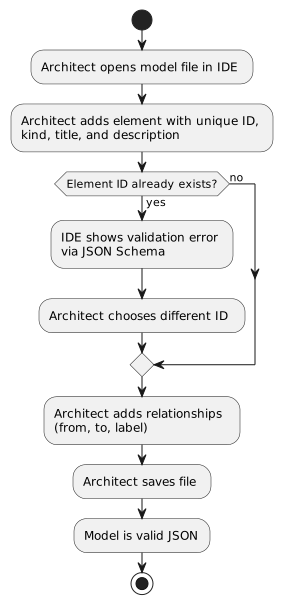
The architect opens the model file in the IDE.
-
The architect adds an element with a unique ID,
kind,title, and optionaldescription. -
The IDE validates against the JSON Schema as the architect types.
-
The architect adds relationships (
from,to,label). -
The architect saves the file; the model remains valid JSON.
Activity Diagram
Extensions
2a. The chosen ID duplicates an existing element key: JSON object keys must be unique, so the editor/JSON tooling flags the collision (plain JSON would silently keep only the last); the architect picks a different ID. (BR-005 separately requires IDs to be non-empty.)
4a. A relationship references a non-existent element: bausteinsicht validate (and sync) reports it as an error (BR-007, BR-008).
Postconditions
Success guarantee: The model contains the new elements with unique IDs and relationships referencing valid element IDs (BR-001–BR-012).
Minimal guarantee: Invalid edits are caught by the schema and by validation before sync; the model is never silently corrupted.
UC-3: Generate draw.io Diagrams (Forward Sync)
Primary Actor: Software Architect
Level: User Goal
Scope: Bausteinsicht (sync engine)
Trigger: The architect runs bausteinsicht sync after changing the model.
Preconditions
-
A valid architecture model exists
-
(Optional) A draw.io template —
template.drawionext to the model or--template <path>; otherwise the embedded default template is used -
(Optional) Existing draw.io diagrams with manual layout
Main Success Scenario
-
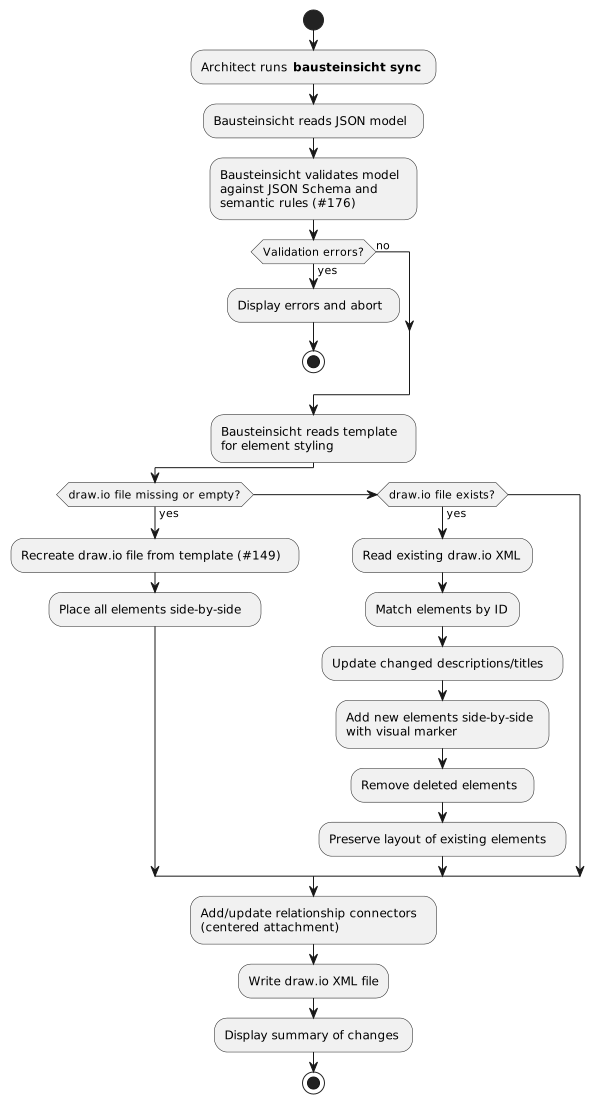
The architect runs
bausteinsicht sync. -
Bausteinsicht reads the model and runs validation (the business rules; JSON Schema validation is IDE-side, not part of the CLI sync).
-
Bausteinsicht resolves the template for element styling (
--template> localtemplate.drawio> embedded default). -
For an existing diagram, it matches elements by
bausteinsicht_id, updates changed titles/descriptions, adds new elements (visually marked), removes deleted ones, and preserves the existing layout. -
Bausteinsicht adds and updates relationship connectors with centered attachment.
-
Bausteinsicht writes the draw.io XML and prints a summary of changes.
Activity Diagram
Extensions
2a. The model is invalid: validation errors are displayed and the sync aborts with exit code 1 (BR-001–BR-026).
3a. No local template.drawio and no --template: Bausteinsicht uses the embedded default template (not an error).
4a. The draw.io file is missing or empty: Bausteinsicht prints a warning, recreates it from the template, and lays the elements out with the layout engine (default layered).
6a. Writing the draw.io file fails (e.g. the path is not writable): Bausteinsicht reports an error and exits with code 2.
Postconditions
Success guarantee: The draw.io file reflects the current model state; existing element positions are preserved; new elements are visually marked for manual positioning; relationship connectors attach to element centers.
Minimal guarantee: On a validation error, the existing diagram is left unchanged.
UC-4: Edit in draw.io and Reverse Sync
Primary Actor: Software Architect or Developer
Level: User Goal
Scope: Bausteinsicht (sync engine)
Trigger: Someone has edited the diagram in draw.io and runs bausteinsicht sync.
Preconditions
-
draw.io diagrams were previously generated from the model
-
Elements in draw.io carry Bausteinsicht IDs
Main Success Scenario
-
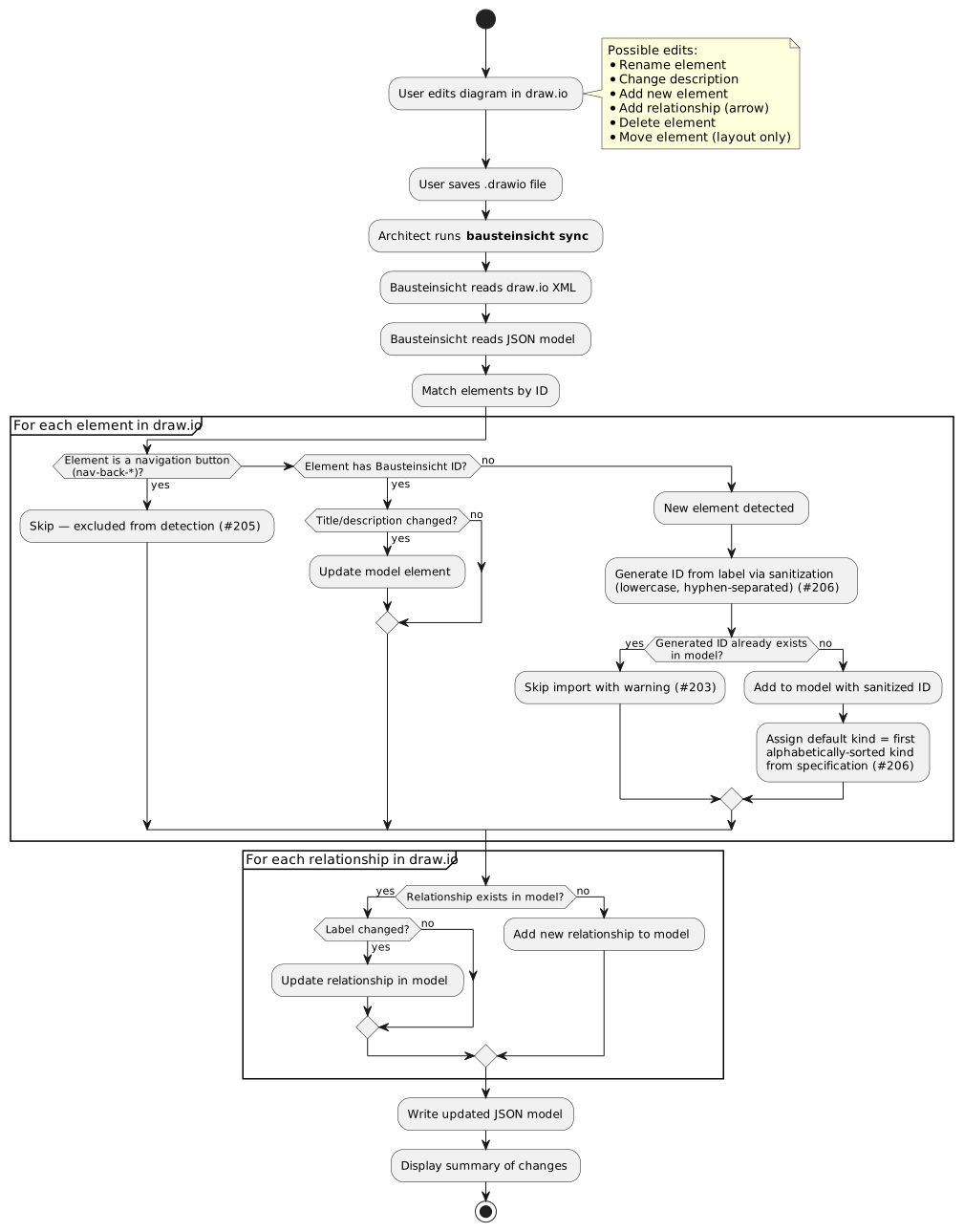
The user edits the diagram in draw.io (rename, change description, add an element or relationship, delete, or move) and saves.
-
The architect runs
bausteinsicht sync. -
Bausteinsicht reads the draw.io XML and the model and matches elements by ID.
-
For each element carrying a
bausteinsicht_idwhose title or description changed, it updates the model element. -
For each new element, it derives an ID from the label (sanitized: lowercase, hyphen-separated) and assigns the first alphabetically-sorted kind from the specification.
-
For each relationship, it adds new ones and updates changed labels.
-
Bausteinsicht writes the updated model and prints a summary of changes.
Activity Diagram
Extensions
3a. The element is a navigation button (nav-back-*): it is skipped — excluded from detection (#205).
4a. The same element changed in both the model and the diagram: a warning is displayed and the model wins; there is no silent overwrite.
5a. The generated ID collides with an existing element: the import is skipped with a warning (#203).
5b. A draw.io element has no ID and cannot be auto-matched: a warning with manual-resolution instructions is shown.
Postconditions
Success guarantee: The model reflects the diagram edits; new elements have sanitized IDs (lowercase, hyphen-separated) and the first alphabetically-sorted kind; colliding IDs are skipped with a warning; navigation buttons are ignored; element positions (layout) do not modify the model.
Minimal guarantee: Conflicting changes never silently overwrite the model; layout-only edits never change it.
UC-5: Watch Mode
Primary Actor: Software Architect
Level: User Goal
Scope: Bausteinsicht (watcher)
Trigger: The architect runs bausteinsicht watch to keep model and diagram in sync while editing.
Preconditions
-
An initialized architecture model exists
-
draw.io diagrams exist
Main Success Scenario
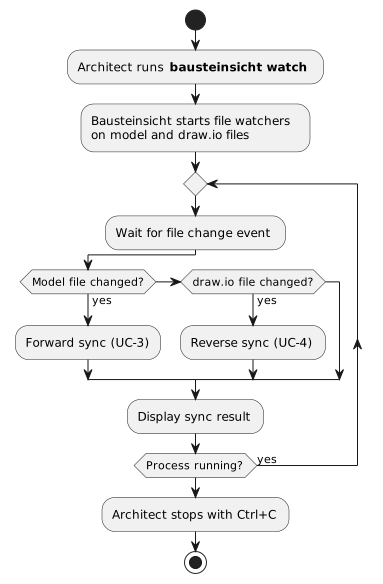
-
The architect runs
bausteinsicht watch. -
Bausteinsicht starts file watchers on the model and draw.io files.
-
On a model-file change, it runs forward sync (UC-3).
-
On a draw.io-file change, it runs reverse sync (UC-4).
-
It prints each sync result and keeps watching until the architect stops it with Ctrl+C.
Activity Diagram
Extensions
2a. The file watcher cannot be created or started: Bausteinsicht reports an error and exits — there is no polling fallback. (A watched file that is removed and later recreated is automatically re-watched.) 3a, 4a. Rapid successive changes: events are debounced (300 ms) to avoid conflicting syncs.
Postconditions
Success guarantee: While running, the model and draw.io diagrams are kept in sync continuously.
Minimal guarantee: Each individual sync follows the UC-3 / UC-4 guarantees; debouncing prevents half-applied conflicting syncs.
UC-6: LLM-Driven Architecture Modification
Primary Actor: LLM Agent
Level: User Goal
Scope: Bausteinsicht (CLI)
Trigger: An LLM agent is asked to modify the architecture and invokes the Bausteinsicht CLI.
Preconditions
-
An initialized architecture model exists
-
LLM agent has access to the Bausteinsicht CLI
Main Success Scenario
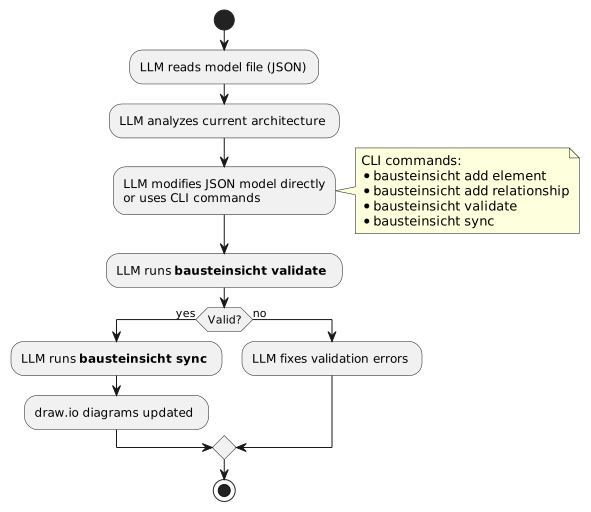
-
The LLM reads the model file (JSON) and analyzes the current architecture.
-
The LLM modifies the model directly or via CLI commands (
add element,add relationship, …). -
The LLM runs
bausteinsicht validate. -
On success, the LLM runs
bausteinsicht sync; the draw.io diagrams update.
Activity Diagram
Extensions
3a. The model is invalid — malformed JSON, or a relationship referencing a non-existent element: validate reports the error before sync; the LLM fixes it and re-validates (BR-007, BR-008).
Postconditions
Success guarantee: The model is valid and updated; the draw.io diagrams reflect the changes; new elements are marked for manual positioning.
Minimal guarantee: validate catches invalid changes before sync, so a broken model is never synced.
UC-7: Drill-Down Navigation
Primary Actor: Software Architect
Level: User Goal
Scope: Bausteinsicht (generated draw.io pages)
Trigger: The architect opens the generated diagram and wants to move between abstraction levels.
Navigation is page-based — one draw.io page per view, with generated cross-page links and a back button — rather than single-page zoom. See ADR-009 for the rationale.
Preconditions
-
Multiple views exist at different hierarchy levels (e.g. a context view scoped to a system, a container view scoped to that system’s children)
-
Sync has run, so each view is rendered as its own draw.io page
Main Success Scenario
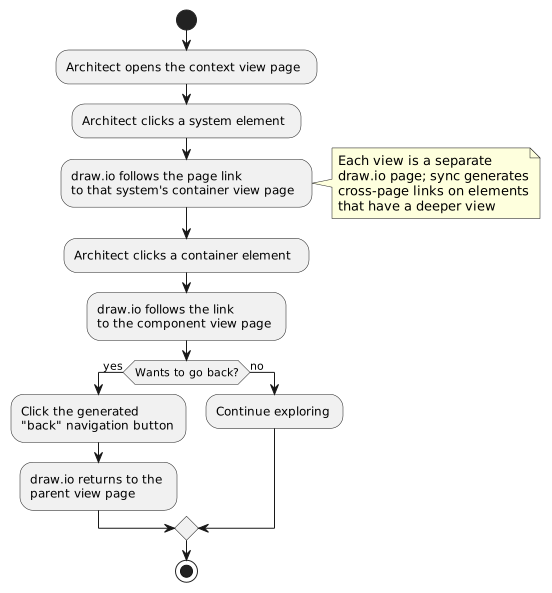
-
The architect opens the context-view page.
-
The architect clicks a system element that has a deeper view.
-
draw.io follows the generated page link to that system’s container-view page.
-
The architect clicks a container element; draw.io follows the link to the component-view page.
-
The architect clicks the generated back-navigation button to return to the parent view page.
Activity Diagram
Extensions
2a. The target view does not exist: the element carries no page link and is not clickable for drill-down.
2b. The element has no detail view but carries a user-defined link field: the element is clickable and opens the linked URL or document anchor. In SVG export embedded in HTML/PDF, the link is preserved as a native <a href> element. If a detail view is later added for the same element, the drill-down link takes priority (the user-defined link is overridden; a sync warning is emitted).
2c. The element carries link, decisions, and/or docLinks: sync additionally renders small clickable icons next to the element — independent of whichever link (if any) owns the element’s own shape — so the architect can jump straight from a diagram element into its governing documentation (arc42 chapter, ADR, PRD/persona) without leaving the drill-down flow. A matching icon row renders for a view’s own docLinks. In PNG export the icons remain visible but are not clickable (PNG discards link information, same as the element shape itself). See ADR-009's "Extension: Doc/ADR Drilldown Icons (#543)". (#543)
Postconditions
Success guarantee: The architect can navigate between abstraction levels by clicking linked elements; each level is a dedicated page, and a generated back-navigation button returns to the parent view.
Minimal guarantee: Elements without a deeper view simply carry no drill-down link; navigation never leads to a missing page.
UC-8: Export Diagram Views
Primary Actor: Developer or CI pipeline
Level: User Goal
Scope: Bausteinsicht (export via draw.io CLI)
Trigger: A developer or CI job runs bausteinsicht export to render views as images for documentation or reports.
Preconditions
-
A synced architecture model exists with at least one view
-
draw.io CLI is available (headless via
xvfb-runin CI environments)
Main Success Scenario
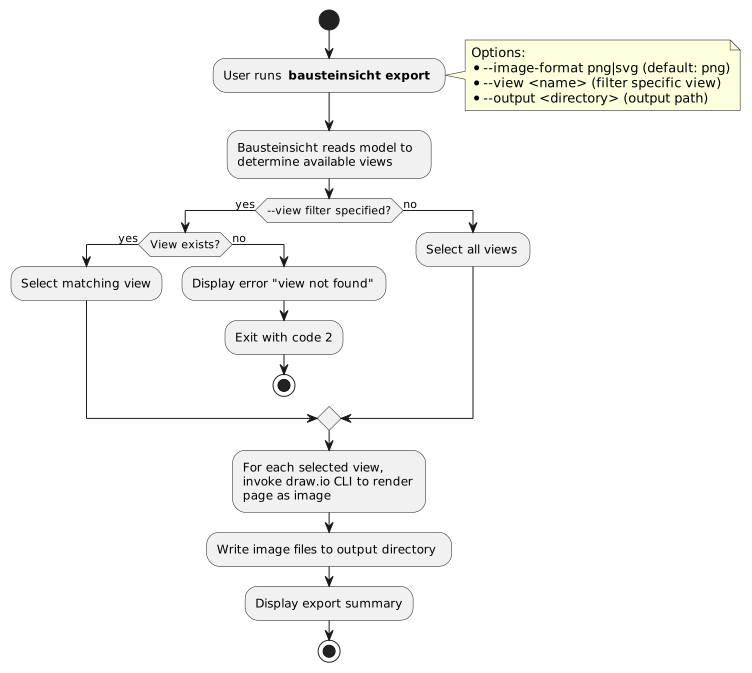
-
The user runs
bausteinsicht export(optionally with--view,--image-format,--output). -
Bausteinsicht reads the model to determine the available views.
-
With
--view, it selects the matching view; otherwise it selects all views. -
For each selected view, it invokes the draw.io CLI to render the page as an image.
-
Bausteinsicht writes the image files to the output directory and prints an export summary.
Activity Diagram
Extensions
3a. The --view name is not found: Bausteinsicht exits with code 2 and a message mentioning "view not found".
4a. The draw.io CLI is not available: Bausteinsicht reports an error with installation instructions.
5a. The output directory is not writable: Bausteinsicht reports an error naming the path.
Postconditions
Success guarantee: Image files (PNG or SVG) exist for each exported view, named after the view; exit code is 0.
Minimal guarantee: On any error (unknown view, missing draw.io CLI, unwritable output) the command exits non-zero and does not report success.
Business Rules
Business Rules are the cross-cutting model-consistency constraints enforced by bausteinsicht validate — and therefore at the start of every forward sync (UC-3) and whenever an LLM agent validates (UC-6). Each rule has a stable BR-NNN ID, a severity, and a single source of truth in the code:
-
error — validation fails; sync aborts (exit code 1).
-
warning — reported with a
WARNING:prefix but non-blocking (exit code 0).
The BR-NNN IDs are the traceability anchors: acceptance criteria (04_acceptance_criteria.adoc) and tests reference them. The authoritative implementation is internal/model/validate.go.
Element rules
| BR | Rule | Severity | Source |
|---|---|---|---|
BR-001 |
An element must declare a |
error |
|
BR-002 |
An element’s |
error |
|
BR-003 |
An element may only have |
error |
|
BR-004 |
An element must declare a |
error |
|
BR-005 |
An element ID must not be empty or whitespace. |
error |
|
BR-006 |
Element nesting must not exceed |
error |
|
Relationship rules
| BR | Rule | Severity | Source |
|---|---|---|---|
BR-007 |
A relationship’s |
error |
|
BR-008 |
A relationship’s |
error |
|
BR-009 |
A relationship’s |
error |
|
BR-010 |
A relationship’s |
error |
|
BR-011 |
A relationship’s |
error |
|
BR-012 |
Two relationships must not be fully duplicate (same |
error |
|
View rules
| BR | Rule | Severity | Source |
|---|---|---|---|
BR-013 |
A view must declare a |
error |
|
BR-014 |
A view’s |
error |
|
BR-015 |
A view’s |
error |
|
BR-016 |
Non-wildcard |
error |
|
BR-017 |
|
error |
|
Dynamic view rules
| BR | Rule | Severity | Source |
|---|---|---|---|
BR-018 |
A dynamic view must declare a |
error |
|
BR-019 |
A dynamic view must declare a |
error |
|
BR-020 |
A dynamic view must have at least one step. |
error |
|
BR-021 |
Each step’s |
error |
|
BR-022 |
A step’s |
error |
|
BR-023 |
Step |
error |
|
Pattern rules
| BR | Rule | Severity | Source |
|---|---|---|---|
BR-024 |
A pattern element must declare a |
error |
|
BR-025 |
A pattern relationship’s |
error |
|
Decision (ADR) rules
| BR | Rule | Severity | Source |
|---|---|---|---|
BR-026 |
An element’s or relationship’s |
error |
|
BR-027 |
A defined decision that no element or relationship references produces an orphan warning. |
warning |
|
BR-028 |
Referencing a decision whose status is |
warning |
|
Documentation link rules
| BR | Rule | Severity | Source |
|---|---|---|---|
BR-034 |
A |
error |
|
BR-035 |
An element kind’s optional |
error |
|
Lifecycle rules
| BR | Rule | Severity | Source |
|---|---|---|---|
BR-029 |
An element’s |
warning |
|
BR-030 |
An archived element should have no outgoing relationships. |
warning |
|
BR-031 |
A deprecated element should link to a deployed successor of the same kind. |
warning |
|
Model completeness rules
| BR | Rule | Severity | Source |
|---|---|---|---|
BR-032 |
The specification should define at least one element kind. |
warning |
|
BR-033 |
The model should not be empty (at least one element). |
warning |
|
Traceability
Each use case maps to its acceptance criteria (04_acceptance_criteria.adoc) and the business rules it exercises. Error-level rules (BR-001–BR-026, plus BR-034 and BR-035) are enforced by bausteinsicht validate, which runs standalone, at the start of forward sync (UC-3), and on demand by LLM agents (UC-6); warning-level rules (BR-027–BR-033) are reported by the same pass. Severity is authoritative per-rule in the tables above — BR-034 and BR-035 break the otherwise-contiguous error/warning ranges because they were added after the lifecycle/completeness rules.
| Use Case | Acceptance Criteria | Business Rules |
|---|---|---|
UC-1 Initialize Architecture Model |
AC-1.1 |
BR-032, BR-033 (the generated sample model satisfies them) |
UC-2 Define Architecture Elements |
AC-2.1, AC-2.2 |
BR-001–BR-012, BR-024, BR-025 |
UC-3 Generate draw.io Diagrams (Forward Sync) |
AC-3.1, AC-3.2 |
BR-001–BR-035 (full validation pass before sync) |
UC-4 Edit in draw.io and Reverse Sync |
AC-4.1, AC-4.2 |
BR-005 (generated IDs must be non-empty), BR-007, BR-008 (new relationships must resolve) |
UC-5 Watch Mode |
AC-5.1 |
inherits UC-3 / UC-4 |
UC-6 LLM-Driven Architecture Modification |
AC-6.1, AC-6.2 |
BR-001–BR-035 (validate before sync) |
UC-7 Drill-Down Navigation |
AC-7.1 |
BR-034 (element/view |
UC-8 Export Diagram Views |
AC-8.1 |
— (rendering only) |
|
Note
|
Test traceability is, by convention going forward, expressed with a // UC-3, BR-007 comment on the test (or a reference in the test name). Existing tests trace de-facto via GitHub issue numbers; new and touched tests should add the explicit UC/BR/AC reference rather than retrofitting all of them at once.
|
Feedback
Was this page helpful?
Glad to hear it! Please tell us how we can improve.
Sorry to hear that. Please tell us how we can improve.