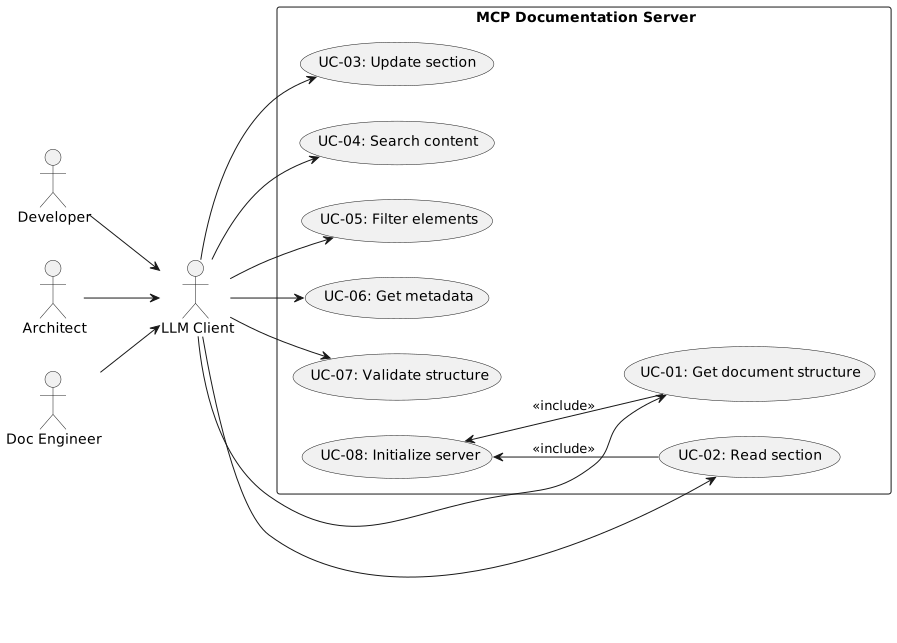
MCP Documentation Server - Use Case Specification
1. Introduction
This document describes the use cases of the MCP Documentation Server based on the PRD. Each use case contains a description, preconditions, flow, and an activity diagram.
2. Actors
| Actor | Description |
|---|---|
LLM Client |
An MCP-compatible client (e.g., Claude, GPT) that communicates with the server via the MCP protocol. |
Software Developer |
Developer who analyzes and maintains code documentation with LLM assistance. |
Software Architect |
Architect who manages technical documentation (e.g., arc42) with LLM assistance. |
Documentation Engineer |
Documentation specialist who manages large documentation projects. |
System Administrator |
Operates and configures the MCP Documentation Server. |
3. System Boundaries
4. Use Cases
4.1. UC-01: Get Document Structure
ID |
UC-01 |
Name |
Get document structure (get_structure) |
Actor |
LLM Client |
Priority |
Must-Have |
Trigger |
Client needs overview of documentation structure |
4.1.1. Description
The LLM Client retrieves the hierarchical structure of a documentation project to get an overview of available chapters and sections.
4.1.2. Preconditions
-
Server is started and index is built
-
Documentation project is configured
4.1.3. Postconditions
-
Client receives structured overview (Table of Contents)
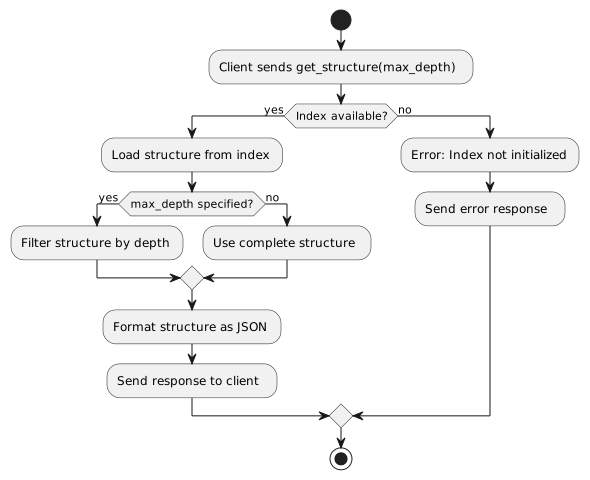
4.1.4. Main Flow
-
Client sends
get_structure(max_depth)request -
Server consults the in-memory index
-
Server filters structure by
max_depth -
Server returns hierarchical structure
4.1.5. Alternative Flows
-
A1: Empty project - Server returns empty structure
-
A2: Invalid max_depth - Server uses default value
4.1.6. Activity Diagram
4.2. UC-02: Read Section
ID |
UC-02 |
Name |
Read section (get_section) |
Actor |
LLM Client |
Priority |
Must-Have |
Trigger |
Client needs content of a specific section |
4.2.1. Description
The LLM Client reads the content of a specific section by its hierarchical path.
4.2.2. Preconditions
-
Server is started and index is built
-
Requested path exists in the project
4.2.3. Postconditions
-
Client receives section content
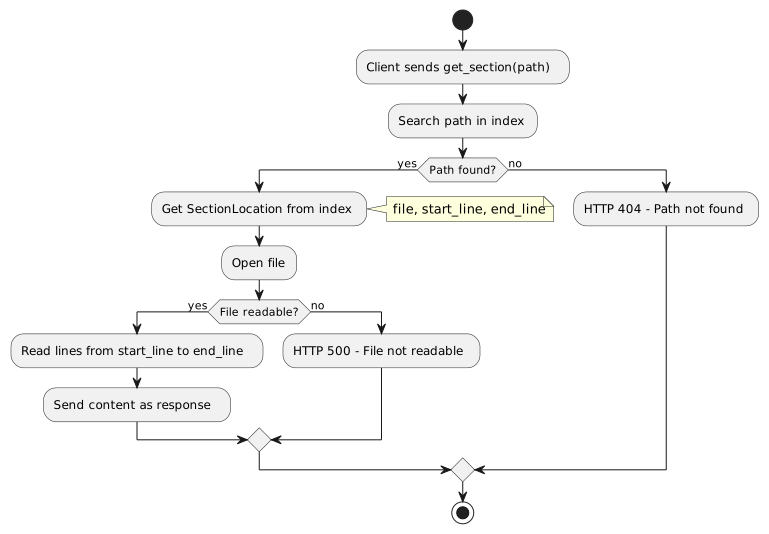
4.2.4. Main Flow
-
Client sends
get_section(path)request -
Server searches path in index
-
Server determines file and line numbers
-
Server reads relevant lines from file
-
Server returns content
4.2.5. Alternative Flows
-
A1: Path not found - Server returns 404 with error message
-
A2: File not readable - Server returns 500 with error message
4.2.6. Activity Diagram
4.3. UC-03: Update Section
ID |
UC-03 |
Name |
Update section (update_section) |
Actor |
LLM Client |
Priority |
Must-Have |
Trigger |
Client wants to modify section content |
4.3.1. Description
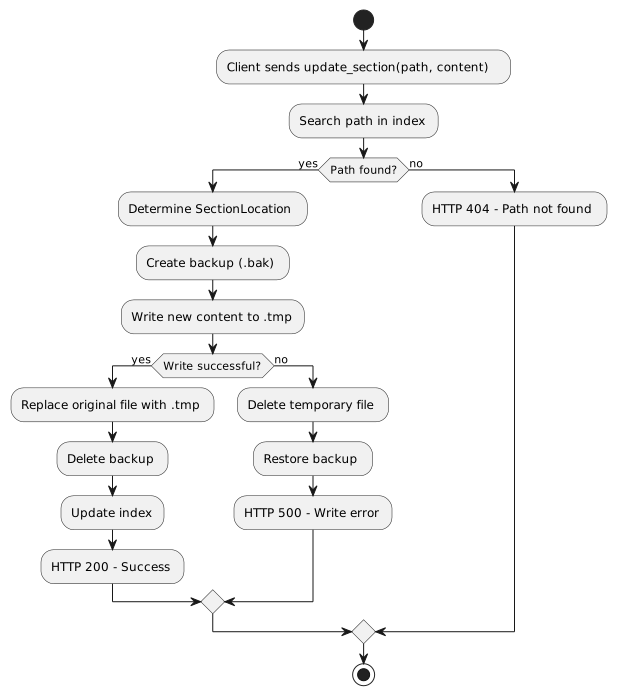
The LLM Client updates the content of a specific section. The change is performed atomically.
4.3.2. Preconditions
-
Server is started and index is built
-
Requested path exists in the project
-
File system is writable
4.3.3. Postconditions
-
Section contains new content
-
Index is updated
-
Original file is unchanged on error
4.3.4. Main Flow
-
Client sends
update_section(path, content)request -
Server searches path in index
-
Server creates backup of original file
-
Server writes new content to temporary file
-
Server atomically replaces original file
-
Server updates index
-
Server deletes backup
-
Server confirms success
4.3.5. Alternative Flows
-
A1: Path not found - Server returns 404
-
A2: Write error - Server restores backup, returns 500
-
A3: Index update failed - Log warning, report success
4.3.6. Activity Diagram
4.4. UC-04: Search Content
ID |
UC-04 |
Name |
Search content (search_content) |
Actor |
LLM Client |
Priority |
Must-Have |
Trigger |
Client searches for specific content |
4.4.1. Description
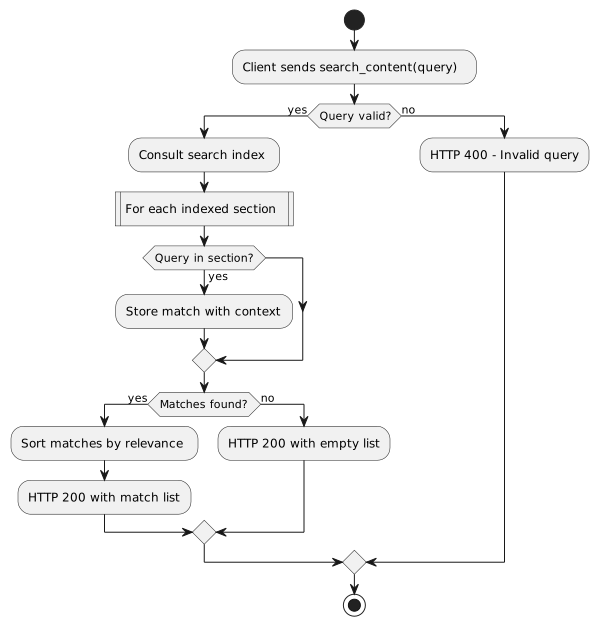
The LLM Client searches for text within the documentation project and receives a list of matches with context.
4.4.2. Preconditions
-
Server is started and index is built
4.4.3. Postconditions
-
Client receives list of matches with paths and context
4.4.4. Main Flow
-
Client sends
search_content(query)request -
Server searches indexed content
-
Server collects matches with context
-
Server returns result list
4.4.5. Alternative Flows
-
A1: No matches - Server returns empty list
-
A2: Invalid query - Server returns 400 with error message
4.4.6. Activity Diagram
4.5. UC-05: Filter Elements by Type
ID |
UC-05 |
Name |
Filter elements by type (get_elements) |
Actor |
LLM Client |
Priority |
Must-Have |
Trigger |
Client needs specific element types |
4.5.1. Description
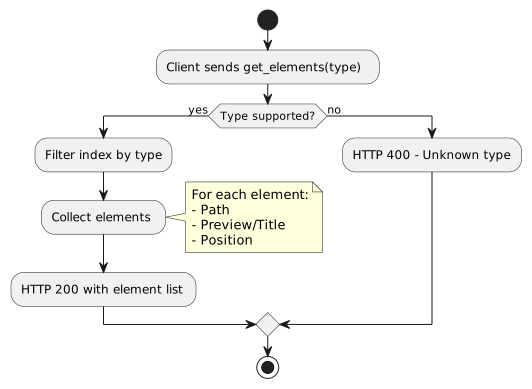
The LLM Client retrieves all elements of a specific type (e.g., diagrams, tables, code blocks).
4.5.2. Preconditions
-
Server is started and index is built
4.5.3. Postconditions
-
Client receives list of all elements of the requested type
4.5.4. Main Flow
-
Client sends
get_elements(type)request -
Server filters index by element type
-
Server returns list of elements with paths
4.5.5. Supported Element Types
-
diagram- PlantUML, Mermaid, etc. -
table- AsciiDoc/Markdown tables -
code- Code blocks -
list- Lists (ordered/unordered) -
image- Embedded images
4.5.6. Activity Diagram
4.6. UC-06: Get Metadata
ID |
UC-06 |
Name |
Get metadata (get_metadata) |
Actor |
LLM Client |
Priority |
Should-Have |
Trigger |
Client needs information about document/section |
4.6.1. Description
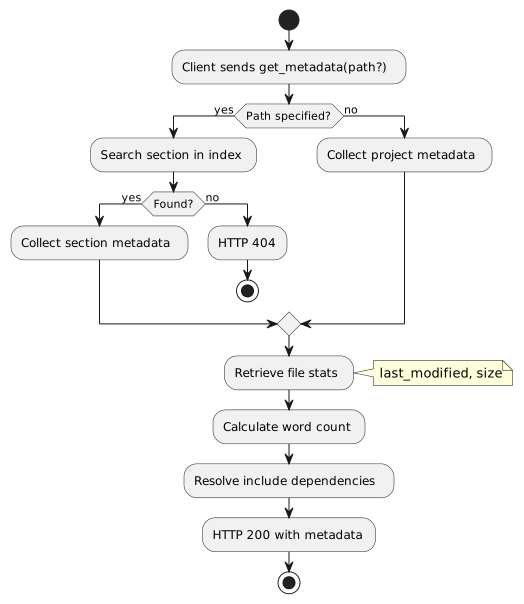
The LLM Client retrieves metadata about the project or a specific section.
4.6.2. Preconditions
-
Server is started and index is built
4.6.3. Postconditions
-
Client receives metadata
4.6.4. Main Flow
-
Client sends
get_metadata(path?)request -
Server determines metadata from index and file system
-
Server returns metadata
4.6.5. Return Values
-
Word count
-
Last modified
-
File path
-
Number of subsections
-
Include dependencies
4.6.6. Activity Diagram
4.7. UC-07: Validate Structure
ID |
UC-07 |
Name |
Validate structure (validate_structure) |
Actor |
LLM Client |
Priority |
Should-Have |
Trigger |
Client wants to check consistency |
4.7.1. Description
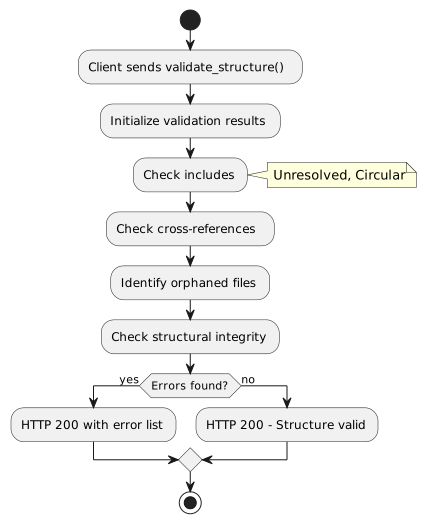
The LLM Client validates the structure of the documentation project for consistency and completeness.
4.7.2. Preconditions
-
Server is started and index is built
4.7.3. Postconditions
-
Client receives validation result
4.7.4. Checks
-
Unresolved includes
-
Circular includes
-
Orphaned files
-
Missing references
-
Invalid paths
4.7.5. Activity Diagram
4.8. UC-08: Initialize Server
ID |
UC-08 |
Name |
Initialize server |
Actor |
System (at startup) |
Priority |
Must-Have |
Trigger |
Server is started |
4.8.1. Description
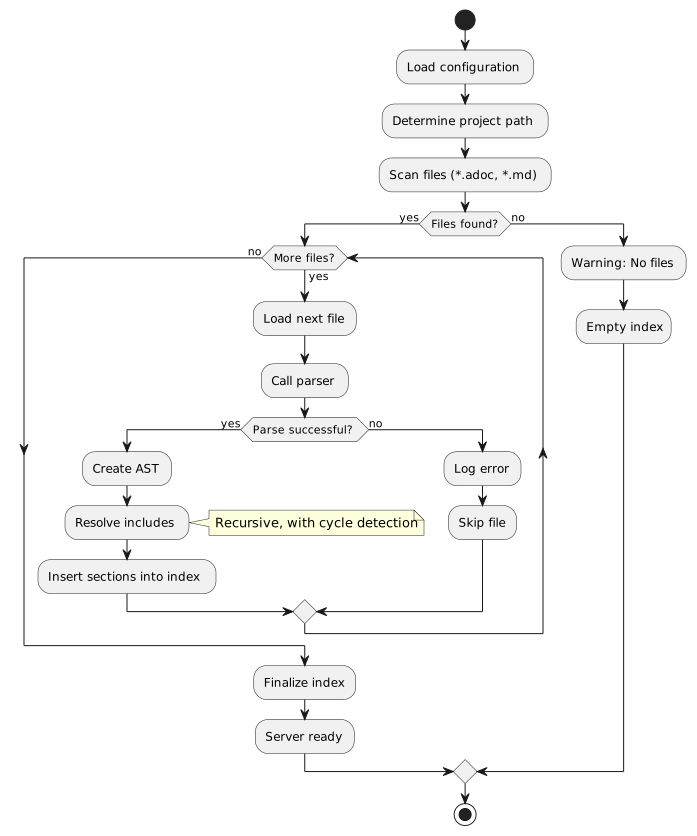
At startup, the server scans and indexes the configured documentation project.
4.8.2. Preconditions
-
Documentation project path is configured
-
Files are readable
4.8.3. Postconditions
-
In-memory index is built
-
Server is ready for requests
4.8.4. Main Flow
-
Server reads configuration
-
Server scans project directory for .adoc/.md files
-
Server parses each file
-
Server resolves include directives
-
Server builds hierarchical index
-
Server reports readiness
4.8.5. Alternative Flows
-
A1: No files found - Server starts with empty index, logs warning
-
A2: Parse error - Server logs error, skips file, continues
-
A3: Circular includes - Server detects cycle, aborts include, logs warning
4.8.6. Activity Diagram
4.9. UC-09: Insert Content
ID |
UC-09 |
Name |
Insert content (insert_at) |
Actor |
LLM Client |
Priority |
Must-Have |
Trigger |
Client wants to add new content |
4.9.1. Description
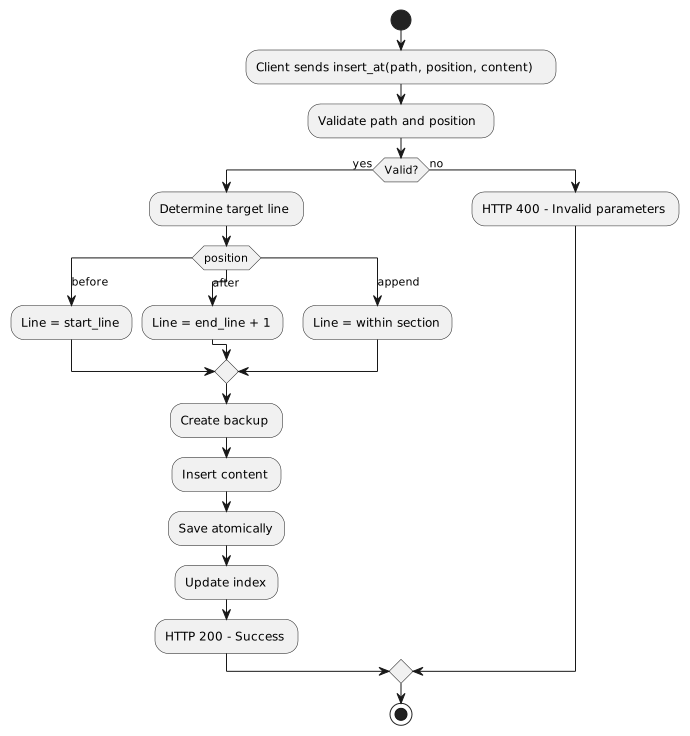
The LLM Client inserts new content at a specific position (before, after, or within a section).
4.9.2. Preconditions
-
Server is started and index is built
-
Requested path exists
-
File system is writable
4.9.3. Postconditions
-
New content is inserted
-
Index is updated
4.9.4. Main Flow
-
Client sends
insert_at(path, position, content)request -
Server validates position (before|after|append)
-
Server determines insertion position in file
-
Server performs atomic write operation
-
Server updates index
-
Server confirms success
4.9.5. Activity Diagram
4.10. UC-10: Replace Element
ID |
UC-10 |
Name |
Replace element (replace_element) |
Actor |
LLM Client |
Priority |
Should-Have |
Trigger |
Client wants to replace a specific element |
4.10.1. Description
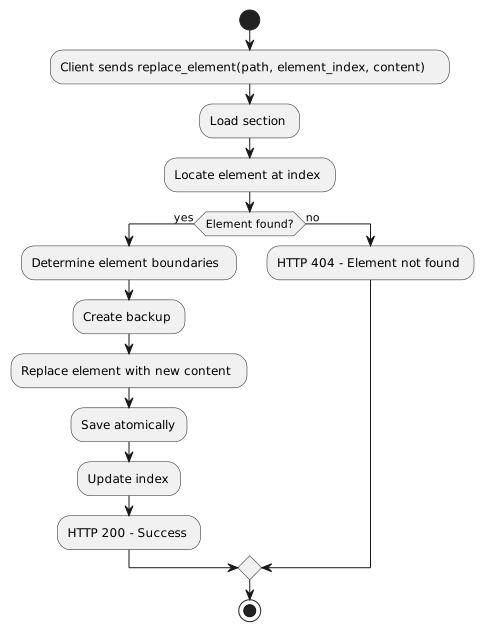
The LLM Client replaces a specific element (e.g., table, code block) within a section.
4.10.2. Preconditions
-
Server is started and index is built
-
Element exists at the specified position
4.10.3. Postconditions
-
Element is replaced
-
Index is updated
4.10.4. Main Flow
-
Client sends
replace_element(path, element_index, content)request -
Server locates element
-
Server validates new content
-
Server performs atomic replacement
-
Server updates index
-
Server confirms success
4.10.5. Activity Diagram
5. Use Case Overview
| ID | Name | Priority | API Group |
|---|---|---|---|
UC-01 |
Get document structure |
Must-Have |
Navigation |
UC-02 |
Read section |
Must-Have |
Navigation |
UC-03 |
Update section |
Must-Have |
Manipulation |
UC-04 |
Search content |
Must-Have |
Content-Access |
UC-05 |
Filter elements by type |
Must-Have |
Content-Access |
UC-06 |
Get metadata |
Should-Have |
Meta-Info |
UC-07 |
Validate structure |
Should-Have |
Meta-Info |
UC-08 |
Initialize server |
Must-Have |
System |
UC-09 |
Insert content |
Must-Have |
Manipulation |
UC-10 |
Replace element |
Should-Have |
Manipulation |
6. Appendix: Glossary
| Term | Definition |
|---|---|
Hierarchical Path |
Dot-separated path to a section, e.g., |
Include Directive |
AsciiDoc instruction for including external files: |
Atomic Write Operation |
Operation that is either completed entirely or not at all |
In-Memory Index |
Memory-resident data structure for fast path-to-position lookups |
SectionLocation |
Data structure with file, start, and end line of a section |
Feedback
Was this page helpful?
Glad to hear it! Please tell us how we can improve.
Sorry to hear that. Please tell us how we can improve.