docs/
├── index.md              # Document introduction (optional)
├── 01_introduction/
│   ├── index.md          # Chapter introduction (optional)
│   ├── 01_overview.md
│   └── 02_goals.md
├── 02_architecture/
│   ├── 01_constraints.md
│   └── 02_decisions.md
└── 03_appendix.md        # Single file as chapter
Markdown Parser - Component Specification
1. Introduction
This specification defines the MarkdownParser - a lightweight component for parsing GitHub Flavored Markdown (GFM) documents. The parser is intentionally tailored to the requirements of this project and is not a complete GFM parser.
1.1. Purpose
The MarkdownParser serves to:
-
Capture document structure: Extract headings and build hierarchical structure
-
Identify elements: Recognize code blocks, tables, and images as addressable blocks
-
Read metadata: Parse YAML frontmatter
-
Source file mapping: Capture line numbers for each element
1.2. Scope Limitations
The parser is not a complete Markdown renderer. It:
-
Does not render HTML
-
Does not parse inline formatting (bold, italic, inline links)
-
Does not analyze table contents
-
Does not process nested lists in detail
2. Supported GFM Features
2.1. Fully Supported
| Feature | Description | Usage |
|---|---|---|
ATX Headings |
|
Document structure |
Fenced Code Blocks |
|
Element extraction |
YAML Frontmatter |
|
Metadata |
Images |
|
Element extraction |
2.2. Recognized (Not Parsed in Detail)
| Feature | Description | Treatment |
|---|---|---|
Tables |
GFM pipe tables |
Recognized as block, content not analyzed |
Task Lists |
|
Recognized as list |
Blockquotes |
|
Recognized as block |
2.3. Not Supported
-
Setext Headings (underlined with
===or---) -
Inline HTML
-
Footnotes
-
Definition Lists
-
Math blocks (LaTeX)
3. Document Structure via Folder Hierarchy
Unlike the AsciiDoc parser, the MarkdownParser uses no include directives. Instead, the folder structure represents the document hierarchy.
3.1. Structure Rules
3.2. Sorting Rules
The order of files and folders is determined alphabetically:
-
Numeric prefixes are sorted correctly:
01_,02_, …10_,11_ -
index.md or README.md always appears first in a folder
-
Folders and files at the same level are sorted together
| File System | Sorted Order |
|---|---|
02_details.md README.md 01_intro.md 10_appendix.md |
README.md (1st - special rule) 01_intro.md (2nd - numeric) 02_details.md (3rd - numeric) 10_appendix.md (4th - numeric) |
3.3. Hierarchy Mapping
| File System | Hierarchical Path | Heading Level |
|---|---|---|
|
|
H1 |
|
|
H1 (Chapter) |
|
|
H1 (becomes H2 in context) |
|
|
H2 (becomes H3 in context) |
4. YAML Frontmatter
The parser supports YAML frontmatter at the file start for metadata.
4.1. Format
---
title: Document Title
author: John Doe
date: 2024-01-15
tags: [architecture, design]
custom_field: arbitrary value
---

# Heading

Content...
4.2. Supported Data Types
-
String:
title: "My Document" -
Number:
order: 42 -
Boolean:
draft: true -
Date:
date: 2024-01-15 -
List:
tags: [a, b, c] -
Nested Objects:
author: { name: "John", email: "john@example.com" }
4.3. Reserved Fields
| Field | Description | Default Value |
|---|---|---|
|
Document title (overrides H1) |
First H1 or filename |
|
Explicit sort order |
Alphabetical by filename |
|
Document is draft (will be ignored) |
|
|
Exclude document from index |
|
5. Extractable Elements
The parser identifies the following elements as standalone, addressable blocks:
5.1. Code Blocks
```python
def hello():
    print("Hello, World!")
```| Attribute | Value |
|---|---|
|
|
|
|
|
Line of opening |
|
Line of closing |
|
Raw content (without fence) |
5.2. Tables
| Header 1 | Header 2 |
|----------|----------|
| Cell 1 | Cell 2 || Attribute | Value |
|---|---|
|
|
|
First line of table |
|
Last line of table |
|
Number of columns (from header) |
|
Number of data rows |
| Table contents are not parsed in detail. Only structural metadata is captured. |
5.3. Images
| Attribute | Value |
|---|---|
|
|
|
|
|
|
|
|
|
Line number |
6. Data Models
6.1. MarkdownDocument
@dataclass
class MarkdownDocument:
    """Represents a parsed Markdown document."""
    file_path: Path
    frontmatter: dict[str, Any]
    title: str
    sections: list[MarkdownSection]
    elements: list[MarkdownElement]
6.2. MarkdownSection
@dataclass
class MarkdownSection:
    """A section (heading) in the document."""
    title: str
    level: int                    # 1-6
    start_line: int
    end_line: int
    path: str                     # Hierarchical path
    children: list[MarkdownSection]
6.3. MarkdownElement
@dataclass
class MarkdownElement:
    """An extractable element (code, table, image)."""
    type: Literal["code", "table", "image"]
    start_line: int
    end_line: int
    attributes: dict[str, Any]    # Type-specific attributes
    parent_section: str           # Path of containing section
6.4. FolderDocument
@dataclass
class FolderDocument:
    """A document from multiple Markdown files."""
    root_path: Path
    documents: list[MarkdownDocument]  # Sorted
    structure: DocumentStructure       # Combined hierarchy
7. Parser Behavior
7.1. Error Handling
| Situation | Behavior |
|---|---|
Invalid frontmatter |
Log warning, treat frontmatter as empty |
File not readable |
Throw exception, skip file |
Invalid UTF-8 encoding |
Throw exception with encoding hint |
Empty file |
Return empty document (no sections) |
File without headings |
Entire content as implicit root section |
7.2. Performance Requirements
-
Parsing a single file: < 50ms
-
Parsing a folder with 100 files: < 2s
-
Memory consumption: < 10KB per parsed file (without content)
8. Acceptance Criteria
8.1. AC-MD-01: Heading Extraction
Scenario: Headings are correctly extracted
  Given a Markdown file with the following content:
    """
    # Main Title

    ## Subchapter 1

    Text...

    ## Subchapter 2

    ### Sub-subchapter
    """
  When the parser processes the file
  Then 4 sections are extracted
  And the hierarchy is:
    | path                              | level |
    | /main-title                       | 1     |
    | /main-title/subchapter-1          | 2     |
    | /main-title/subchapter-2          | 2     |
    | /main-title/subchapter-2/sub-subchapter | 3 |
8.2. AC-MD-02: Frontmatter Parsing
Scenario: YAML frontmatter is correctly parsed
  Given a Markdown file with the following content:
    """
    ---
    title: My Document
    author: John Doe
    tags: [design, architecture]
    ---

    # Content
    """
  When the parser processes the file
  Then frontmatter["title"] equals "My Document"
  And frontmatter["author"] equals "John Doe"
  And frontmatter["tags"] is a list with 2 elements
8.3. AC-MD-03: Code Block Extraction
Scenario: Fenced code blocks are extracted
  Given a Markdown file with a Python code block
  When the parser processes the file
  Then elements contains an entry of type "code"
  And its language equals "python"
  And start_line and end_line are correctly set
8.4. AC-MD-04: Table Recognition
Scenario: GFM tables are recognized as blocks
  Given a Markdown file with a 3-column table
  When the parser processes the file
  Then elements contains an entry of type "table"
  And columns equals 3
8.5. AC-MD-05: Folder Structure
Scenario: Folder hierarchy is correctly mapped
  Given a folder with the following structure:
    | Path                    |
    | index.md                |
    | 01_intro/index.md       |
    | 01_intro/01_details.md  |
    | 02_chapter.md           |
  When the parser processes the folder
  Then the document order is:
    | index.md                |
    | 01_intro/index.md       |
    | 01_intro/01_details.md  |
    | 02_chapter.md           |
8.6. AC-MD-06: Sorting with Prefixes
Scenario: Numeric prefixes are correctly sorted
  Given a folder with files: 10_z.md, 2_b.md, 1_a.md, README.md
  When the parser processes the folder
  Then the order is: README.md, 1_a.md, 2_b.md, 10_z.md
9. Interfaces
9.1. Parser Interface
class MarkdownParser:
    """Parser for GitHub Flavored Markdown documents."""

    def parse_file(self, file_path: Path) -> MarkdownDocument:
        """Parses a single Markdown file."""
        ...

    def parse_folder(self, folder_path: Path) -> FolderDocument:
        """Parses a folder with Markdown files."""
        ...

    def get_section(self, doc: MarkdownDocument, path: str) -> MarkdownSection | None:
        """Finds a section by its hierarchical path."""
        ...

    def get_elements(
        self,
        doc: MarkdownDocument,
        element_type: str | None = None
    ) -> list[MarkdownElement]:
        """Returns all elements, optionally filtered by type."""
        ...
10. Implementation Notes
10.1. Recommended Libraries
-
PyYAML or ruamel.yaml: For frontmatter parsing
-
regex (instead of re): For better Unicode support
10.2. Regex Patterns
# ATX Heading
HEADING_PATTERN = r'^(#{1,6})\s+(.+?)(?:\s+#*)?$'

# Fenced Code Block (opening)
CODE_FENCE_OPEN = r'^(`{3,}|~{3,})(\w*)?$'

# YAML Frontmatter
FRONTMATTER_PATTERN = r'^---\s*\n(.*?)\n---\s*\n'

# Image
IMAGE_PATTERN = r'!\[([^\]]*)\]\(([^)\s]+)(?:\s+"([^"]*)")?\)'

# Table Row
TABLE_ROW_PATTERN = r'^\|(.+)\|$'
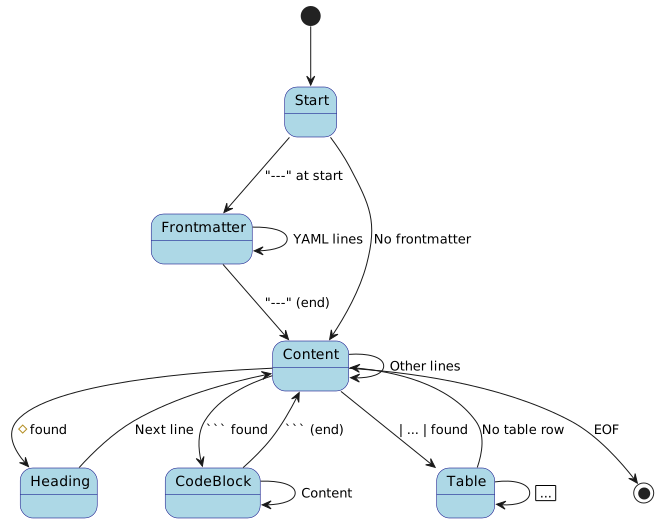
10.3. State Machine for Parsing
Feedback
Was this page helpful?
Glad to hear it! Please tell us how we can improve.
Sorry to hear that. Please tell us how we can improve.