|
Note
|
This version of the template contains some help and explanations. It is used for familiarization with arc42 and the understanding of the concepts. For documentation of your own system you use better the plain version. |
 Template
Unresolved directive in <stdin> - include::chapters/../../../common/styles/arc42-help-style.adoc[]
About arc42
arc42, the template for documentation of software and system architecture.
Template Version {revnumber}. {revremark}, {revdate}
Created, maintained and © by Dr. Peter Hruschka, Dr. Gernot Starke and contributors. See https://arc42.org.
1. Introduction and Goals
Bausteinsicht is an architecture-as-code tool that uses draw.io as its visual frontend. It maintains a structured architecture model in a JSON-based DSL and synchronizes it bidirectionally with draw.io diagrams.
1.1. Requirements Overview
Bausteinsicht addresses the gap between structured architecture models and widely adopted visual diagramming tools.
| Requirement | Description |
|---|---|
Architecture Model |
A JSON-based DSL serves as single source of truth for all architecture elements, relationships, and metadata. |
draw.io Integration |
draw.io serves as the visual frontend. Templates define the styling, fully customizable by the user. |
Bidirectional Sync |
Changes in the model are reflected in draw.io views and vice versa. New elements, updated descriptions, and relationships are synchronized in both directions. |
Flexible Hierarchy |
Element hierarchy is user-defined and not limited to the 4 C4 levels. Components of components are valid. |
CLI & Watch Mode |
A CLI provides commands for sync, validation, and watching. CLI commands also enable LLM-driven architecture maintenance. |
Template System |
Templates are draw.io files containing styled example elements. Users create and customize templates entirely within draw.io. |
Architecture Analysis |
Commands assess the model: constraint checking ( |
Architecture Evolution |
The architecture is versioned and comparable over time: snapshots with semantic diff ( |
Interoperability & Export |
Models import from Structurizr DSL and LikeC4 ( |
IDE Integration |
A Language Server (the separate |
See PRD-001 for the full product requirements.
1.2. Quality Goals
The top three quality goals driving architectural decisions:
| Priority | Quality Goal | Scenario |
|---|---|---|
1 |
Learnability |
A developer unfamiliar with Bausteinsicht creates a working architecture model with draw.io views within 30 minutes using only the documentation and IDE autocompletion. |
2 |
IDE Support |
When editing the JSON model in VS Code, IntelliJ, or Neovim, the editor provides autocompletion, validation, and hover documentation without installing any Bausteinsicht-specific plugin. |
3 |
LLM Friendliness |
An LLM agent (e.g., Claude) can read the architecture model, add a new element with relationships, and trigger synchronization using only CLI commands — without human intervention. |
See Chapter 10 for the full quality requirements and scenarios.
1.3. Stakeholders
| Role/Name | Contact | Expectations |
|---|---|---|
Software Architect |
Primary user |
Maintains architecture models visually in draw.io with a structured model behind the scenes. Expects flexible hierarchy and easy template customization. |
Developer |
Team member |
Consults architecture diagrams in draw.io. Expects diagrams to always reflect the current model state. |
LLM Agent |
AI assistant (e.g., Claude) |
Modifies architecture models via CLI commands. Expects a machine-readable JSON format and predictable CLI behavior. |
1.4. Related Projects
Bausteinsicht exists in the broader landscape of architecture-as-code and C4 modeling tools. The following projects solve similar or overlapping problems:
| Project | Description |
|---|---|
The original C4 model tooling by Simon Brown. Provides a dedicated DSL, web-based renderer, and export to many formats. DSL is source-of-truth (no bidirectional sync with diagrams). |
|
The methodology behind the 4-level architecture abstraction (Context, Container, Component, Code). Bausteinsicht is C4-inspired but supports user-defined, unlimited nesting levels. |
|
A modern C4-inspired tool with a custom DSL, VS Code extension, and live web preview. Supports user-defined element kinds and flexible nesting, similar to Bausteinsicht. |
|
A visual-first architecture diagramming tool with isometric rendering. Focused on visual editing rather than text-based modeling. |
|
Extends the C4 model with interface and flow concepts for documenting system interactions at a more granular level. |
Bausteinsicht’s differentiator is bidirectional synchronization between a text model (JSONC) and draw.io diagrams — edits in either direction are merged. See ADR-001 for a detailed comparison of DSL formats.
2. Architecture Constraints
2.1. Technical Constraints
| Constraint | Description |
|---|---|
Go as implementation language |
The tool is implemented in Go to enable single-binary distribution without runtime dependencies. See ADR-002. |
JSON as model format |
The architecture model uses JSON (JSONC) with JSON Schema for validation. See ADR-001. |
draw.io XML as output format |
The visual representation uses draw.io’s mxGraph XML format. This constrains layout capabilities to what draw.io supports. |
No JavaScript/Node.js in the product |
The CLI and its libraries use no JavaScript/Node.js, avoiding npm supply-chain risk. Exception: the optional VS Code extension ( |
Cross-platform |
The tool must run on Linux, macOS, and Windows. |
Headless draw.io for image export |
|
Git for history-based commands |
|
2.2. Organizational Constraints
| Constraint | Description |
|---|---|
Open Source |
The project is developed as open source software. |
Documentation in English |
All documentation is written in English. |
Documentation in AsciiDoc |
Architecture documentation uses arc42 template in AsciiDoc format. |
ADR format |
Architecture decisions follow the Nygard ADR format with a weighted Pugh matrix for option evaluation. |
2.3. Conventions
| Convention | Description |
|---|---|
Version control |
All files (model JSON, draw.io XML, templates) are text-based and Git-friendly. |
Version numbering |
The tool displays a version number. Semantic versioning is used. |
ADR naming |
ADRs follow the pattern |
3. Context and Scope
3.1. Business Context
Bausteinsicht sits between the architecture model (JSON files) and draw.io diagrams, synchronizing both bidirectionally.
3.1.1. Architecture Maintenance Process
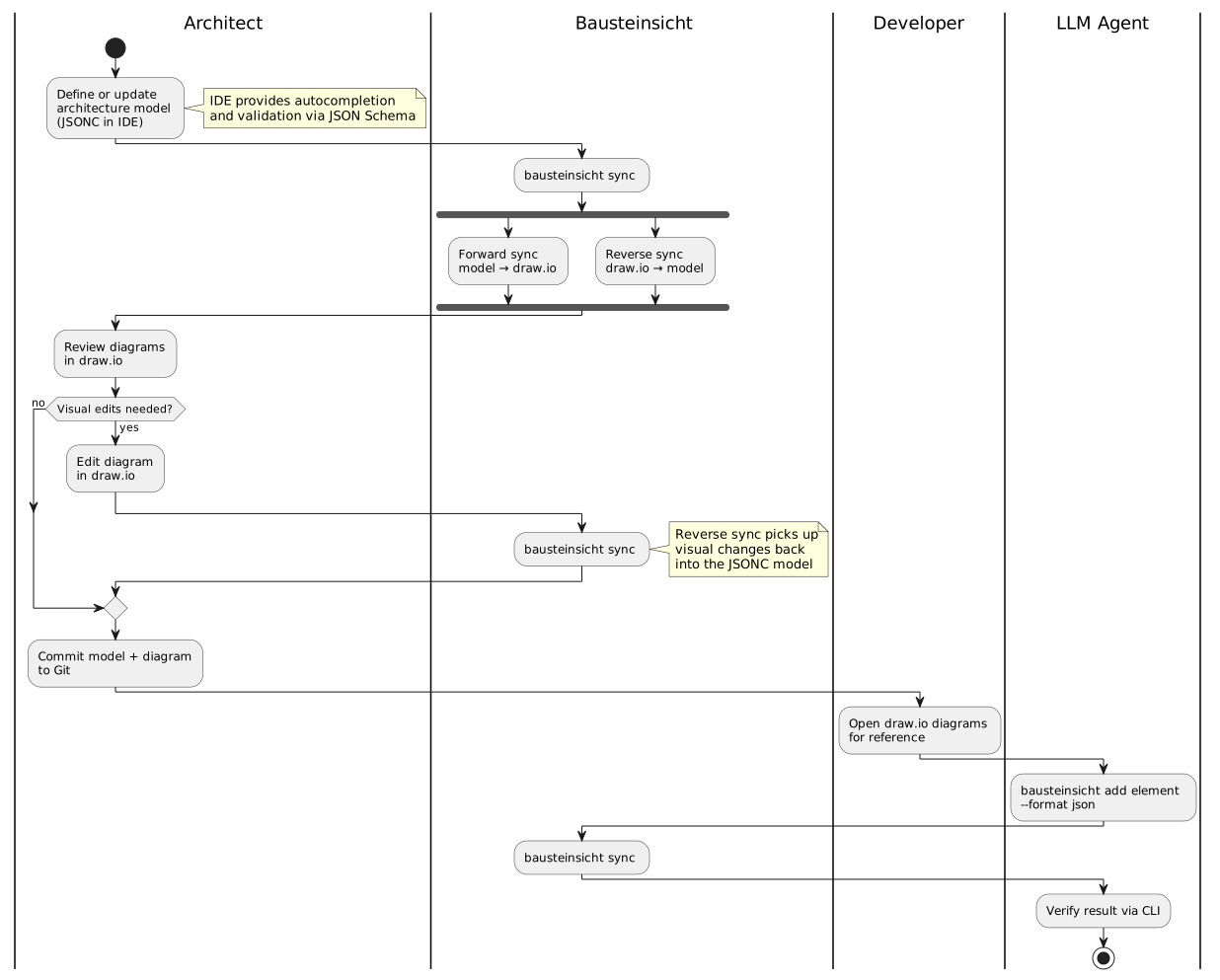
The following activity diagram shows how Bausteinsicht fits into the daily architecture workflow. The architect chooses between editing the text model or the visual diagram — Bausteinsicht synchronizes both directions.
3.1.2. Extended Workflows
The core loop above covers day-to-day editing. Bausteinsicht’s other ~30 commands enter or feed off that loop at specific points rather than replacing it — grouped here by where they attach, not detailed step-by-step (chapter 6’s Runtime View has the sequence diagrams for that level of detail, themselves generated via bausteinsicht export-sequence from dynamicViews in architecture.jsonc).

3.1.3. System Context

Figure 1. System Context (generated from architecture model)
| Element | Kind | Technology | Description |
|---|---|---|---|
Bausteinsicht |
system |
Architecture-as-code tool with draw.io as visual frontend and bidirectional synchronization |
|
Developer |
actor |
Developer using the Bausteinsicht CLI to manage architecture models |
|
draw.io App |
external_system |
draw.io desktop or web application for visual diagram editing |
|
IDE |
external_system |
IDE with JSON Schema support for JSONC editing with autocompletion |
|
Note
|
The generated diagram above is itself produced from a Bausteinsicht model and shows the principal technical partners (developer, draw.io, IDE). The table below is the authoritative, complete set of communication partners — including the human architect, LLM agents, and git, which act on the system rather than appearing inside its own context view. |
| Communication Partner | Input | Output |
|---|---|---|
Software Architect |
Edits to architecture model (JSONC) or draw.io diagrams |
Synchronized model and diagrams |
Developer |
— |
Up-to-date architecture diagrams in draw.io |
LLM Agent |
CLI commands (add element, sync, validate) |
Updated model files, validation results |
draw.io |
Visual edits to diagram elements and relationships |
Generated/updated diagram XML |
IDE (VS Code, IntelliJ, etc.) |
JSON Schema |
Autocompletion, validation, hover docs for model files |
Git |
Version-controlled model and diagram files |
Diff-friendly text-based file changes |
3.2. Technical Context
| Interface | Technology | Description |
|---|---|---|
Architecture Model |
JSONC files on filesystem |
The model is stored as |
draw.io Diagrams |
mxGraph XML files on filesystem |
Standard |
Templates |
mxGraph XML files on filesystem |
draw.io files containing styled reference elements for each element kind. |
CLI |
Go binary (stdin/stdout) |
Command-line interface for sync, validate, watch, and model manipulation commands. |
File System Watcher |
OS-native (inotify/FSEvents/ReadDirectoryChanges) |
Watches model and diagram files for changes in watch mode. |
JSON Schema |
Published schema file (local or SchemaStore.org) |
Enables IDE support without Bausteinsicht-specific plugins. |
draw.io CLI |
External process (auto-detected on |
|
Git |
External process ( |
|
Import / export formats |
Files on filesystem |
In: Structurizr DSL ( |
Language Server (LSP) |
JSON-RPC over stdio |
The |
Snapshot store |
Files on filesystem ( |
Versioned model captures written and read by the |
4. Solution Strategy
4.1. Technology Decisions
| Decision | Choice | Rationale |
|---|---|---|
Implementation language |
Go (ADR-002) |
Single-binary distribution, LLM-friendly code generation, compile-time type safety |
Architecture model format |
JSONC with JSON Schema (ADR-001) |
Universal IDE support, zero parser effort, LLM-native read/write |
draw.io XML processing |
|
Flexible DOM-style XML manipulation for dynamic attributes on |
CLI framework |
Cobra |
Battle-tested (kubectl, gh, terraform), built-in help generation, shell completion |
File watching |
|
Cross-platform file system events, no polling overhead |
4.2. Top-Level Decomposition
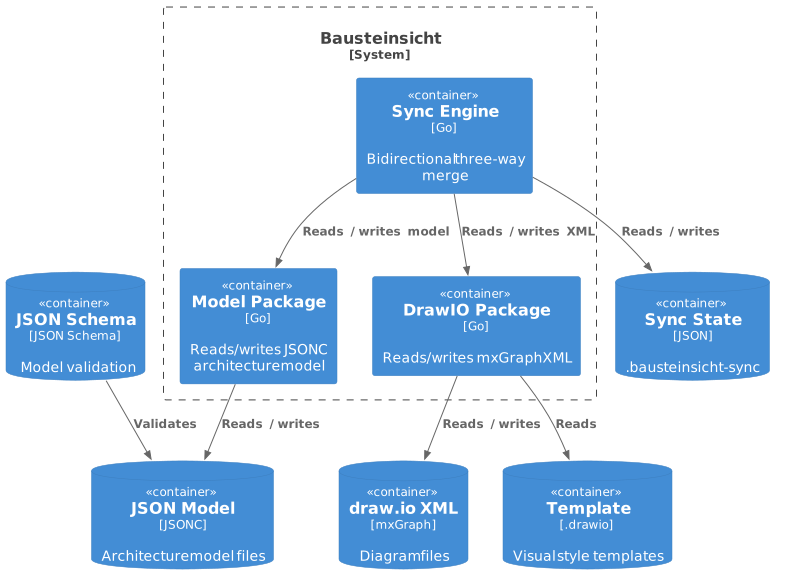
Bausteinsicht follows a pipes-and-filters architecture with a clear separation between data formats:
-
Model package reads/writes the JSON model. Knows nothing about draw.io XML.
-
DrawIO package reads/writes mxGraph XML. Knows nothing about the JSON model.
-
Sync Engine orchestrates the bidirectional sync between both formats, using a state file for three-way merge.
-
CLI layer is a thin shell delegating to these packages.
This decomposition ensures that model format changes (e.g., switching from JSONC to YAML) or draw.io format changes do not ripple across the codebase.
4.3. Quality Goal Strategies
| Quality Goal | Strategy |
|---|---|
Learnability |
|
IDE Support |
JSON Schema is published and referenced via |
LLM Friendliness |
All CLI commands support |
4.4. Key Design Patterns
4.4.1. Three-Way Merge for Bidirectional Sync
Rather than simple overwrite, Bausteinsicht uses a .bausteinsicht-sync state file to detect which side changed. This prevents data loss when both the model and draw.io are edited between syncs. See Sync Specification for details.
4.4.2. Template-Based Styling
Visual styles are not hardcoded. A draw.io template file defines the appearance of each element kind via bausteinsicht_template attributes. Users can customize templates without modifying source code.
4.4.3. Thin CLI, Rich Library
The cmd/ layer contains only argument parsing and output formatting. All logic lives in internal/ packages that can be tested independently and reused (e.g., for a future LSP server or web API).
5. Building Block View
5.1. Level 1: Overall System

Figure 2. Container View (generated from architecture model)
5.1.1. Motivation
At the centre sits a small core engine — model (the JSONC world), drawio (the XML world), and sync as the mediator between them, so changes to one format never leak into the other package. Around this core, a set of feature packages add analysis, evolution, interop, and styling, and a thin CLI layer (cmd/bausteinsicht) wires commands to them. A second binary (cmd/bausteinsicht-lsp) reuses the same library code to serve editors over the Language Server Protocol.
In total the system is two binaries over ~23 production packages (plus three test-only helper packages). The complete map is in the Package Map below; the core engine and the CLI layer are decomposed further in the Level 2 sections.
5.1.2. Building Blocks (core)
| Element | Kind | Technology | Description |
|---|---|---|---|
Changelog |
container |
Go |
Architecture changelog generation between two git refs |
CLI |
container |
Go / Cobra |
Command-line interface providing validate, sync, export, and watch commands |
Constraints |
container |
Go |
Validation constraints for model linting and consistency checking |
Diagram |
container |
Go |
Text-based diagram export to Mermaid C4 and PlantUML formats with markdown wrapping |
Diff |
container |
Go |
As-is vs. to-be architecture comparison |
draw.io |
container |
Go / etree |
draw.io XML document handling — elements, connectors, templates, and labels |
Export |
container |
Go |
Export diagrams to PNG, SVG, and other visual formats via draw.io CLI |
Exporter |
container |
Go |
Architecture export to Structurizr DSL and other formats |
Graph |
container |
Go |
Relationship graph analysis — cycle detection and dependency depth |
Health |
container |
Go |
Architecture health scoring — completeness, conformance, and complexity |
Importer |
container |
Go |
Import architecture from Structurizr DSL, LikeC4, and XMI/Enterprise Architect formats |
Layout |
container |
Go |
Auto-layout algorithms for positioning elements in draw.io diagrams |
Language Server |
container |
Go |
Language Server Protocol implementation for VS Code and other editors |
Model |
container |
Go |
JSONC architecture model management — loading, validation, and mutation |
Overlay |
container |
Go |
Metric heatmap overlay application and removal on draw.io diagrams |
Schema |
container |
Go |
JSON Schema generation from Go model types for IDE autocompletion |
Search |
container |
Go |
Element and relationship search with filtering and pattern matching |
Snapshot |
container |
Go |
Versioned architecture snapshot storage and restore |
Stale |
container |
Go |
Detects unused or forgotten architecture elements via git history and ADR/status metadata |
Sync Engine |
container |
Go |
Bidirectional synchronization engine between JSONC model and draw.io diagrams |
Table |
container |
Go |
Export architecture to CSV and Markdown table formats |
Template |
container |
Go |
draw.io template generation from element specification (shapes, layout) |
Watcher |
container |
Go / fsnotify |
File system monitoring for automatic sync on model or diagram changes |
Workspace |
container |
Go |
Multi-model workspace configuration loading and merging |
Developer |
actor |
Developer using the Bausteinsicht CLI to manage architecture models |
|
draw.io App |
external_system |
draw.io desktop or web application for visual diagram editing |
|
IDE |
external_system |
IDE with JSON Schema support for JSONC editing with autocompletion |
5.1.3. Important Interfaces
| Interface | Description |
|---|---|
|
Parses a JSONC file into the Go model struct. Validates against schema constraints. |
|
Writes the model back to JSONC, preserving comments where possible. |
|
Parses a draw.io XML file into a manipulable document structure. |
|
Writes the document back to uncompressed draw.io XML. |
|
Reads a template file and extracts styles keyed by |
|
Executes one full bidirectional sync cycle — a pure function with no I/O. |
|
Reads the |
|
Writes the updated sync state after successful sync. |
5.1.4. Package Map (all building blocks)
Every production package, grouped by role. Each row is a Level-1 building block: its responsibility and its source location. The core engine (model, drawio, sync) and the CLI layer (cli) are decomposed further in the Level 2 sections below.
| Package | Responsibility | Source |
|---|---|---|
|
DSL types, JSONC loader (comment-preserving patch + full save), validation, ID/wildcard resolution |
|
|
Read/write draw.io XML: document, element, connector, template, HTML label |
|
|
Bidirectional sync: diff, forward/reverse apply, conflict resolution, state, layout, badges, metadata |
|
|
fsnotify file watcher driving |
|
| Package | Responsibility | Source |
|---|---|---|
|
Evaluate architectural rules from the model ( |
|
|
Relationship-graph analysis: cycles, dependency depth, centrality ( |
|
|
Architecture health score across weighted categories ( |
|
|
Detect unused/forgotten elements, using git history ( |
|
|
Full-text search over elements, relationships, views ( |
|
|
Group, merge, and validate multiple models together as one workspace ( |
|
| Package | Responsibility | Source |
|---|---|---|
|
Versioned model captures, semantically diffable ( |
|
|
As-is vs. to-be model comparison ( |
|
|
Architecture changelog between two git points ( |
|
| Package | Responsibility | Source |
|---|---|---|
|
Hierarchical auto-layout engine ( |
|
|
Generate a draw.io template from the specification ( |
|
|
Apply/remove metric heatmap overlays on diagrams ( |
|
| Package | Responsibility | Source |
|---|---|---|
|
Import models from Structurizr DSL, LikeC4, and XMI/Enterprise Architect ( |
|
|
Export the model as Structurizr DSL |
|
|
Render views as text diagrams: C4-PlantUML, Mermaid, DOT, D2, HTML, sequence ( |
|
|
Render element attributes as AsciiDoc/Markdown tables ( |
|
|
Export diagram pages to PNG/SVG via headless draw.io ( |
|
|
Generate the JSON Schema from the Go model types ( |
|
| Package | Responsibility | Source |
|---|---|---|
|
Language Server Protocol server: diagnostics, code lenses; backs the |
|
|
Note
|
internal/chaos (fault-injection helper), internal/benchmarks, and internal/e2eplan (the e2e-test-plan report generator’s plan-ID registry, see #519) are test-only utilities, not production building blocks.
|
5.1.5. Container View by Domain
The full Container View above packs all ~24 containers and their relationships onto one page — accurate, but dense enough to be hard to read at the level of individual boxes and connector labels (#604). Two containers sit at the centre of nearly every relationship: cli (the entry point every command wires through) and model (the data structure nearly every package reads or writes) — a hub-and-spoke shape no simple grouping fully untangles. The four views below group the remaining containers by functional domain, each alongside cli and model for context, trading one complete picture for four legible ones.
5.2. Level 2: Sync Core Containers
The bidirectional sync loop: CLI, model, drawio, sync engine, watcher, and template resolution.

Figure 3. Sync Core Containers (generated from architecture model via draw.io export)
5.2.1. Building Blocks
| Element | Kind | Technology | Description |
|---|---|---|---|
CLI |
container |
Go / Cobra |
Command-line interface providing validate, sync, export, and watch commands |
draw.io |
container |
Go / etree |
draw.io XML document handling — elements, connectors, templates, and labels |
Model |
container |
Go |
JSONC architecture model management — loading, validation, and mutation |
Sync Engine |
container |
Go |
Bidirectional synchronization engine between JSONC model and draw.io diagrams |
Template |
container |
Go |
draw.io template generation from element specification (shapes, layout) |
Watcher |
container |
Go / fsnotify |
File system monitoring for automatic sync on model or diagram changes |
5.3. Level 2: Export & Import Containers
Containers reading and writing external formats: images, DSLs, text diagrams, tables, and the language server.

Figure 4. Export & Import Containers (generated from architecture model via draw.io export)
5.3.1. Building Blocks
| Element | Kind | Technology | Description |
|---|---|---|---|
CLI |
container |
Go / Cobra |
Command-line interface providing validate, sync, export, and watch commands |
Diagram |
container |
Go |
Text-based diagram export to Mermaid C4 and PlantUML formats with markdown wrapping |
Export |
container |
Go |
Export diagrams to PNG, SVG, and other visual formats via draw.io CLI |
Exporter |
container |
Go |
Architecture export to Structurizr DSL and other formats |
Importer |
container |
Go |
Import architecture from Structurizr DSL, LikeC4, and XMI/Enterprise Architect formats |
Language Server |
container |
Go |
Language Server Protocol implementation for VS Code and other editors |
Model |
container |
Go |
JSONC architecture model management — loading, validation, and mutation |
Table |
container |
Go |
Export architecture to CSV and Markdown table formats |
5.4. Level 2: Analysis & Governance Containers
Read-only architecture-quality containers: dependency graph analysis, health scoring, stale-element detection, constraint linting, search, and metric overlays.

Figure 5. Analysis & Governance Containers (generated from architecture model via draw.io export)
5.4.1. Building Blocks
| Element | Kind | Technology | Description |
|---|---|---|---|
CLI |
container |
Go / Cobra |
Command-line interface providing validate, sync, export, and watch commands |
Constraints |
container |
Go |
Validation constraints for model linting and consistency checking |
Graph |
container |
Go |
Relationship graph analysis — cycle detection and dependency depth |
Health |
container |
Go |
Architecture health scoring — completeness, conformance, and complexity |
Model |
container |
Go |
JSONC architecture model management — loading, validation, and mutation |
Overlay |
container |
Go |
Metric heatmap overlay application and removal on draw.io diagrams |
Search |
container |
Go |
Element and relationship search with filtering and pattern matching |
Stale |
container |
Go |
Detects unused or forgotten architecture elements via git history and ADR/status metadata |
5.5. Level 2: Evolution & Tooling Containers
Versioning and tooling containers: changelog, as-is/to-be diff, snapshots, multi-model workspaces, JSON Schema generation, and auto-layout.

Figure 6. Evolution & Tooling Containers (generated from architecture model via draw.io export)
5.5.1. Building Blocks
| Element | Kind | Technology | Description |
|---|---|---|---|
Changelog |
container |
Go |
Architecture changelog generation between two git refs |
CLI |
container |
Go / Cobra |
Command-line interface providing validate, sync, export, and watch commands |
Diff |
container |
Go |
As-is vs. to-be architecture comparison |
Layout |
container |
Go |
Auto-layout algorithms for positioning elements in draw.io diagrams |
Model |
container |
Go |
JSONC architecture model management — loading, validation, and mutation |
Schema |
container |
Go |
JSON Schema generation from Go model types for IDE autocompletion |
Snapshot |
container |
Go |
Versioned architecture snapshot storage and restore |
Workspace |
container |
Go |
Multi-model workspace configuration loading and merging |
5.6. Level 2: Sync Engine
The sync engine is the most complex package. It decomposes into five sub-components.

Figure 7. Sync Engine Components (generated from architecture model via draw.io export)
5.6.1. Building Blocks
| Element | Kind | Technology | Description |
|---|---|---|---|
CLI |
container |
Go / Cobra |
Command-line interface providing validate, sync, export, and watch commands |
draw.io |
container |
Go / etree |
draw.io XML document handling — elements, connectors, templates, and labels |
Model |
container |
Go |
JSONC architecture model management — loading, validation, and mutation |
Conflict |
component |
Go |
Conflict detection and resolution when both model and diagram changed |
Diff |
component |
Go |
Three-way change detection comparing model, diagram, and last-sync state |
Engine |
component |
Go |
Main sync orchestrator coordinating diff, forward, reverse, and conflict resolution |
Forward Sync |
component |
Go |
Applies model changes to draw.io diagrams (model → drawio) |
Reverse Sync |
component |
Go |
Applies draw.io changes back to the JSONC model (drawio → model) |
State |
component |
Go |
Sync state persistence using SHA256 hashes for change detection |
Watcher |
container |
Go / fsnotify |
File system monitoring for automatic sync on model or diagram changes |
5.7. Level 2: DrawIO Package
The draw.io package handles all mxGraph XML concerns.

Figure 8. draw.io Package Components (generated from architecture model via draw.io export)
5.7.1. Building Blocks
| Element | Kind | Technology | Description |
|---|---|---|---|
Connector |
component |
Go |
Connector/relationship CRUD for edges between elements |
Document |
component |
Go |
XML parsing, page management, and file I/O for .drawio files |
Element |
component |
Go |
Element CRUD operations on mxGraphModel objects and mxCells |
Label |
component |
Go |
HTML label generation and parsing for element display text |
Template |
component |
Go |
Template loading and style lookup from .drawio template files |
Export |
container |
Go |
Export diagrams to PNG, SVG, and other visual formats via draw.io CLI |
Sync Engine |
container |
Go |
Bidirectional synchronization engine between JSONC model and draw.io diagrams |
draw.io App |
external_system |
draw.io desktop or web application for visual diagram editing |
5.8. Level 2: Model Package

Figure 9. Model Package Components (generated from architecture model via draw.io export)
5.8.1. Building Blocks
| Element | Kind | Technology | Description |
|---|---|---|---|
CLI |
container |
Go / Cobra |
Command-line interface providing validate, sync, export, and watch commands |
Loader |
component |
Go |
JSONC read/write with comment stripping and trailing comma handling |
Patch |
component |
Go |
Comment-preserving JSONC mutations for reverse sync |
Resolve |
component |
Go |
Dot-notation element resolution and wildcard pattern matching |
Types |
component |
Go |
Core struct definitions for elements, relationships, views, and specification |
Validate |
component |
Go |
Model validation rules for elements, relationships, and views |
Sync Engine |
container |
Go |
Bidirectional synchronization engine between JSONC model and draw.io diagrams |
IDE |
external_system |
IDE with JSON Schema support for JSONC editing with autocompletion |
5.9. Level 2: CLI Package
The CLI is the thinnest layer (no business logic — see Conventions below), but at 41 files across ~15 subcommands it’s grouped into 7 components by concern rather than one component per file, for the same reason `model’s 7 files map to 5 components above: file-level granularity would be noise at this diagram’s zoom level.

Figure 10. CLI Package Components (generated from architecture model via draw.io export)
5.9.1. Building Blocks
| Element | Kind | Technology | Description |
|---|---|---|---|
Add |
component |
Go |
Add element/relationship/view/specification/pattern subcommands |
Analysis |
component |
Go |
find, show, status, stale, health, graph, and lint subcommands |
Core |
component |
Go |
Root command wiring, init, sync, validate, watch, and template resolution |
Evolution |
component |
Go |
snapshot (save/list/diff/restore/delete), diff, and changelog subcommands |
Export Commands |
component |
Go |
export, export-diagram, export-table, and export-sequence subcommands |
Interactive |
component |
Go |
repl, overlay, and adr subcommands |
Tooling |
component |
Go |
import, generate-template, layout, schema, and workspace subcommands |
Model |
container |
Go |
JSONC architecture model management — loading, validation, and mutation |
Sync Engine |
container |
Go |
Bidirectional synchronization engine between JSONC model and draw.io diagrams |
Watcher |
container |
Go / fsnotify |
File system monitoring for automatic sync on model or diagram changes |
5.10. Level 2: Diagram Package Components
Text-based diagram export components (Mermaid C4, PlantUML) and markdown wrapping.

Figure 11. Diagram Package Components (generated from architecture model via draw.io export)
5.10.1. Building Blocks
| Element | Kind | Technology | Description |
|---|---|---|---|
CLI |
container |
Go / Cobra |
Command-line interface providing validate, sync, export, and watch commands |
Markdown |
component |
Go |
Markdown document wrapper for multiple diagram pages |
Mermaid C4 |
component |
Go |
Mermaid C4 diagram generation with C4 level detection |
Model |
container |
Go |
JSONC architecture model management — loading, validation, and mutation |
5.11. Level 2: Importer Package Components
Import components for Structurizr DSL and LikeC4 format conversion to Bausteinsicht model.

Figure 12. Importer Package Components (generated from architecture model via draw.io export)
5.11.1. Building Blocks
| Element | Kind | Technology | Description |
|---|---|---|---|
CLI |
container |
Go / Cobra |
Command-line interface providing validate, sync, export, and watch commands |
LikeC4 |
component |
Go |
LikeC4 DSL parsing and model conversion |
Structurizr |
component |
Go |
Structurizr DSL parsing and model conversion |
XMI |
component |
Go |
XMI/Enterprise Architect parsing and model conversion. Buffers the whole file in memory and converts Windows-1252 to UTF-8 before parsing (peak RSS ~2x file size); a 200MB read cap is enforced. |
Model |
container |
Go |
JSONC architecture model management — loading, validation, and mutation |
5.12. Level 2: Exporter Package Components
Export components for converting Bausteinsicht model to external formats (Structurizr DSL).

Figure 13. Exporter Package Components (generated from architecture model via draw.io export)
5.12.1. Building Blocks
| Element | Kind | Technology | Description |
|---|---|---|---|
CLI |
container |
Go / Cobra |
Command-line interface providing validate, sync, export, and watch commands |
Structurizr |
component |
Go |
Structurizr DSL export with smart variable naming |
Model |
container |
Go |
JSONC architecture model management — loading, validation, and mutation |
5.13. Level 2: Search Package Components
Element and relationship search with pattern matching and filtering.

Figure 14. Search Package Components (generated from architecture model via draw.io export)
5.13.1. Building Blocks
| Element | Kind | Technology | Description |
|---|---|---|---|
CLI |
container |
Go / Cobra |
Command-line interface providing validate, sync, export, and watch commands |
Model |
container |
Go |
JSONC architecture model management — loading, validation, and mutation |
Search |
container |
Go |
Element and relationship search with filtering and pattern matching |
5.14. Go Package Layout
The directory structure maps directly to the building blocks above (packages, not every file):
bausteinsicht/
├── cmd/
│   ├── bausteinsicht/      // main CLI — one file per command (init, sync, add, repl, export*, …)
│   └── bausteinsicht-lsp/  // Language Server Protocol binary
├── internal/
│   ├── model/  drawio/  sync/  watcher/                          // core engine
│   ├── constraints/  graph/  health/  stale/  search/            // analysis
│   ├── snapshot/  diff/  changelog/                              // evolution
│   ├── layout/  template/  overlay/                              // layout & styling
│   ├── importer/  exporter/  diagram/  table/  export/  schema/  // interop & export
│   ├── lsp/                                                      // IDE integration
│   └── chaos/  benchmarks/  e2eplan/                              // test-only helpers
├── go.mod
└── go.sum
5.14.1. Conventions
-
cmd/bausteinsicht/contains only CLI wiring — no business logic; all logic lives ininternal/packages (so the LSP binary can reuse it). -
internal/ensures packages cannot be imported by external code. -
Each package has a clear single responsibility (see the Package Map).
-
Cross-package dependencies flow inward toward the core:
cmd → feature packages → sync → model + drawio. -
The
modelanddrawiopackages never depend on each other —syncis the only mediator. -
chaosandbenchmarksare imported only from_test.gofiles, so production code never depends on them.e2eplanis imported by the standalonescripts/e2e-test-report-gentool (not a_test.gofile, but also not shipped in thebausteinsicht/bausteinsicht-lspbinaries).
6. Runtime View
6.1. Sync Command
The most important runtime scenario. Shows what happens when the user runs bausteinsicht sync.
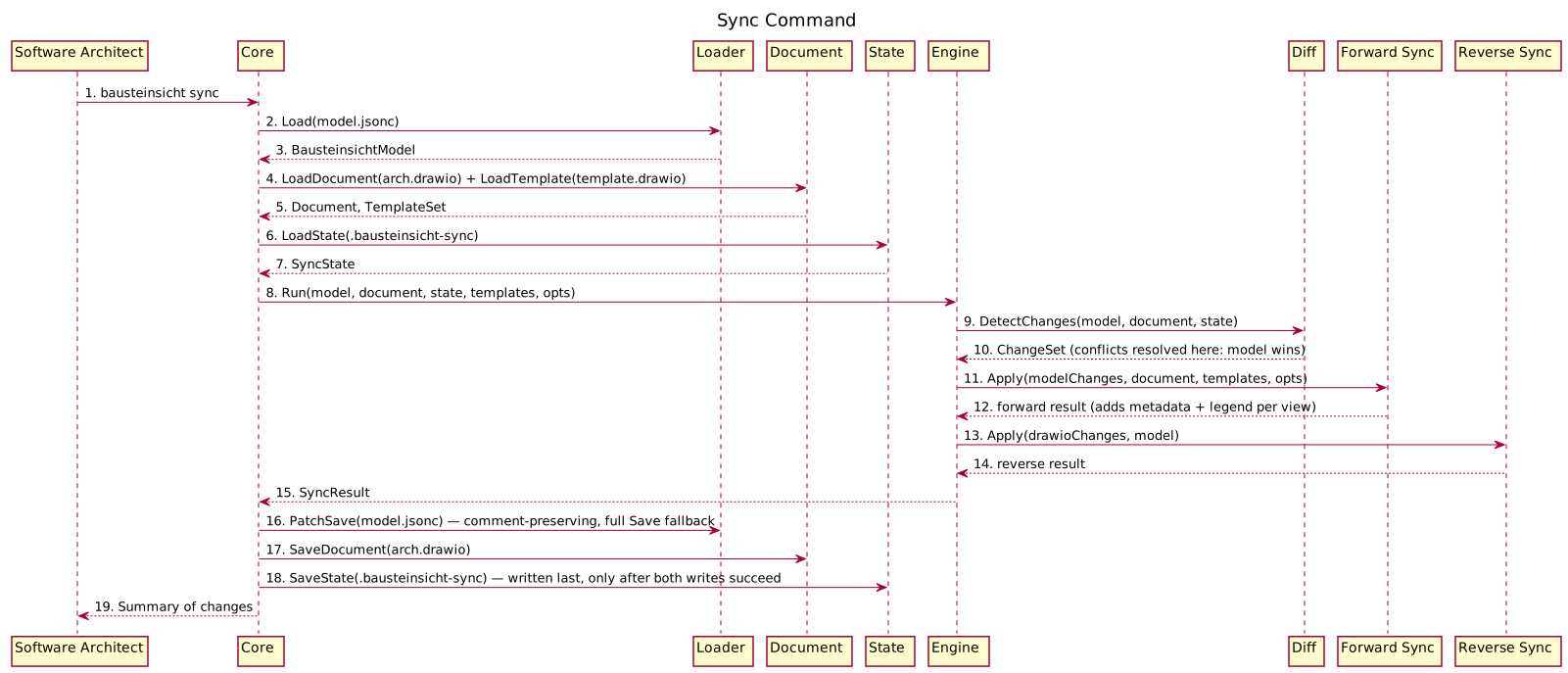
Figure 15. Sync Command (generated from
dynamicViews.sync-command in architecture.jsonc via bausteinsicht export-sequence)6.1.1. Key Observations
-
The sync engine receives all data as parameters — it performs no I/O itself
-
Forward sync runs before reverse sync in the same cycle
-
The state file is only written after both directions complete successfully
-
If any step fails, no files are written (atomic operation)
-
Forward sync adds metadata (title, source, author, timestamp) and a legend to each view page
6.2. Watch Mode
Shows the continuous sync loop triggered by file changes.
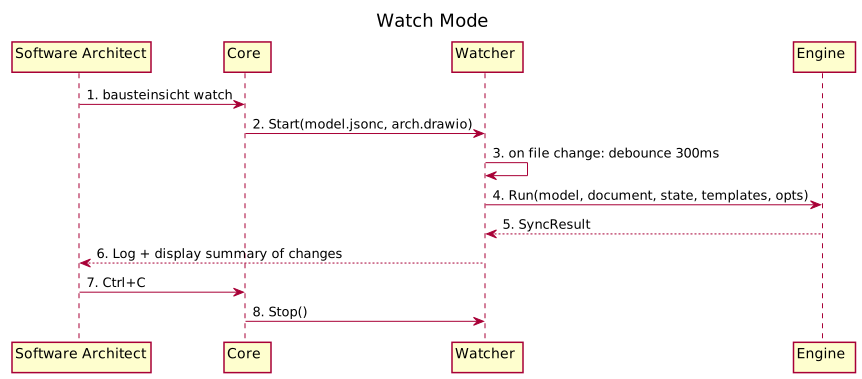
Figure 16. Watch Mode (generated from
dynamicViews.watch-mode in architecture.jsonc via bausteinsicht export-sequence)6.2.1. Debounce Strategy
File editors often trigger multiple save events in rapid succession (write + metadata update). The watcher debounces events with a 300ms window: after the first change event, it waits 300ms for additional events before triggering a sync.
6.3. Init Command
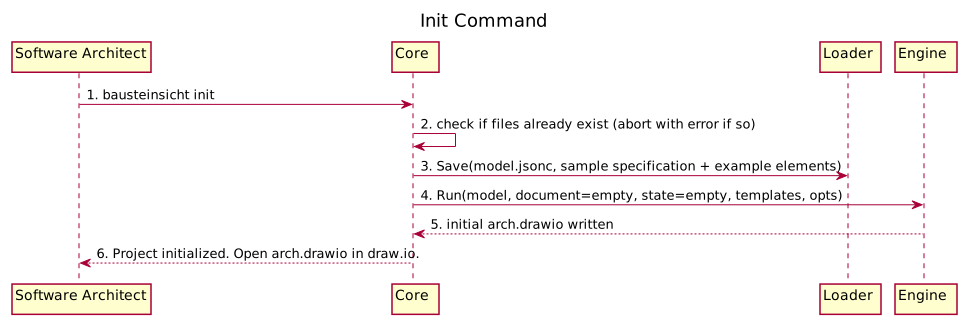
Figure 17. Init Command (generated from
dynamicViews.init-command in architecture.jsonc via bausteinsicht export-sequence)6.4. LLM-Driven Modification
Shows how an LLM agent uses CLI commands to modify the architecture.
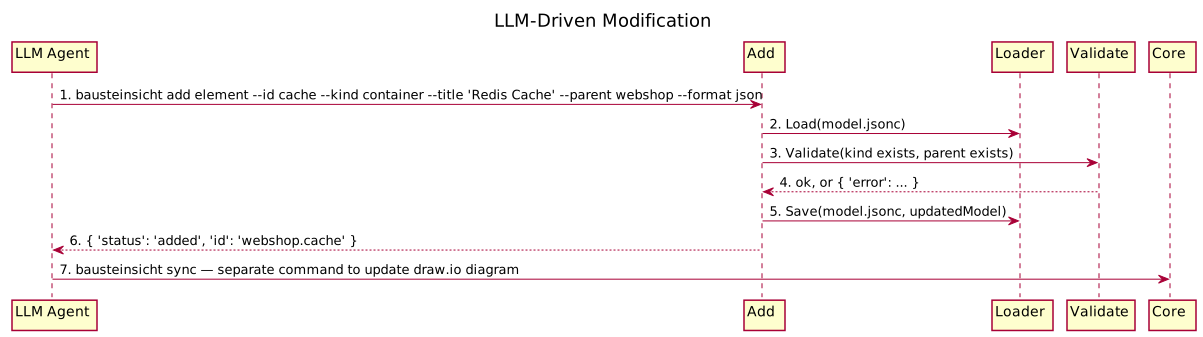
Figure 18. LLM-Driven Modification (generated from
dynamicViews.llm-driven-modification in architecture.jsonc via bausteinsicht export-sequence)6.4.1. Design Decision: Separate Add and Sync
The add commands only modify the JSON model. They do not trigger a sync automatically. This keeps commands predictable (single responsibility) and allows LLMs to batch multiple model changes before syncing.
6.5. Import from Structurizr / LikeC4 / XMI
Shows how an existing model is brought into Bausteinsicht (bausteinsicht import <file> --from structurizr|likec4|xmi).
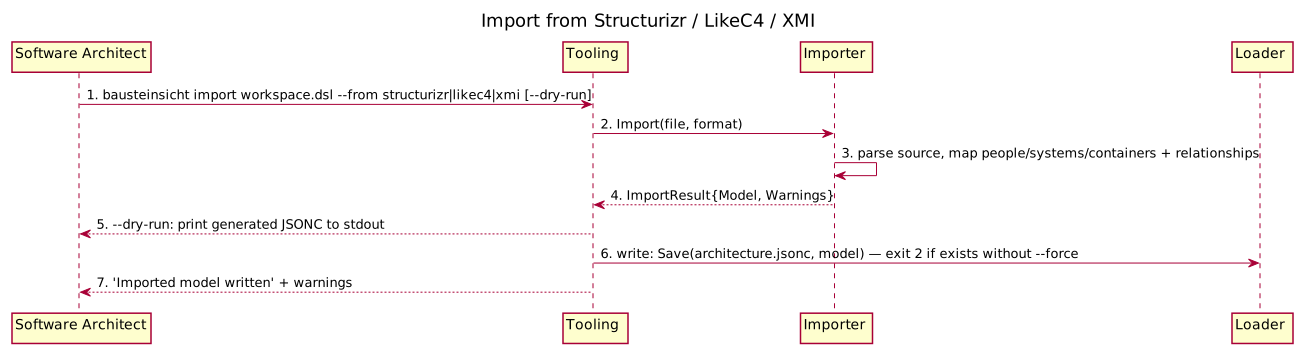
Figure 19. Import from Structurizr / LikeC4 / XMI (generated from
dynamicViews.import-from-external-formats in architecture.jsonc via bausteinsicht export-sequence)The result is immediately syncable with bausteinsicht sync. The importer never touches draw.io — it only produces the model. The XMI path additionally buffers the whole file in memory and converts Windows-1252 to UTF-8 before parsing (peak RSS ~2× the raw file size, 200 MB read cap enforced) — a materially different cost profile from the other two formats, though the CLI-level flow shown above is the same for all three.
6.6. REPL Save: Patch vs. Full-Save Fallback
The REPL keeps the model in memory and, on save, chooses how to persist so JSONC comments survive when possible. This is the key data-integrity flow.
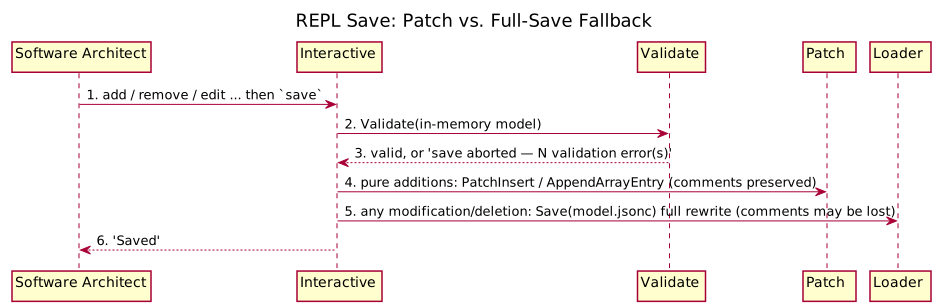
Figure 20. REPL Save: Patch vs. Full-Save Fallback (generated from
dynamicViews.repl-save in architecture.jsonc via bausteinsicht export-sequence)6.6.1. Key Observations
-
Validation runs before any write — an invalid model is never persisted.
-
Pure additions take the comment-preserving patch path; modifications/deletions conservatively fall back to a full rewrite with a visible warning about comment loss.
-
The same patch primitives back the non-interactive
addcommands.
6.7. Stale Detection
Shows how bausteinsicht stale flags forgotten elements using git history.
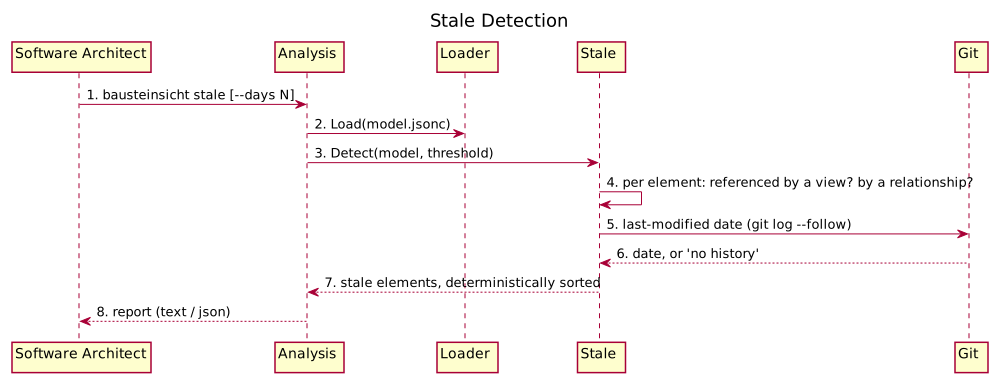
Figure 21. Stale Detection (generated from
dynamicViews.stale-detection in architecture.jsonc via bausteinsicht export-sequence)When run outside a git repository the git lookups degrade gracefully (no date), and detection falls back to the view/relationship membership checks.
6.8. Error & Recovery: Failed Write During Sync
The contract requires at least one error/recovery scenario. This shows why a failed or interrupted sync never corrupts the working files.
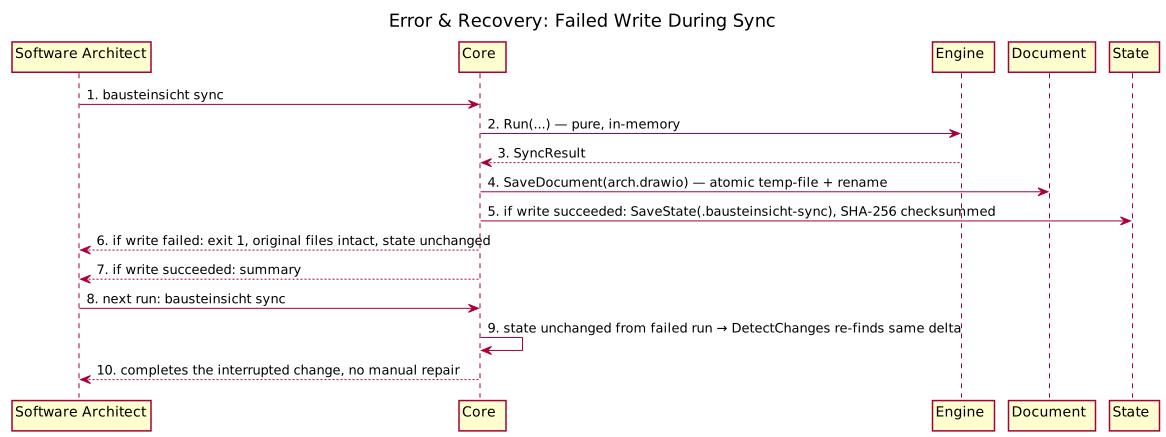
Figure 22. Error & Recovery: Failed Write During Sync (generated from
dynamicViews.error-recovery in architecture.jsonc via bausteinsicht export-sequence)|
Note
|
dynamicViews/SequenceStep (the model type behind this generated diagram) only supports linear sync/async/return arrows — no alt/opt/group branching or notes, unlike hand-written PlantUML. The two write-outcome branches ("if write failed" / "if write succeeded") and the atomic-write grouping are represented as plain sequential steps with the condition folded into the label text instead of a true visual branch. If this loses too much clarity, this scenario is the best candidate in chapter 6 to stay hand-written rather than generated — see #535.
|
6.8.1. Key Observations
-
The engine computes everything in memory first; files are written only afterwards, each via a temp-file-plus-rename so a partial write cannot truncate a real file.
-
The state file is written last. If any earlier write fails, the state is left untouched, so the next run re-detects the same change and retries — the operation is effectively idempotent and self-healing.
-
The state file carries a SHA-256 checksum, so external tampering or truncation is detected on load rather than silently trusted.
6.9. Add: Relationship / View / Specification / From-Pattern
The non-element add subcommands — add relationship, add view, add specification (with its own add specification element and add specification relationship children, for extending the specification itself rather than the model), and add-from-pattern — cover relationships between existing elements, views, specification entries, and pattern-based bulk generation. bausteinsicht add-from-pattern doesn’t have its own list subcommand; the sibling add pattern list command (a separate group under add, not under add-from-pattern) lists the patterns available to apply. All are pure model edits, same shape as add element (see LLM-Driven Modification above).
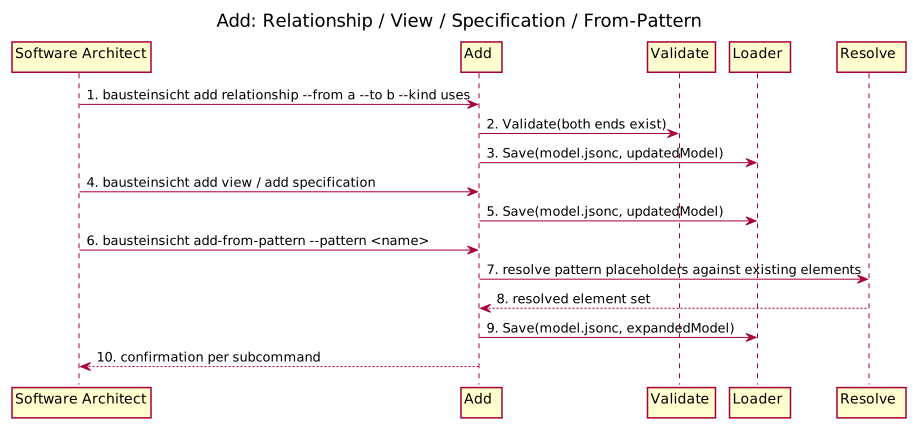
Figure 23. Add: Relationship / View / Specification / From-Pattern (generated from
dynamicViews.add-family in architecture.jsonc via bausteinsicht export-sequence)6.10. Snapshot: Save / List / Diff / Restore / Delete
Versioned model captures: snapshot save, snapshot list, snapshot diff, snapshot restore, and snapshot delete. snapshot restore is destructive (overwrites the live model), so it’s the one step here worth flagging as such.
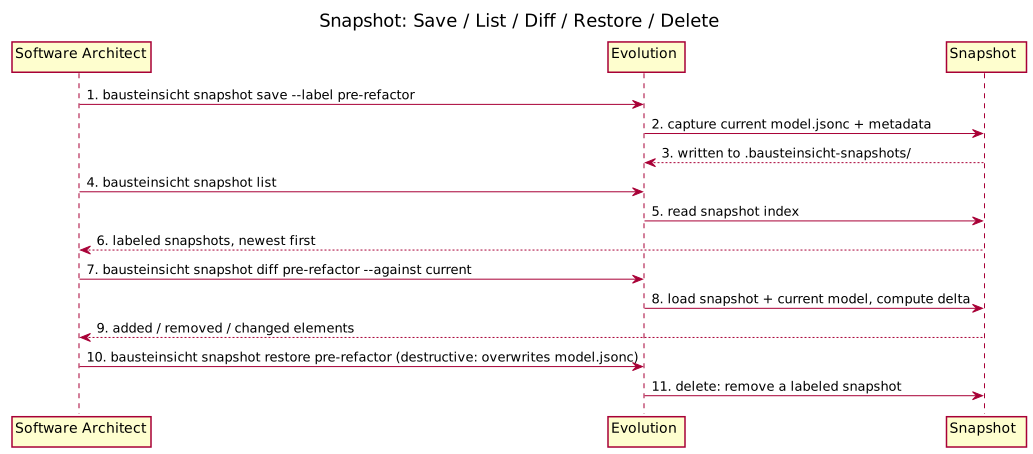
Figure 24. Snapshot: Save / List / Diff / Restore / Delete (generated from
dynamicViews.snapshot-management in architecture.jsonc via bausteinsicht export-sequence)6.11. As-Is/To-Be Diff and Changelog Generation
diff compares two model states; changelog walks git history calling diff at each relevant commit to build a human-readable architecture changelog.
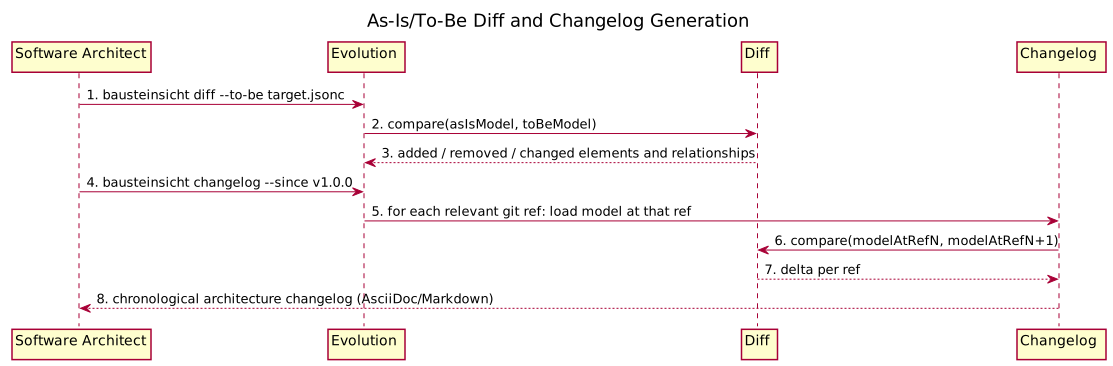
Figure 25. As-Is/To-Be Diff and Changelog Generation (generated from
dynamicViews.diff-and-changelog in architecture.jsonc via bausteinsicht export-sequence)6.12. Export: Diagrams, Tables, and Rendered Images
The three export commands — export, export-diagram, and export-table — read the model (and, for export, the synced draw.io document) and render it to an external format — the output-side counterpart to import. None of them write back to the model or draw.io.
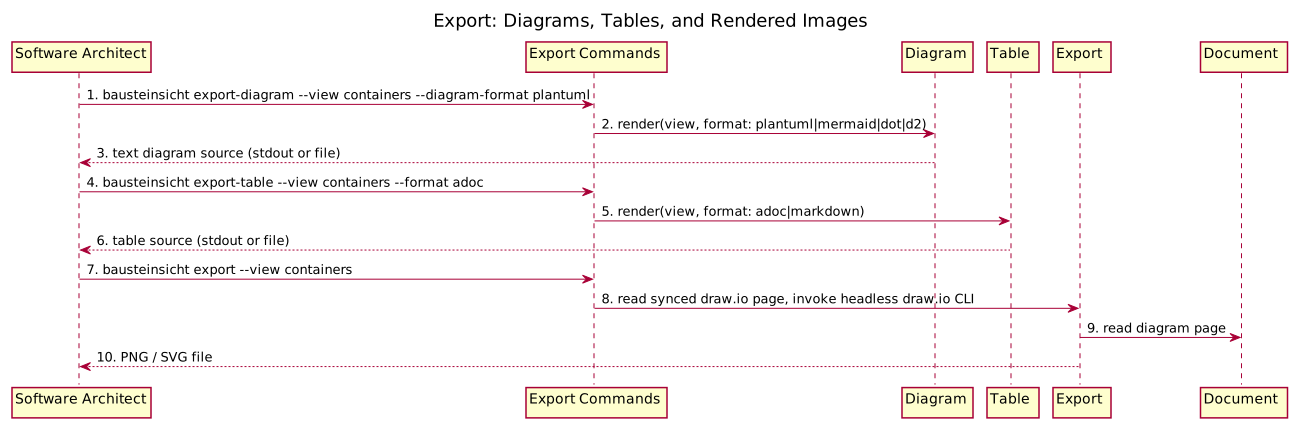
Figure 26. Export: Diagrams, Tables, and Rendered Images (generated from
dynamicViews.export-family in architecture.jsonc via bausteinsicht export-sequence)6.13. Analysis: Health, Graph, Find, Lint
Read-only architecture-quality checks, all following the same shape as Stale Detection (load model, analyze, report) — shown together since the flow is structurally identical across all four.
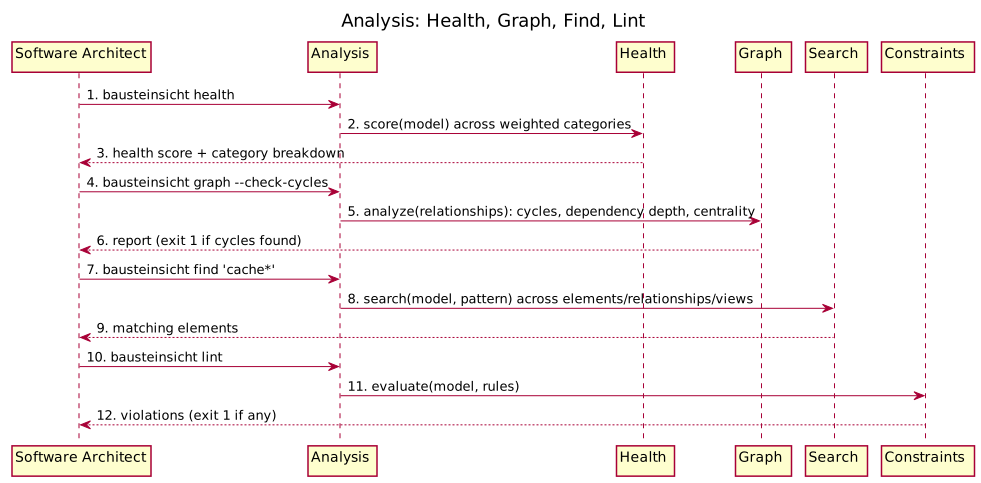
Figure 27. Analysis: Health, Graph, Find, Lint (generated from
dynamicViews.analysis-suite in architecture.jsonc via bausteinsicht export-sequence)6.14. Validate as a Standalone Gate
validate runs the same check other commands run internally before writing (see REPL Save, LLM-Driven Modification above), but as its own entry point — typically in CI or a pre-commit hook, checked before any file is touched.
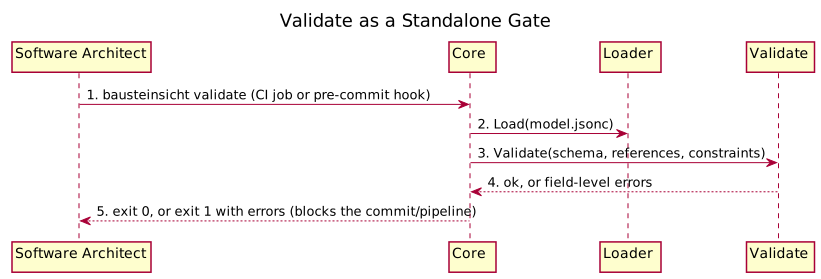
Figure 28. Validate as a Standalone Gate (generated from
dynamicViews.validate-standalone in architecture.jsonc via bausteinsicht export-sequence)6.15. Tooling: Workspace, Layout, Generate-Template, Schema
Cross-cutting setup/maintenance commands, not part of the daily edit-sync loop: multi-model workspaces (workspace merge, workspace validate, workspace list), auto-layout, template scaffolding, and JSON Schema regeneration (schema generate) for IDE support.
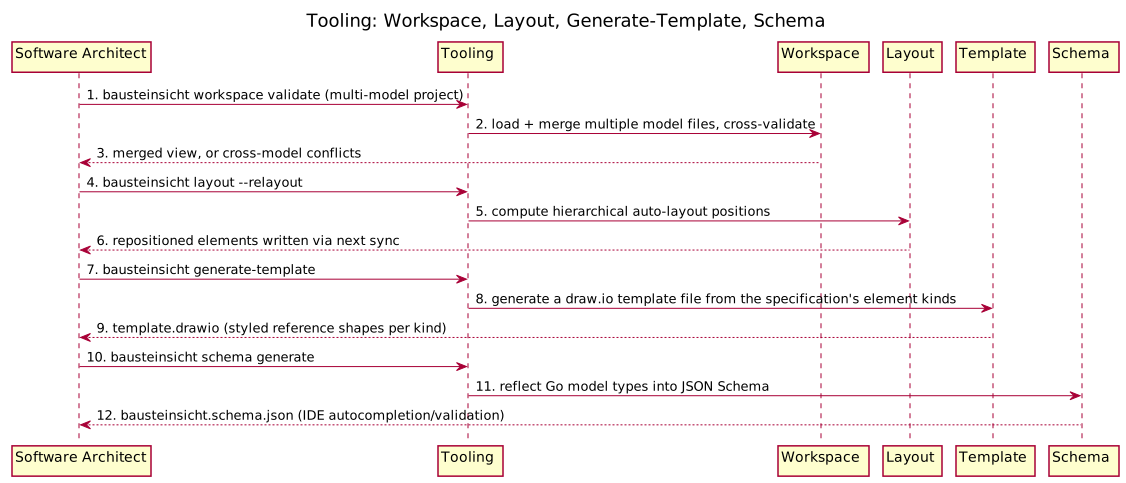
Figure 29. Tooling: Workspace, Layout, Generate-Template, Schema (generated from
dynamicViews.tooling-commands in architecture.jsonc via bausteinsicht export-sequence)6.16. Overlay and ADR
Two interactive-group commands outside the REPL itself: metric heatmap overlays on diagrams (overlay apply, overlay remove, overlay list), and ADR (Architecture Decision Record) scaffolding (adr list, adr show).
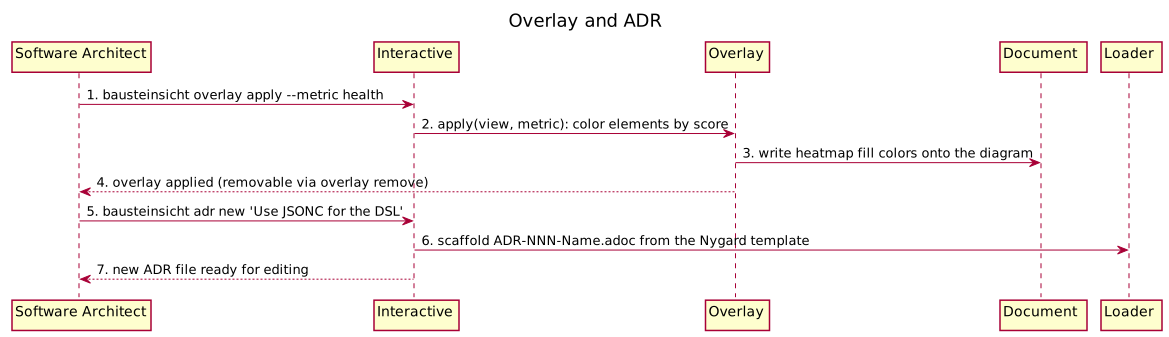
Figure 30. Overlay and ADR (generated from
dynamicViews.interactive-extras in architecture.jsonc via bausteinsicht export-sequence)7. Deployment View
7.1. Infrastructure Level 1
Bausteinsicht is a single-binary CLI tool that runs on the developer’s local machine. There is no server, no database, and no network communication at runtime.
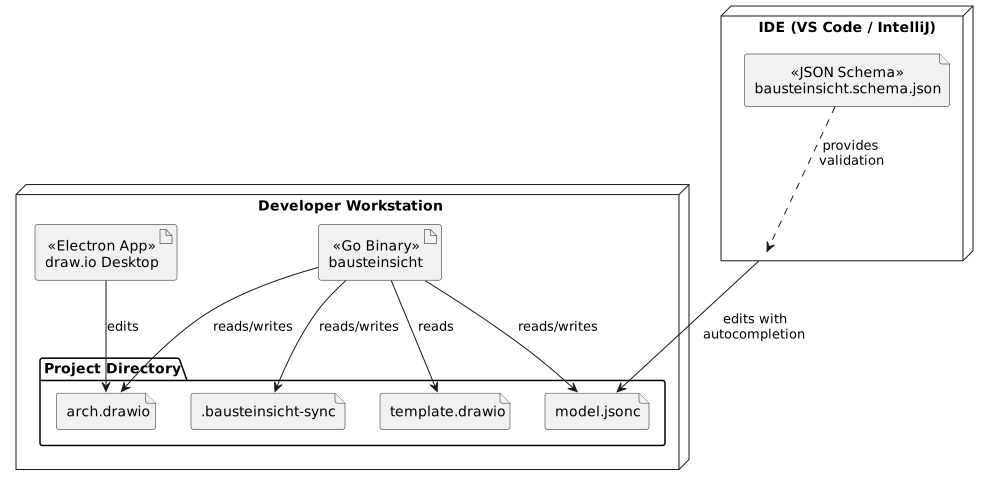
7.1.1. Motivation
Bausteinsicht intentionally has the simplest possible deployment: one binary, no dependencies. This directly serves the Learnability quality goal — download, run, be productive.
7.1.2. Quality and Performance Features
| Feature | Description |
|---|---|
Startup time |
< 10ms (native Go binary, no runtime to load) |
Sync time |
< 100ms for models with up to 200 elements (in-memory XML/JSON processing) |
Binary size |
~10-15 MB (single statically linked binary) |
Zero dependencies |
No runtime, no package manager, no database, no network |
7.1.3. Mapping of Building Blocks to Infrastructure
| Building Block | Deployment |
|---|---|
|
The compiled binary, distributed via GitHub Releases for Linux, macOS, Windows (amd64 + arm64) |
|
Compiled into the same binary. No separate deployment. |
JSON Schema |
Published to GitHub (raw URL) and referenced via |
Template |
Bundled as a Go embed resource in the binary for |
7.2. Distribution
7.2.1. GitHub Releases
Each tagged version produces compressed archives for all target platforms via GoReleaser. Archives are named bausteinsicht_v2.6.7_{Os}_{Arch} — .tar.gz for Linux and macOS, .zip for Windows:
| Platform | Archive |
|---|---|
Linux amd64 |
|
Linux arm64 |
|
Linux arm (v7) |
|
macOS amd64 |
|
macOS arm64 (Apple Silicon) |
|
Windows amd64 |
|
Windows arm64 |
|
The authoritative build matrix is .goreleaser.yml: goos: [linux, darwin, windows] × goarch: [amd64, arm64, arm] (with goarm: 7). GoReleaser produces one archive per combination Go actually supports, skipping the rest (e.g. darwin/arm); the table above lists the primary targets and is not exhaustive. Each archive also ships with an SBOM (SPDX-JSON and CycloneDX-JSON); a checksums.txt covers all artifacts.
7.2.2. Installation
# Pick the archive for your platform from the releases page:
#   https://github.com/docToolchain/Bausteinsicht/releases/latest
# then download, unpack, and install (example: Linux amd64, release v1.2.3)
curl -L https://github.com/docToolchain/Bausteinsicht/releases/download/v1.2.3/bausteinsicht_1.2.3_linux_amd64.tar.gz -o bausteinsicht.tar.gz
tar -xzf bausteinsicht.tar.gz
sudo install -m 0755 bausteinsicht /usr/local/bin/bausteinsicht

# Or via Go install
go install github.com/docToolchain/Bausteinsicht/cmd/bausteinsicht@latest
7.2.3. Embedded Resources
The init command needs a default template and sample model. These are embedded into the binary using Go’s embed package:
//go:embed templates/default.drawio
var defaultTemplate []byte

//go:embed templates/sample-model.jsonc
var sampleModel []byte
This eliminates the need to distribute additional files alongside the binary.
8. Cross-cutting Concepts
8.1. 8.1 Threat Model (STRIDE)
Bausteinsicht is a local CLI tool that reads and writes files on the user’s workstation. The primary trust boundary is the filesystem: the tool processes user-supplied JSONC and draw.io files and writes results back to the same directory.
8.1.1. STRIDE Threat Table
| ID | STRIDE Category | Severity | Threat | Mitigation |
|---|---|---|---|---|
T-1 |
Tampering |
Medium |
Malicious JSONC or draw.io file in the workspace overwrites model data via sync |
Atomic writes ( |
T-2 |
Tampering |
Low |
CLI flags |
Reject |
T-3 |
Information Disclosure |
Low |
|
File written at 0600; state contains no secrets, only structural metadata (SHA-256 checksums, element IDs) |
T-4 |
Denial of Service |
Low |
Oversized JSONC model file causes OOM or slow parse |
10 MB file size limit enforced before parsing (SEC-006) |
T-5 |
Denial of Service |
Low |
Deeply nested element hierarchy causes stack overflow during |
|
T-6 |
Tampering |
Low |
|
|
Spoofing and Repudiation are not applicable: the tool operates on local files under the user’s own identity; no authentication or audit log is required.
8.1.2. Risk Acceptance
Remaining accepted risks: * T-3 — sync state leaks structural metadata; acceptable because the file lives in the project directory alongside the model itself (same trust level). * Dockerfile script downloads without checksums (SEC-014) — deferred; upstream projects do not publish checksums.
See Security Review 2026-03-01 for the full SEC catalog.
8.2. 8.2 Security Mitigations
Security controls implemented across the codebase, keyed to threat IDs:
| Control | Threat | Implementation |
|---|---|---|
Atomic file writes |
T-1 |
|
Path traversal guard |
T-2 |
|
Safe view key |
T-2 |
|
File permissions |
T-1/T-3 |
All model/sync files written at |
File size limit |
T-4 |
|
Element depth limit |
T-5 |
|
HTML sanitization |
T-6 |
|
Dependency scanning |
All |
|
|
Note
|
As of 2026-07-09, govulncheck, gitleaks (secret scanning), and go test -race run as
blocking CI jobs in .github/workflows/go.yml (govulncheck, gitleaks, test-race), all
verified clean against the current codebase (#550). gosec (SAST) and nilaway (nil-pointer
analysis) also run in CI but non-blocking (continue-on-error: true) for now: gosec currently
reports 35 pre-existing file-permission findings (tracked separately), and nilaway’s memory/time
footprint on a GitHub-hosted runner hasn’t been validated as reliably fast/light enough to gate every
PR on. `test-race excludes internal/importer/xmi — its ~118MB BigData.xmi test fixture makes
race instrumentation’s memory overhead impractical; the other 33 packages are raced normally. See
issue #550 for the follow-up to make
gosec/nilaway blocking once their respective backlogs are addressed.
|
8.3. 8.3 Test Strategy
Decided in ADR-007. Three tiers:
| Tier | Volume | Scope | Characteristics |
|---|---|---|---|
Unit tests |
~70% |
Pure functions: label parsing, ID resolution, XML element creation, validation |
No I/O; <100 ms per test; co-located |
Integration tests |
~25% |
Package-level: full model load/save cycle, full XML round-trip |
|
E2E tests |
~5% |
Full CLI workflows: |
Execute compiled binary; real JSONC + draw.io files; <5 s per test |
8.3.1. Property-Based Testing
pgregory.net/rapid is used for roundtrip and idempotency properties:
-
Label escaping / unescaping roundtrip (
internal/drawio/) -
escapeHTML/trimBracketsinvariants
8.3.2. Test Fixtures
Packages use testdata/ directories for representative input files.
Golden-file comparisons are done by committing expected output and checking with bytes.Equal in tests.
There is no -update-golden flag; update expected files manually and recommit.
8.4. 8.4 Observability
8.4.1. User-Facing Output
Normal output goes to stdout:
-
text (default) — human-readable summaries
-
json (
--format json) — machine-parseable; used by LLM agents
Warnings and errors go to stderr.
8.4.2. Verbose Mode
With --verbose, additional sync and export progress is printed to stderr (plain text, no [DEBUG] prefix):
Syncing model: architecture.jsonc
  42 elements, 18 relationships, 3 views
Forward sync: 2 elements created, 1 updated, 0 deleted; 3 connectors created, 0 updated, 0 deleted
Reverse sync: 0 elements created, 1 updated, 0 deleted; 0 relationships created, 0 updated, 0 deleted
Conflicts resolved: 0 (model wins)
Verbose output is suppressed in --format json mode to keep stdout machine-parseable.
8.4.3. No Logging Framework
Bausteinsicht uses fmt.Fprintf(stderr, …) for verbose output and fmt for normal output.
No external logging framework is used — log package is not imported in the CLI layer.
8.5. 8.5 Error Handling
8.5.1. Strategy
Errors propagate upward and are only formatted for the user at the CLI layer (cmd/bausteinsicht/).
| Layer | Error Handling |
|---|---|
|
Return |
|
Catch errors, format them for the user (plain text or JSON), and set the exit code via |
8.5.2. Exit Codes
| Code | Meaning |
|---|---|
0 |
Success |
1 |
Validation error or sync conflict |
2 |
File not found or I/O error |
8.5.3. Structured Error Output
With --format json, errors are emitted to stderr as:
{"error": "validation failed: model.webshop.api unknown kind", "code": 1}The single error string contains the full wrapped error chain. This enables LLM agents to parse errors programmatically.
|
Note
|
The details array (multiple per-field errors) is not part of the JSON error format. Validation warnings are only available in text mode via bausteinsicht validate.
|
8.6. 8.6 JSONC Comment Preservation
Standard Go encoding/json does not support comments. Bausteinsicht strips comments before parsing and writes back selectively:
-
Remove single-line comments (
// …) and trailing commas before parsing -
Parse the cleaned JSON with
encoding/json -
On pure insertions (new elements, new relationships):
model.PatchInsert/cmd/bausteinsicht/sync.go:saveModelpatches only the changed lines, preserving existing comments and key ordering (ADR-011) -
On deletions or modifications of existing entries: full rewrite via
model.Save— comments are lost
|
Note
|
The REPL’s save command follows the same patch-first/full-save-fallback strategy.
|
8.7. 8.7 File Atomicity
When writing files, Bausteinsicht uses a write-to-temp-then-rename pattern:
-
Write to a temporary file in the same directory (e.g.,
.model.jsonc.tmp) -
os.Renamethe temp file to the target path (atomic on most filesystems) -
On failure, the original file remains intact
This prevents corrupted files if the process is interrupted during write (mitigates T-1).
8.8. 8.8 Configuration Discovery
Bausteinsicht uses convention over configuration:
-
Look for
*.jsoncin the current directory. Exactly one match is used as the model file; multiple files require--model(the tool never silently picks one, since it mutates synchronized files — SEC-005). -
Look for
*.drawioin the current directory (the diagram file) -
Look for
.bausteinsicht-syncin the current directory -
Template:
template.drawioin the current directory, or fall back to the embedded default
All paths can be overridden via CLI flags (--model, --template).
8.9. 8.9 Version Management
The binary version is injected at build time via ldflags:
go build -ldflags "-X main.version=0.1.0" ./cmd/bausteinsichtGoReleaser handles this automatically for tagged releases.
9. Architecture Decisions
Architecture decisions are documented as ADRs (Architecture Decision Records) following the Nygard format with a weighted Pugh matrix for option evaluation.
All ADRs are located in src/docs/arc42/ADRs/.
| ADR | Title | Status | Summary |
|---|---|---|---|
Choice of DSL Format |
Accepted |
JSON with JSON Schema (JSONC) chosen over TypeScript DSL and Custom DSL (Langium). Scored highest on learnability, IDE support, LLM friendliness, and bidirectional sync suitability. |
|
Choice of Implementation Language |
Accepted |
Go chosen over Python and Kotlin/JVM. Single-binary distribution, LLM-friendly code generation, compile-time type safety, and dedicated mxGraph library support. |
|
Risk Classification |
Accepted |
Tier 2 (Extended Assurance) — determined by Code Type = 2 (Business Logic). Existing toolchain covers most mitigations. Guides AI-assisted development quality requirements. |
|
Sequence Diagram Export |
Superseded by ADR-008 |
Originally rejected |
|
Auto-Layout Engine for New Diagram Pages |
Accepted |
Layered/grid/none placement modes for fresh diagram pages. Relationship-aware BFS ordering within scopes; manual positions preserved on incremental sync. |
|
CLI Add Command Strategy |
Accepted |
|
|
Testing Strategy |
Accepted |
Unit / integration / E2E classification, plus property-based tests (pgregory.net/rapid). Tests trace to issues and use cases. |
|
Sequence Diagram Export (Revisited) |
Accepted |
Reverses ADR-004: implements |
|
Drill-Down Navigation |
Accepted |
Page-based drill-down (one draw.io page per view + cross-page links + back button) over single-page semantic zoom. Uses native draw.io pages; keeps bidirectional sync simple. |
10. Quality Requirements
10.1. Quality Requirements Overview
| ISO 25010 Characteristic | Quality Requirement | Top-goal link |
|---|---|---|
Usability / Learnability |
New users productive within 30 minutes using only docs and IDE autocompletion |
Concretises QG-1 (Learnability) |
Usability / Operability |
IDE autocompletion, validation, hover docs without tool-specific plugin |
Concretises QG-2 (IDE Support) |
Compatibility / Interoperability |
LLM agents can reliably read, write, and manipulate architecture models |
Concretises QG-3 (LLM Friendliness) |
Functional Suitability / Correctness |
Bidirectional sync never silently loses data |
Derived (sync reliability enables QG-1–3) |
Portability / Installability |
Single binary, no runtime dependencies, install in under 1 minute |
Derived (prerequisite for all three top goals) |
Maintainability / Modifiability |
Element hierarchy freely configurable, not hardcoded to C4 levels |
Derived (enables diverse team adoption) |
Performance Efficiency |
10 MB JSONC model processed in under 5 seconds on commodity hardware |
Derived (blocks usability at scale) |
Reliability / Fault Tolerance |
Corrupt or oversized input never corrupts the model file |
Derived (trust prerequisite for QG-1) |
Security |
Path traversal via CLI flags rejected; model files written at 0600 |
Derived (operating in shared workspaces) |
10.2. Quality Scenarios
The six-part scenario form used below: Source → Stimulus → Artifact → Environment → Response → Response Measure
10.2.1. QS-1: Learnability
| Source | Developer unfamiliar with Bausteinsicht, first contact with the project |
|---|---|
Stimulus |
Reads the getting-started documentation and opens their IDE |
Artifact |
Bausteinsicht CLI + JSON Schema + user manual |
Environment |
Normal developer workstation; IDE with JSON Schema support (VS Code, IntelliJ, or Neovim) |
Response |
Developer creates and validates an architecture model using IDE autocompletion |
Response Measure |
Within 30 minutes, the developer has created a valid model with ≥3 elements, ≥2 relationships, and ≥1 draw.io view — using only documentation and IDE features, no Bausteinsicht-specific help |
Concretises QG-1. Driven by: ADR-001 (JSON chosen for universal familiarity and IDE support).
10.2.2. QS-2: IDE Support
| Source | Architect editing a .jsonc model file |
|---|---|
Stimulus |
Types a new element definition |
Artifact |
|
Environment |
VS Code, IntelliJ, or Neovim with JSON Schema plugin; no Bausteinsicht plugin installed |
Response |
Editor shows autocompletion for property names, validates values, and displays hover documentation |
Response Measure |
0 additional plugins installed beyond JSON Schema association; all three named IDEs provide autocompletion and validation |
Concretises QG-2. Driven by: ADR-001 (JSON Schema provides free IDE support via SchemaStore).
10.2.3. QS-3: LLM Friendliness
| Source | LLM agent (e.g., Claude Code) |
|---|---|
Stimulus |
Instructed to add a new microservice to an existing architecture model |
Artifact |
JSONC model file + Bausteinsicht CLI |
Environment |
Automated agent workflow; no human at the keyboard |
Response |
Agent reads the model, issues |
Response Measure |
0 human interventions required; model remains valid JSON after agent edits; |
Concretises QG-3. Driven by: ADR-001 (JSON is the native output format of LLMs).
10.2.4. QS-4: Sync Reliability
| Source | Architect (working in draw.io) and developer (working in JSONC) simultaneously |
|---|---|
Stimulus |
|
Artifact |
JSONC model file + draw.io diagram + |
Environment |
Normal development workflow; no true data conflict (different fields changed) |
Response |
Description change from draw.io is written to the model; new element from the model appears in the draw.io view; conflicts (same field changed on both sides) produce a warning and model wins |
Response Measure |
0 silent data losses; every changed field appears in the correct destination; conflicts logged to stderr with element ID and field name |
Derived from reliability requirement (trust prerequisite for all top goals).
10.2.5. QS-5: Installability
| Source | Developer on macOS, Linux, or Windows |
|---|---|
Stimulus |
Downloads the binary from a GitHub Release and runs |
Artifact |
Released binary (goreleaser cross-compiled archive) |
Environment |
Clean workstation; no Go, Python, Node.js, Java, or other runtime installed |
Response |
Command executes and prints the version string |
Response Measure |
Under 1 minute from download to first successful command; 0 runtime dependencies required |
Driven by: ADR-002 (Go chosen for single-binary distribution).
10.2.6. QS-6: Flexible Hierarchy
| Source | Architect modeling a system with deep nesting (e.g., domain → subdomain → system → service → component) |
|---|---|
Stimulus |
Defines elements nested 4–49 levels deep in the JSON model |
Artifact |
JSONC model file |
Environment |
Normal model editing; |
Response |
Model validates and renders correctly for all depths up to the enforced limit |
Response Measure |
Nesting depths 1–49 succeed without error; depth 50 returns a clear error message naming the offending element path (enforced by |
|
Note
|
Prior versions of this document stated "no artificial limit on hierarchy depth." This was corrected in the 2026-06-27 audit. A depth of 50 covers all realistic C4 and custom hierarchy depths while preventing denial-of-service (see SEC-007). |
Driven by: ADR-001 (flexible element kinds).
10.2.7. QS-7: Performance at Scale
| Source | Developer with a large monolith model |
|---|---|
Stimulus |
Runs |
Artifact |
JSONC model + draw.io diagram |
Environment |
Commodity developer laptop (≥4 cores, ≥8 GB RAM); no external network dependency |
Response |
Sync completes without timeout or OOM |
Response Measure |
Sync finishes in under 5 seconds wall time; benchmarks in |
Derived from performance efficiency requirement.
10.2.8. QS-8: Reliability Under Bad Input
| Source | Attacker or misconfigured tool writing a corrupt/oversized JSONC file to the model path |
|---|---|
Stimulus |
|
Artifact |
JSONC model file |
Environment |
Developer workstation; tool runs with normal user permissions |
Response |
Tool rejects the file with an error; existing draw.io diagram and sync state are not modified |
Response Measure |
0 model mutations on parse failure; error returned with code 2; existing files intact (atomic write pattern ensures no partial overwrite) |
Derived from reliability and security requirements (T-4 DoS mitigation, SEC-006).
10.2.9. QS-9: Security — Path Containment
| Source | Malicious JSONC model or untrusted script passing crafted CLI arguments |
|---|---|
Stimulus |
CLI invoked with |
Artifact |
CLI argument parser ( |
Environment |
Any OS; normal user privileges |
Response |
Tool rejects the path with an error before any file I/O |
Response Measure |
All paths containing |
Derived from security requirement (T-2 path traversal).
11. Risks and Technical Debts
This is the project’s living risk register. Its risk IDs (R-n) and debt IDs (D-n) are local to this chapter. The ATAM Architecture Review (2026-03-06) was the original input and remains the point-in-time analysis with its own separate numbering (sensitivity/tradeoff points); do not assume R-5 here equals R-5 there.
11.1. Risks
Priority is derived from likelihood × impact. The table is ordered by priority, resolved items last.
| ID | Risk | Likelihood | Impact | Priority | Mitigation / Status |
|---|---|---|---|---|---|
R-3 |
draw.io XML format changes — the format is not formally versioned; a breaking change could break the sync engine. |
Medium |
High |
High |
Custom |
R-6 |
DSL import parsing errors — Structurizr DSL / LikeC4 parsers may fail on valid-but-unexpected syntax, losing data on import. |
Medium |
High |
High |
Comprehensive error messages + validation warnings; add roundtrip tests (import → export → import). Open. Burdens |
R-5 |
LSP server crashes or hangs — editor integration depends on its availability. |
Medium |
Medium |
Medium |
Health checks, restart logic, timeout handling. Open. Burdens |
R-9 |
Headless draw.io dependency — PNG/SVG export drives the draw.io Electron app via xvfb + dbus; a fragile setup that fails silently in unusual environments. |
Medium |
Medium |
Medium |
Text exports ( |
R-10 |
Auto-layout quality — the engine is a layered heuristic, not crossing-minimization; dense diagrams still need manual cleanup. |
Medium |
Low |
Low |
|
R-4 |
Large-model sync performance — O(n·m) element/view matching on every run. |
Low |
Medium |
Low |
Go keeps this acceptable below ~1000 elements; profile with a 500-element model. Open (v2). |
R-7 |
Large-model export performance — exporting 1000+ elements to text/DSL could be slow. |
Low |
Medium |
Low |
Streaming export for large models; profile at 500 elements. Open (v2). |
R-8 |
Search completeness — pattern matching might miss results due to escaping or scope filtering. |
Low |
Low |
Low |
Property-based tests for search patterns; edge cases (special chars, deep nesting). Open. Burdens |
R-11 |
Supply chain (SEC-014) — the Dockerfile downloads install scripts without checksum verification. |
Low |
Medium |
Low |
Deferred; see the security review. Affects the dev/CI image only, not the released binary. |
R-1 |
Path traversal via |
— |
— |
Resolved |
|
R-2 |
Sync-state file corruption — a corrupt |
— |
— |
Resolved |
The state file carries a SHA-256 checksum verified on load ( |
11.2. Technical Debts
Each item names the building block it burdens (see Chapter 5).
-
D-1 — Auto-layout is heuristic (
internal/layout,internal/sync): layered/grid placement, not edge-crossing minimization. Adequate for typical C4 diagrams; a force-directed engine remains a future option (ADR-005). (Replaces the former "no auto-layout" debt — auto-layout now ships.) -
D-2 — REPL full-save loses JSONC comments (
cmd/bausteinsichtrepl,internal/modelpatch): pure additions are patched comment-preserving, but any modification/deletion falls back to a full rewrite that drops comments (with a visible warning). Tracked in #410. -
D-3 — LSP editor support (
internal/lsp): the server works but only the VS Code integration is complete; extend to Neovim/Sublime/Emacs. -
D-4 — Import/export roundtrip is lossy (
internal/importer,internal/exporter): Structurizr/LikeC4 import and Structurizr export may drop custom metadata on a full cycle; document lossy fields, plan full roundtrip for v2. -
D-5 — Coverage gate friction (CI): the SonarCloud new-code-coverage gate (80%) blocks refactors touching untested legacy code while the baseline is ~70%; see #449.
11.3. Non-Risks
The following were evaluated and confirmed not to be threats (see ATAM Non-Risks):
-
XXE / XML-bomb — the draw.io XML parser does not expand external entities.
-
JSON deserialization — Go’s
encoding/jsonis memory-safe. -
Command injection from input — the tool does invoke external binaries (
internal/export→ draw.io,internal/stale&internal/changelog→git,internal/lspre-exec), but they are resolved fromPATHand their names/arguments are never derived from model or template content, so untrusted input cannot inject a command. HardenPATHin restricted environments. -
Supply chain — the product binary uses no npm and only 4 direct Go modules (
beevik/etree,fsnotify,cobra,pgregory.net/rapid), with module verification; the optional VS Code extension is a separate TypeScript/npm artifact, not part of the CLI. -
Regression safety — 863 test functions (9 skipped), property-based tests (
pgregory.net/rapid), and pre-commit hooks guard the build.
12. Glossary
The terms below form Bausteinsicht’s ubiquitous language — the same words are used in this documentation, the specification, and the source code.
12.1. Model concepts
| Term | Definition |
|---|---|
Element |
A node in the architecture model — a system, container, component, actor, datastore, and so on. Elements are nested arbitrarily deep and keyed by a dot-separated path that doubles as their unique ID (e.g. |
Element kind |
The type of an element ( |
Relationship |
A directed connection between two elements, with a |
View |
A named filter over the model that becomes one draw.io page. A view lists what to |
Scope |
The element a view drills into. A scoped view shows that element’s children inside its boundary and powers page-based drill-down navigation. |
Dynamic view |
A behavioral view: an ordered list of interaction |
Specification |
The model section that defines the vocabulary: which element kinds and relationship kinds exist, plus tags, patterns, and decision records. |
Lifecycle status |
An optional element field tracking its stage: |
Pattern |
A reusable element/relationship template that |
12.2. Synchronization
| Term | Definition |
|---|---|
Forward sync |
Applying model changes to the draw.io diagram (model → draw.io). |
Reverse sync |
Applying draw.io edits (titles, descriptions, technology, new shapes/connectors) back to the model (draw.io → model). |
Model-wins |
The conflict-resolution policy: when the same element changed on both sides since the last sync, the model value is kept and a warning is shown — never a silent overwrite. |
Sync state |
The checksummed JSON snapshot of the last synchronized state, stored in |
|
The attribute carried by every synced draw.io cell that anchors it to its model element — the link between the two file formats. |
Endpoint lifting |
When a relationship’s endpoint is not directly visible in a view, the connector is attached to the nearest visible ancestor element instead. |
Boundary |
A container shape in draw.io that visually encloses a scoped element’s children; it auto-expands to fit them. |
Drill-down navigation |
Page-based navigation between abstraction levels: one draw.io page per view, with sync-generated cross-page links and a back button. See ADR-009. |
12.3. Tooling & styling
| Term | Definition |
|---|---|
Template |
A draw.io file whose shapes carry a |
Overlay |
A metric heatmap applied on top of a diagram (e.g. coloring elements by a metric), added/removed by the |
Badge |
A small visual marker attached to an element in the diagram (e.g. a decision badge). |
Snapshot |
A versioned capture of the whole architecture model, stored under |
Stale element |
An element flagged by the |
Workspace |
A multi-model grouping that lets several Bausteinsicht models be validated and related together. |
REPL |
The interactive shell ( |
Feedback
Was this page helpful?
Glad to hear it! Please tell us how we can improve.

Sorry to hear that. Please tell us how we can improve.
