Context and Scope
Business Context
Bausteinsicht sits between the architecture model (JSON files) and draw.io diagrams, synchronizing both bidirectionally.
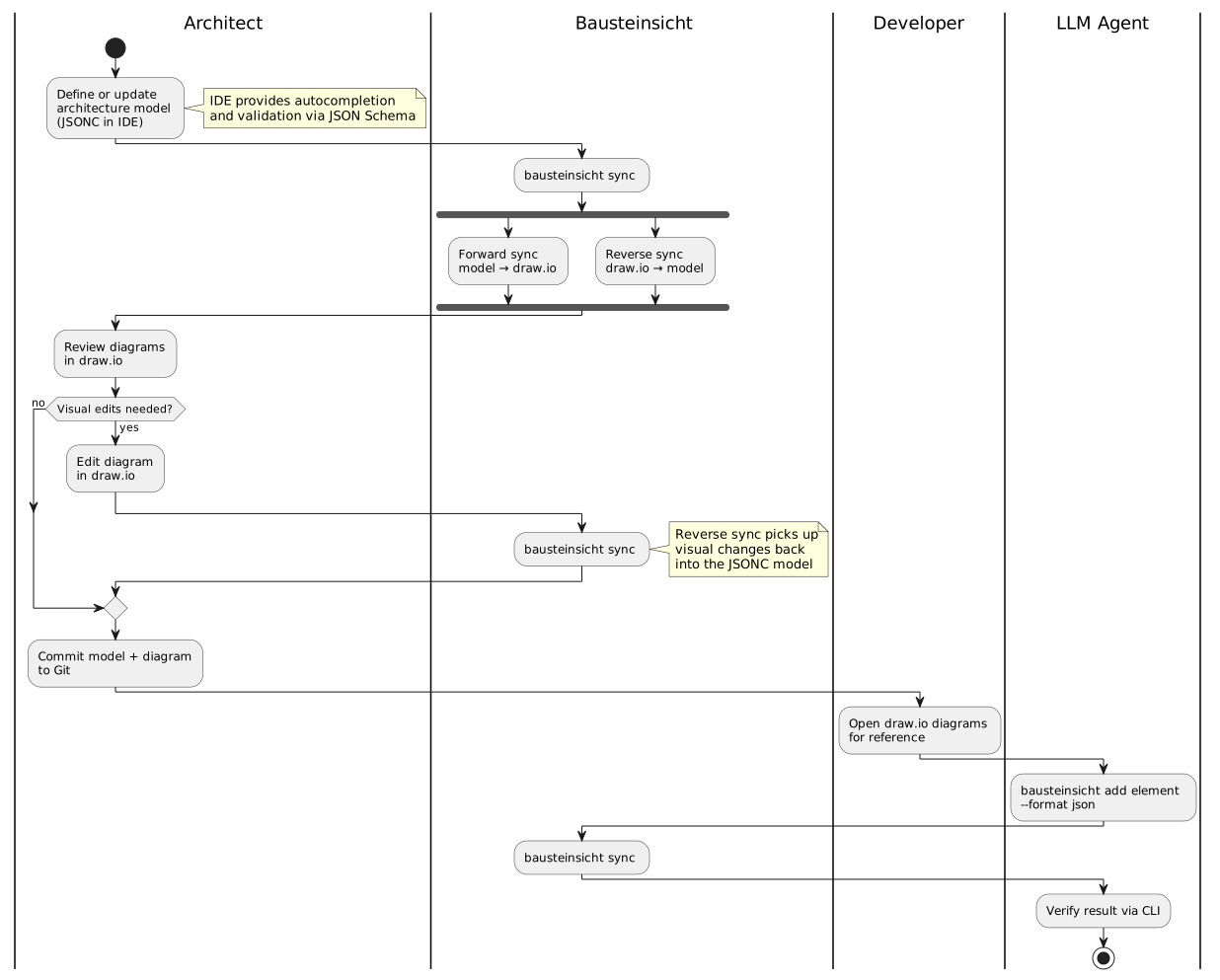
Architecture Maintenance Process
The following activity diagram shows how Bausteinsicht fits into the daily architecture workflow. The architect chooses between editing the text model or the visual diagram — Bausteinsicht synchronizes both directions.
Extended Workflows
The core loop above covers day-to-day editing. Bausteinsicht’s other ~30 commands enter or feed off that loop at specific points rather than replacing it — grouped here by where they attach, not detailed step-by-step (chapter 6’s Runtime View has the sequence diagrams for that level of detail, themselves generated via bausteinsicht export-sequence from dynamicViews in architecture.jsonc).

System Context

Figure 1. System Context (generated from architecture model)
| Element | Kind | Technology | Description |
|---|---|---|---|
Bausteinsicht |
system |
Architecture-as-code tool with draw.io as visual frontend and bidirectional synchronization |
|
Developer |
actor |
Developer using the Bausteinsicht CLI to manage architecture models |
|
draw.io App |
external_system |
draw.io desktop or web application for visual diagram editing |
|
IDE |
external_system |
IDE with JSON Schema support for JSONC editing with autocompletion |
|
Note
|
The generated diagram above is itself produced from a Bausteinsicht model and shows the principal technical partners (developer, draw.io, IDE). The table below is the authoritative, complete set of communication partners — including the human architect, LLM agents, and git, which act on the system rather than appearing inside its own context view. |
| Communication Partner | Input | Output |
|---|---|---|
Software Architect |
Edits to architecture model (JSONC) or draw.io diagrams |
Synchronized model and diagrams |
Developer |
— |
Up-to-date architecture diagrams in draw.io |
LLM Agent |
CLI commands (add element, sync, validate) |
Updated model files, validation results |
draw.io |
Visual edits to diagram elements and relationships |
Generated/updated diagram XML |
IDE (VS Code, IntelliJ, etc.) |
JSON Schema |
Autocompletion, validation, hover docs for model files |
Git |
Version-controlled model and diagram files |
Diff-friendly text-based file changes |
Technical Context
| Interface | Technology | Description |
|---|---|---|
Architecture Model |
JSONC files on filesystem |
The model is stored as |
draw.io Diagrams |
mxGraph XML files on filesystem |
Standard |
Templates |
mxGraph XML files on filesystem |
draw.io files containing styled reference elements for each element kind. |
CLI |
Go binary (stdin/stdout) |
Command-line interface for sync, validate, watch, and model manipulation commands. |
File System Watcher |
OS-native (inotify/FSEvents/ReadDirectoryChanges) |
Watches model and diagram files for changes in watch mode. |
JSON Schema |
Published schema file (local or SchemaStore.org) |
Enables IDE support without Bausteinsicht-specific plugins. |
draw.io CLI |
External process (auto-detected on |
|
Git |
External process ( |
|
Import / export formats |
Files on filesystem |
In: Structurizr DSL ( |
Language Server (LSP) |
JSON-RPC over stdio |
The |
Snapshot store |
Files on filesystem ( |
Versioned model captures written and read by the |
Feedback
Was this page helpful?
Glad to hear it! Please tell us how we can improve.
Sorry to hear that. Please tell us how we can improve.