Runtime View
Sync Command
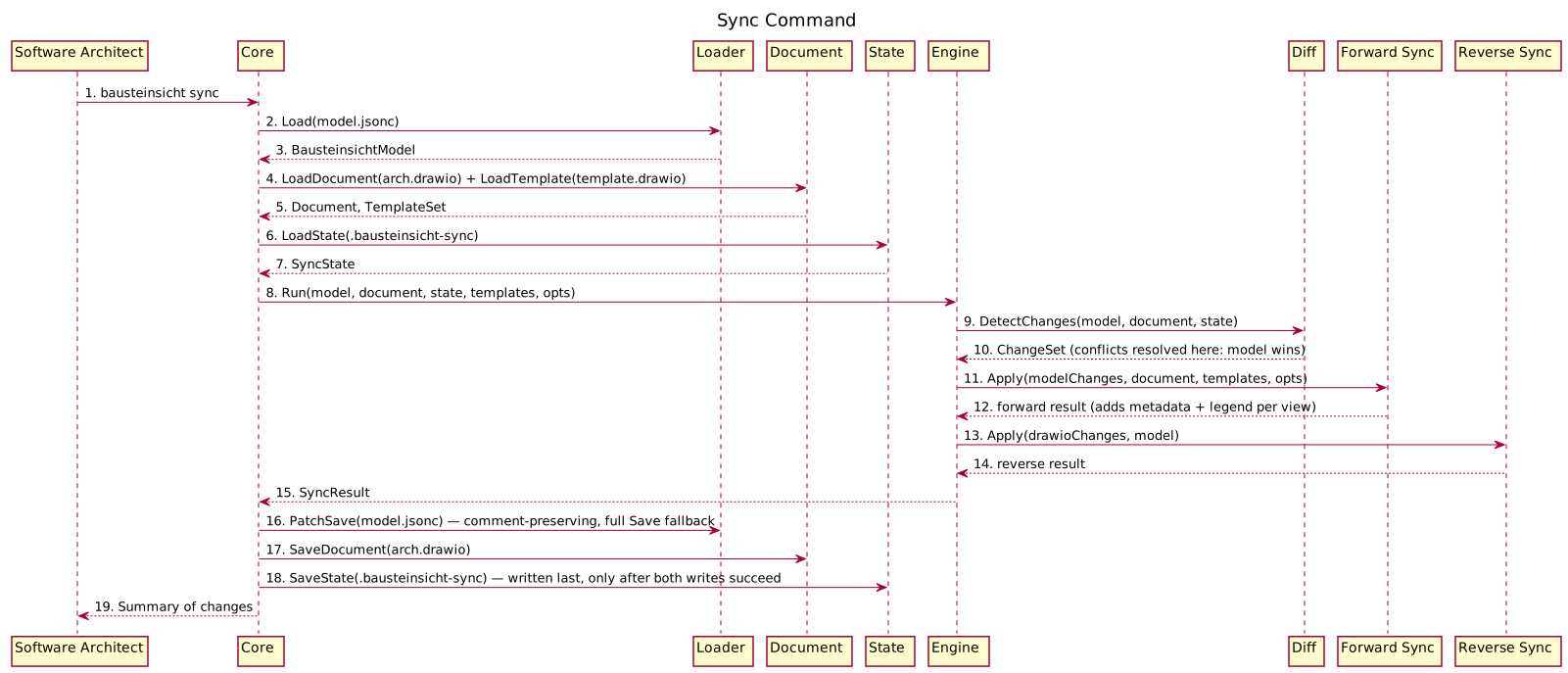
The most important runtime scenario. Shows what happens when the user runs bausteinsicht sync.
Figure 1. Sync Command (generated from
dynamicViews.sync-command in architecture.jsonc via bausteinsicht export-sequence)Key Observations
-
The sync engine receives all data as parameters — it performs no I/O itself
-
Forward sync runs before reverse sync in the same cycle
-
The state file is only written after both directions complete successfully
-
If any step fails, no files are written (atomic operation)
-
Forward sync adds metadata (title, source, author, timestamp) and a legend to each view page
Watch Mode
Shows the continuous sync loop triggered by file changes.
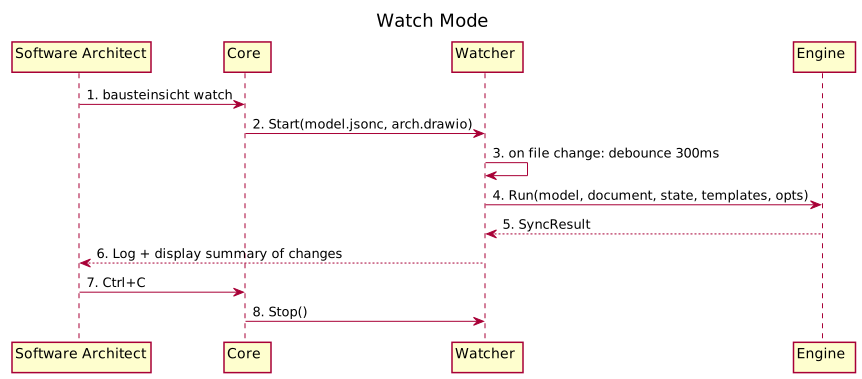
Figure 2. Watch Mode (generated from
dynamicViews.watch-mode in architecture.jsonc via bausteinsicht export-sequence)Debounce Strategy
File editors often trigger multiple save events in rapid succession (write + metadata update). The watcher debounces events with a 300ms window: after the first change event, it waits 300ms for additional events before triggering a sync.
Init Command
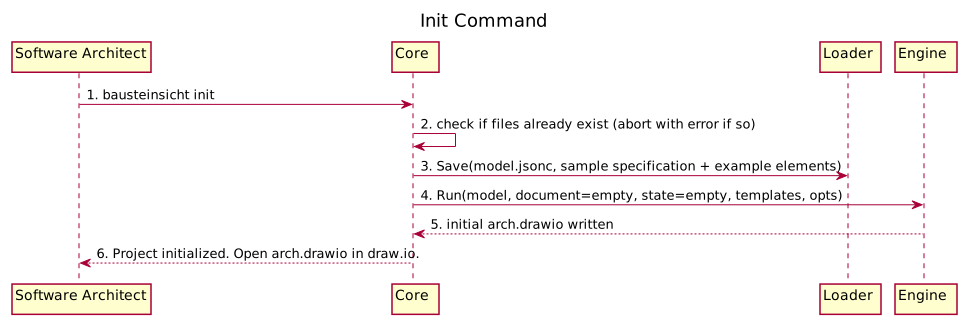
Figure 3. Init Command (generated from
dynamicViews.init-command in architecture.jsonc via bausteinsicht export-sequence)LLM-Driven Modification
Shows how an LLM agent uses CLI commands to modify the architecture.
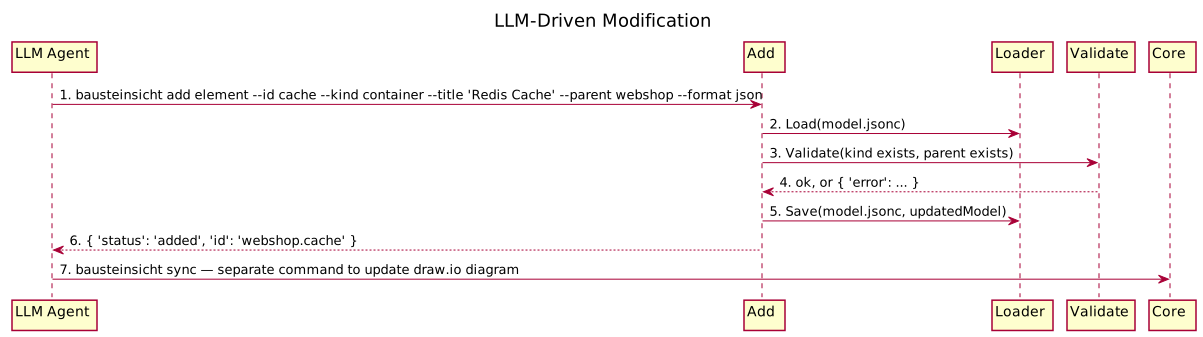
Figure 4. LLM-Driven Modification (generated from
dynamicViews.llm-driven-modification in architecture.jsonc via bausteinsicht export-sequence)Design Decision: Separate Add and Sync
The add commands only modify the JSON model. They do not trigger a sync automatically. This keeps commands predictable (single responsibility) and allows LLMs to batch multiple model changes before syncing.
Import from Structurizr / LikeC4 / XMI
Shows how an existing model is brought into Bausteinsicht (bausteinsicht import <file> --from structurizr|likec4|xmi).
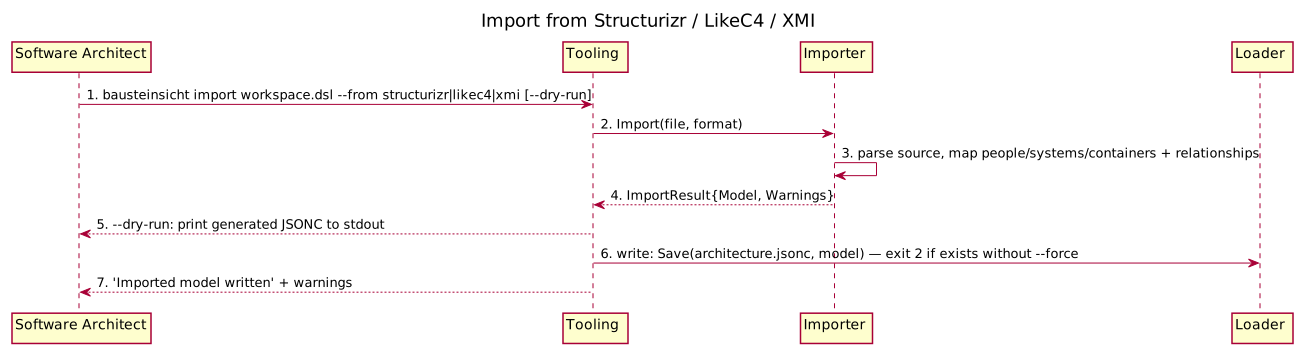
Figure 5. Import from Structurizr / LikeC4 / XMI (generated from
dynamicViews.import-from-external-formats in architecture.jsonc via bausteinsicht export-sequence)The result is immediately syncable with bausteinsicht sync. The importer never touches draw.io — it only produces the model. The XMI path additionally buffers the whole file in memory and converts Windows-1252 to UTF-8 before parsing (peak RSS ~2× the raw file size, 200 MB read cap enforced) — a materially different cost profile from the other two formats, though the CLI-level flow shown above is the same for all three.
REPL Save: Patch vs. Full-Save Fallback
The REPL keeps the model in memory and, on save, chooses how to persist so JSONC comments survive when possible. This is the key data-integrity flow.
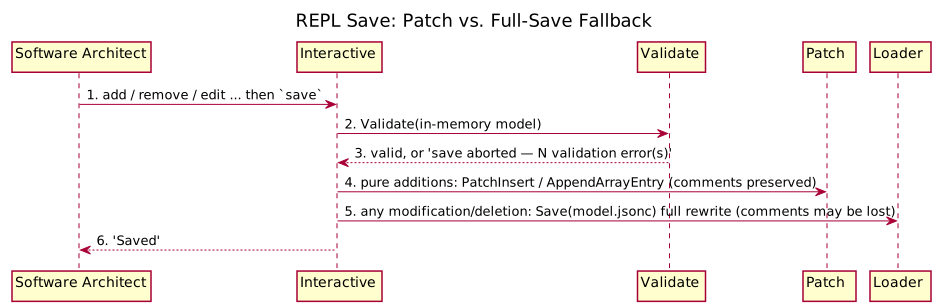
Figure 6. REPL Save: Patch vs. Full-Save Fallback (generated from
dynamicViews.repl-save in architecture.jsonc via bausteinsicht export-sequence)Key Observations
-
Validation runs before any write — an invalid model is never persisted.
-
Pure additions take the comment-preserving patch path; modifications/deletions conservatively fall back to a full rewrite with a visible warning about comment loss.
-
The same patch primitives back the non-interactive
addcommands.
Stale Detection
Shows how bausteinsicht stale flags forgotten elements using git history.
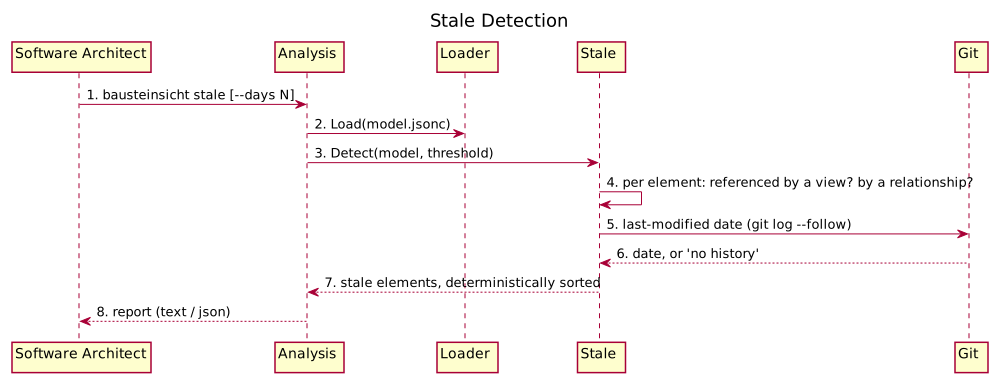
Figure 7. Stale Detection (generated from
dynamicViews.stale-detection in architecture.jsonc via bausteinsicht export-sequence)When run outside a git repository the git lookups degrade gracefully (no date), and detection falls back to the view/relationship membership checks.
Error & Recovery: Failed Write During Sync
The contract requires at least one error/recovery scenario. This shows why a failed or interrupted sync never corrupts the working files.
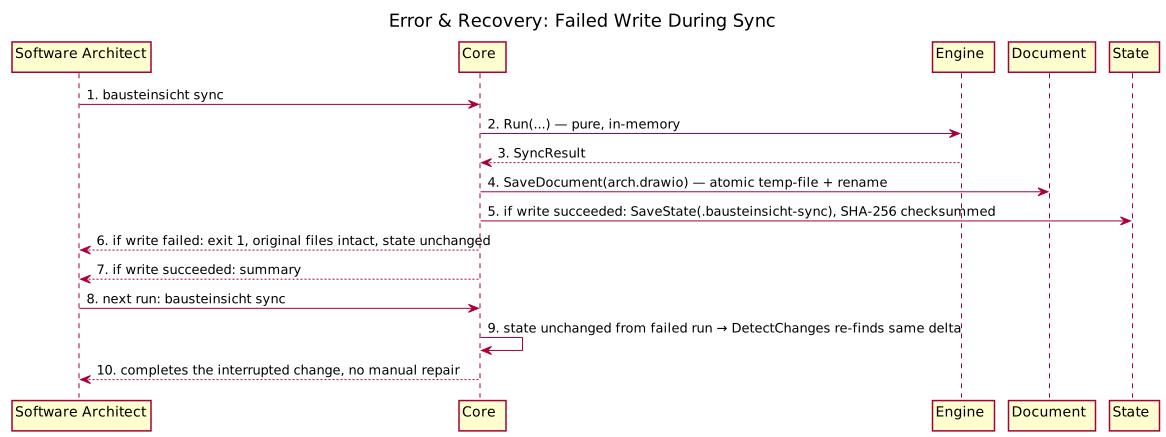
Figure 8. Error & Recovery: Failed Write During Sync (generated from
dynamicViews.error-recovery in architecture.jsonc via bausteinsicht export-sequence)|
Note
|
dynamicViews/SequenceStep (the model type behind this generated diagram) only supports linear sync/async/return arrows — no alt/opt/group branching or notes, unlike hand-written PlantUML. The two write-outcome branches ("if write failed" / "if write succeeded") and the atomic-write grouping are represented as plain sequential steps with the condition folded into the label text instead of a true visual branch. If this loses too much clarity, this scenario is the best candidate in chapter 6 to stay hand-written rather than generated — see #535.
|
Key Observations
-
The engine computes everything in memory first; files are written only afterwards, each via a temp-file-plus-rename so a partial write cannot truncate a real file.
-
The state file is written last. If any earlier write fails, the state is left untouched, so the next run re-detects the same change and retries — the operation is effectively idempotent and self-healing.
-
The state file carries a SHA-256 checksum, so external tampering or truncation is detected on load rather than silently trusted.
Add: Relationship / View / Specification / From-Pattern
The non-element add subcommands — add relationship, add view, add specification (with its own add specification element and add specification relationship children, for extending the specification itself rather than the model), and add-from-pattern — cover relationships between existing elements, views, specification entries, and pattern-based bulk generation. bausteinsicht add-from-pattern doesn’t have its own list subcommand; the sibling add pattern list command (a separate group under add, not under add-from-pattern) lists the patterns available to apply. All are pure model edits, same shape as add element (see LLM-Driven Modification above).
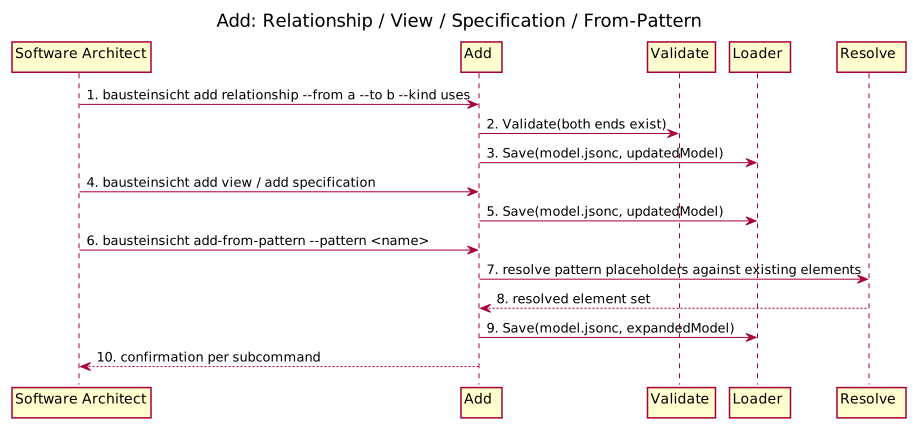
Figure 9. Add: Relationship / View / Specification / From-Pattern (generated from
dynamicViews.add-family in architecture.jsonc via bausteinsicht export-sequence)Snapshot: Save / List / Diff / Restore / Delete
Versioned model captures: snapshot save, snapshot list, snapshot diff, snapshot restore, and snapshot delete. snapshot restore is destructive (overwrites the live model), so it’s the one step here worth flagging as such.
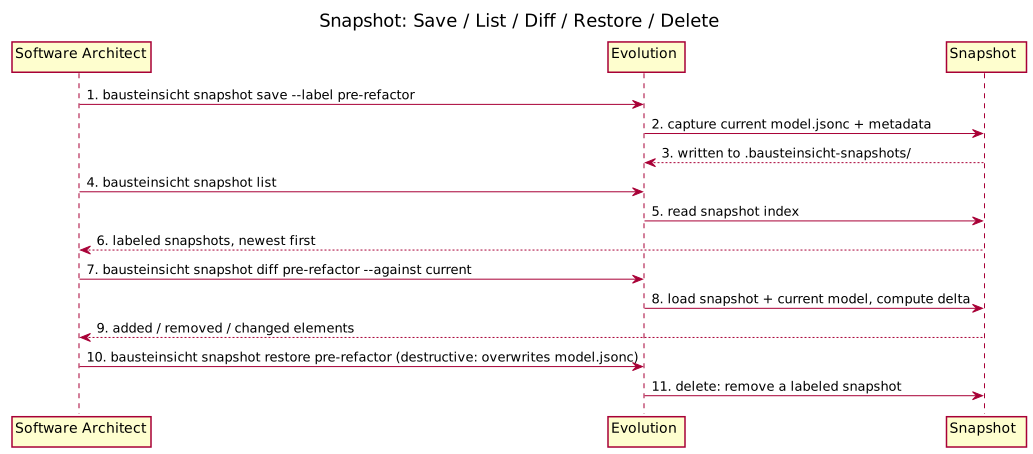
Figure 10. Snapshot: Save / List / Diff / Restore / Delete (generated from
dynamicViews.snapshot-management in architecture.jsonc via bausteinsicht export-sequence)As-Is/To-Be Diff and Changelog Generation
diff compares two model states; changelog walks git history calling diff at each relevant commit to build a human-readable architecture changelog.
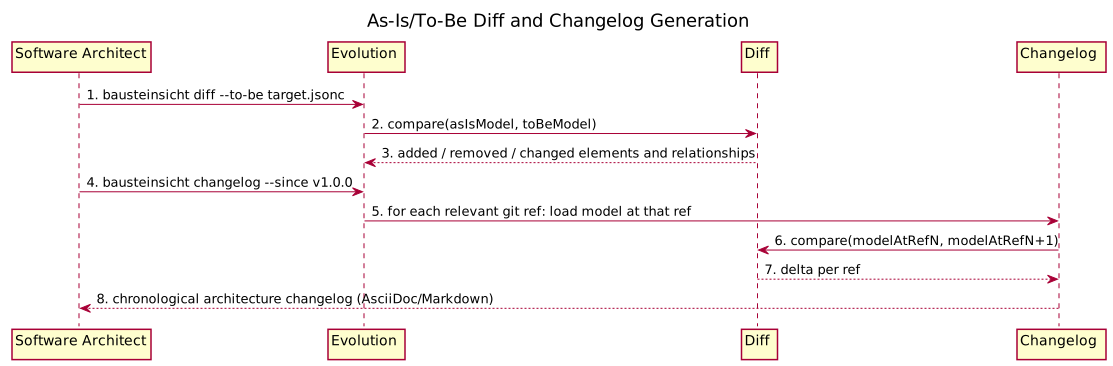
Figure 11. As-Is/To-Be Diff and Changelog Generation (generated from
dynamicViews.diff-and-changelog in architecture.jsonc via bausteinsicht export-sequence)Export: Diagrams, Tables, and Rendered Images
The three export commands — export, export-diagram, and export-table — read the model (and, for export, the synced draw.io document) and render it to an external format — the output-side counterpart to import. None of them write back to the model or draw.io.
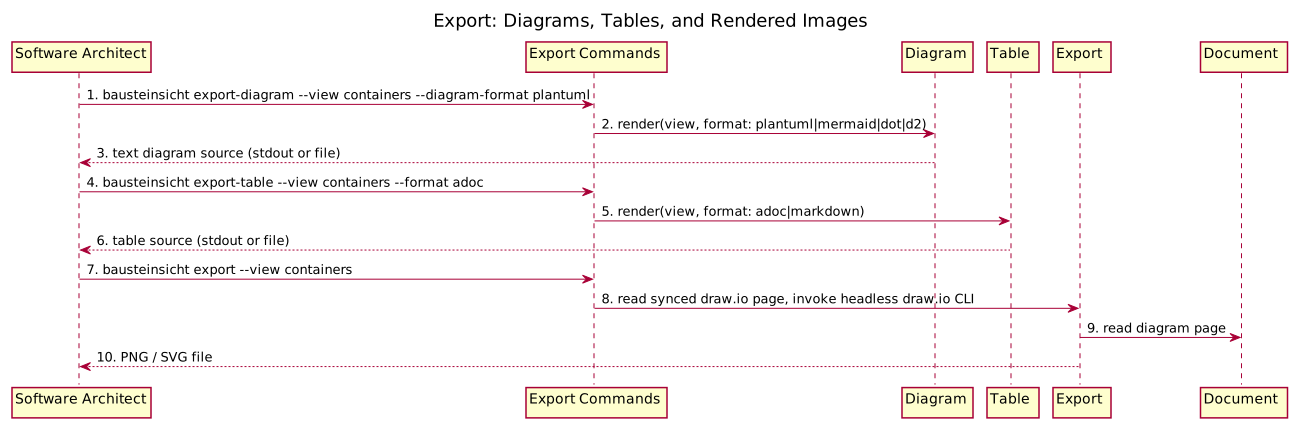
Figure 12. Export: Diagrams, Tables, and Rendered Images (generated from
dynamicViews.export-family in architecture.jsonc via bausteinsicht export-sequence)Analysis: Health, Graph, Find, Lint
Read-only architecture-quality checks, all following the same shape as Stale Detection (load model, analyze, report) — shown together since the flow is structurally identical across all four.
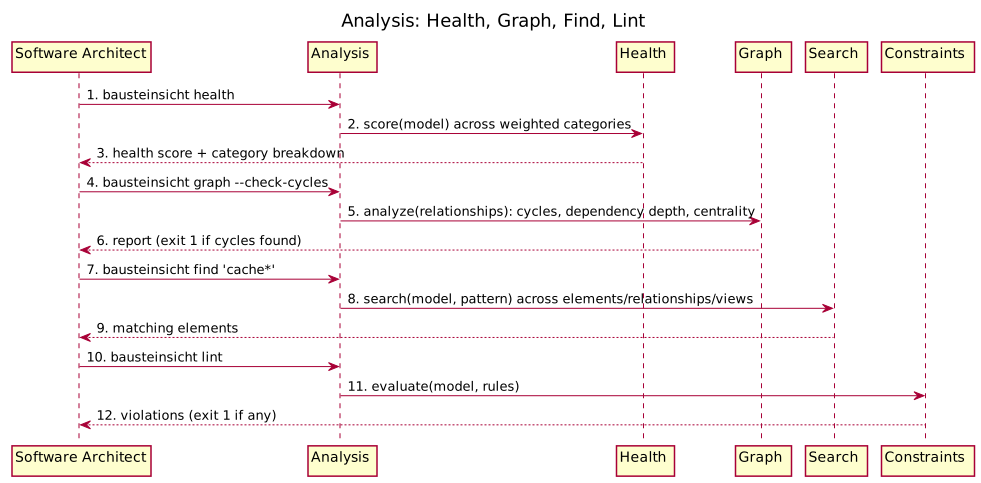
Figure 13. Analysis: Health, Graph, Find, Lint (generated from
dynamicViews.analysis-suite in architecture.jsonc via bausteinsicht export-sequence)Validate as a Standalone Gate
validate runs the same check other commands run internally before writing (see REPL Save, LLM-Driven Modification above), but as its own entry point — typically in CI or a pre-commit hook, checked before any file is touched.
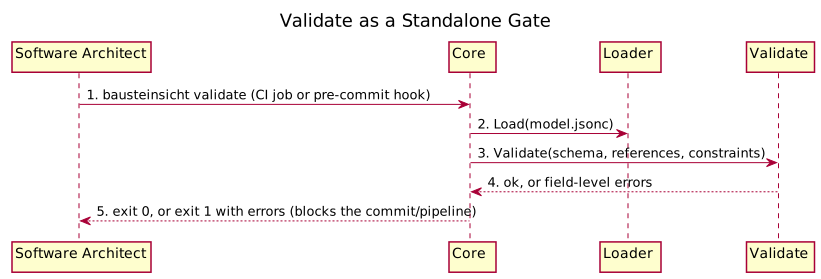
Figure 14. Validate as a Standalone Gate (generated from
dynamicViews.validate-standalone in architecture.jsonc via bausteinsicht export-sequence)Tooling: Workspace, Layout, Generate-Template, Schema
Cross-cutting setup/maintenance commands, not part of the daily edit-sync loop: multi-model workspaces (workspace merge, workspace validate, workspace list), auto-layout, template scaffolding, and JSON Schema regeneration (schema generate) for IDE support.
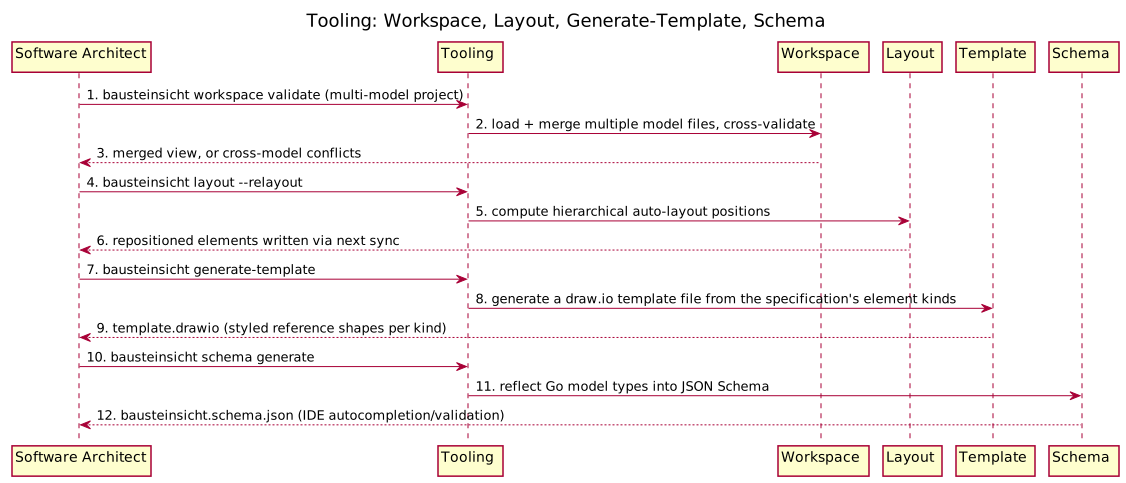
Figure 15. Tooling: Workspace, Layout, Generate-Template, Schema (generated from
dynamicViews.tooling-commands in architecture.jsonc via bausteinsicht export-sequence)Overlay and ADR
Two interactive-group commands outside the REPL itself: metric heatmap overlays on diagrams (overlay apply, overlay remove, overlay list), and ADR (Architecture Decision Record) scaffolding (adr list, adr show).
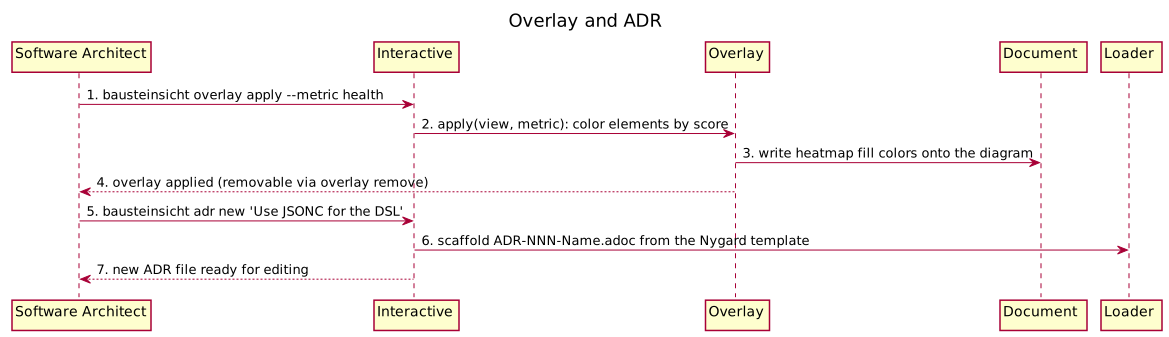
Figure 16. Overlay and ADR (generated from
dynamicViews.interactive-extras in architecture.jsonc via bausteinsicht export-sequence)Feedback
Was this page helpful?
Glad to hear it! Please tell us how we can improve.
Sorry to hear that. Please tell us how we can improve.