bausteinsicht export-diagram --view context
Sharing: Exports
The model is the truth — but your audience reads wikis, pull requests, and slide decks. Bausteinsicht exports to whatever they consume.
Text diagrams: PlantUML, Mermaid, D2 and friends
@startuml
!include <C4/C4_Context>

Person(customer, "Customer", "End user who browses products and places orders")
System(onlineshop, "Online Shop", "E-commerce platform for selling products online")
System_Ext(payment_provider, "Payment Provider", "Stripe API", "Processes credit card and bank transfer payments")

Rel(customer, onlineshop, "browses & orders")
Rel(onlineshop, payment_provider, "charges payment")
@enduml
That is proper C4-PlantUML, ready for any docs-as-code pipeline. The --diagram-format flag switches the dialect:
| Format | Use it for |
|---|---|
|
C4-PlantUML for AsciiDoc/docToolchain pipelines |
|
GitHub READMEs and merge-request descriptions — renders inline |
|
D2 and Graphviz toolchains |
|
A self-contained interactive HTML page |
|
Structurizr DSL — take your model with you |
Output goes to stdout by default; use --output <dir> to write files. Omit --view to export all views at once.
|
Tip
|
sync --mermaid maintains an always-current architecture.md with Mermaid diagrams next to your model — useful when the repository README should always show the latest architecture.
|
Sequence diagrams from dynamic views
Static structure is half the story. The model also supports dynamicViews — ordered interaction steps across your elements:
"dynamicViews": {
  "checkout-flow": {
    "title": "Checkout Flow",
    "steps": [
      { "from": "customer", "to": "onlineshop.mobile-app", "label": "tap 'Place Order'" },
      { "from": "onlineshop.mobile-app", "to": "onlineshop.api", "label": "POST /orders" },
      { "from": "onlineshop.api", "to": "payment-provider", "label": "charge card" }
    ]
  }
}
The scaffolded sample model ships one. Render it:
bausteinsicht export-sequence@startuml checkout_flow title Checkout Flow participant "Customer" as customer participant "Mobile App" as onlineshop_mobile_app participant "REST API" as onlineshop_api ... customer -> onlineshop_mobile_app : 1. tap 'Place Order'
Rendered, the sample model’s checkout flow becomes a full sequence diagram — the same dynamicViews steps, now readable at a glance:
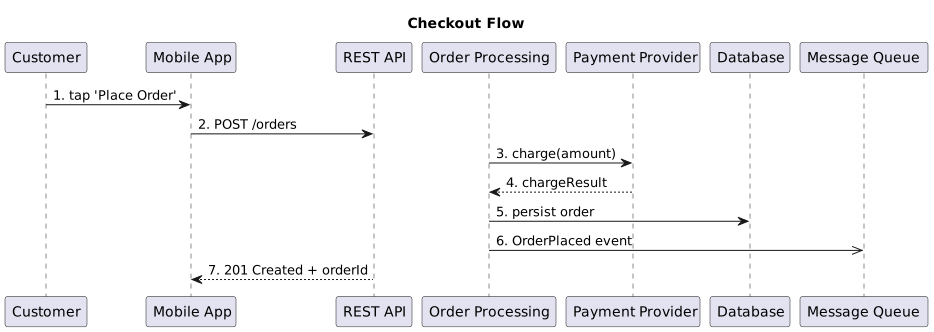
--diagram-format mermaid produces the Mermaid sequenceDiagram equivalent.
Tables for the spreadsheet people
bausteinsicht export-table --view context=== System Context [cols="2,1,1,3"] |=== | Element | Kind | Technology | Description | Customer | actor | | End user who browses products and places orders ...
AsciiDoc by default, --table-format md for Markdown, --combined for one deduplicated table across all views. --format json emits the raw rows for further processing.
Images: PNG and SVG
For slide decks and wikis that want pixels:
bausteinsicht export --view context --image-format pngThis drives the draw.io desktop app headlessly, so it requires draw.io installed on the machine. --image-format svg, --scale 2 for high-DPI (scale factors above 1 need a hardware GPU), --output <dir> to choose the destination. In containers, see the devcontainer notes in the repository — headless draw.io needs xvfb and a dbus daemon.
Continue with 5. Analysis and Evolution.
Feedback
Was this page helpful?
Glad to hear it! Please tell us how we can improve.
Sorry to hear that. Please tell us how we can improve.