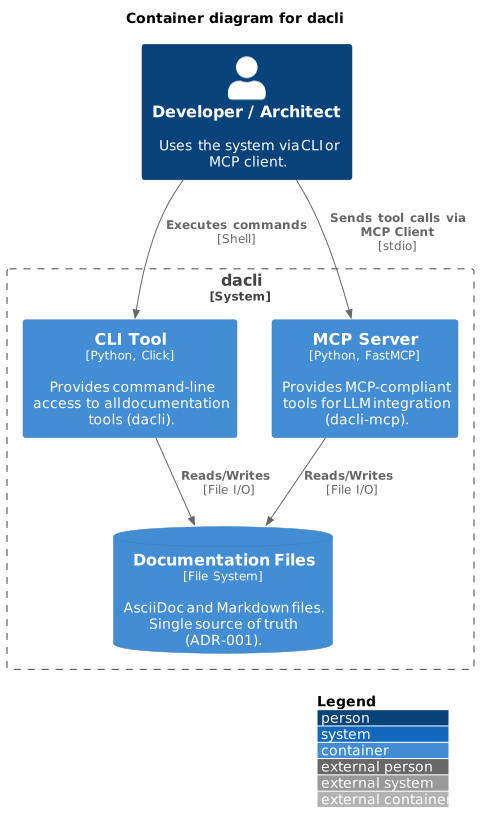
Building Block View
This chapter describes the static decomposition of the system into its key building blocks. We use the C4 model to illustrate the structure at different levels of detail.
Level 2: System Containers
The dacli system provides two interfaces: a CLI tool for direct command-line usage and an MCP server for LLM integration. The file system serves as the system’s database (see ADR-001).
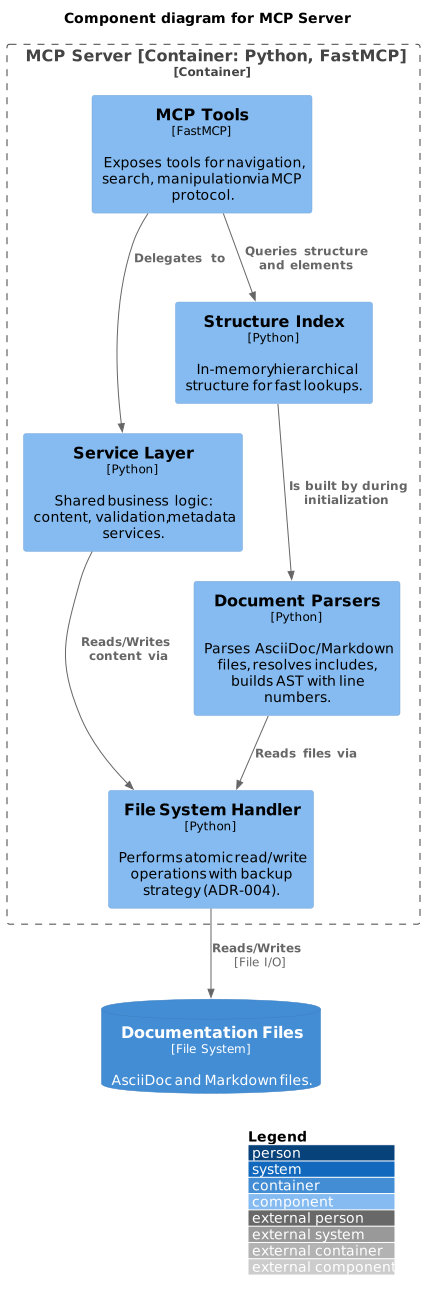
Level 3: Components of the MCP Server
We now zoom into the MCP Server container. It is composed of several components, each with a distinct responsibility.
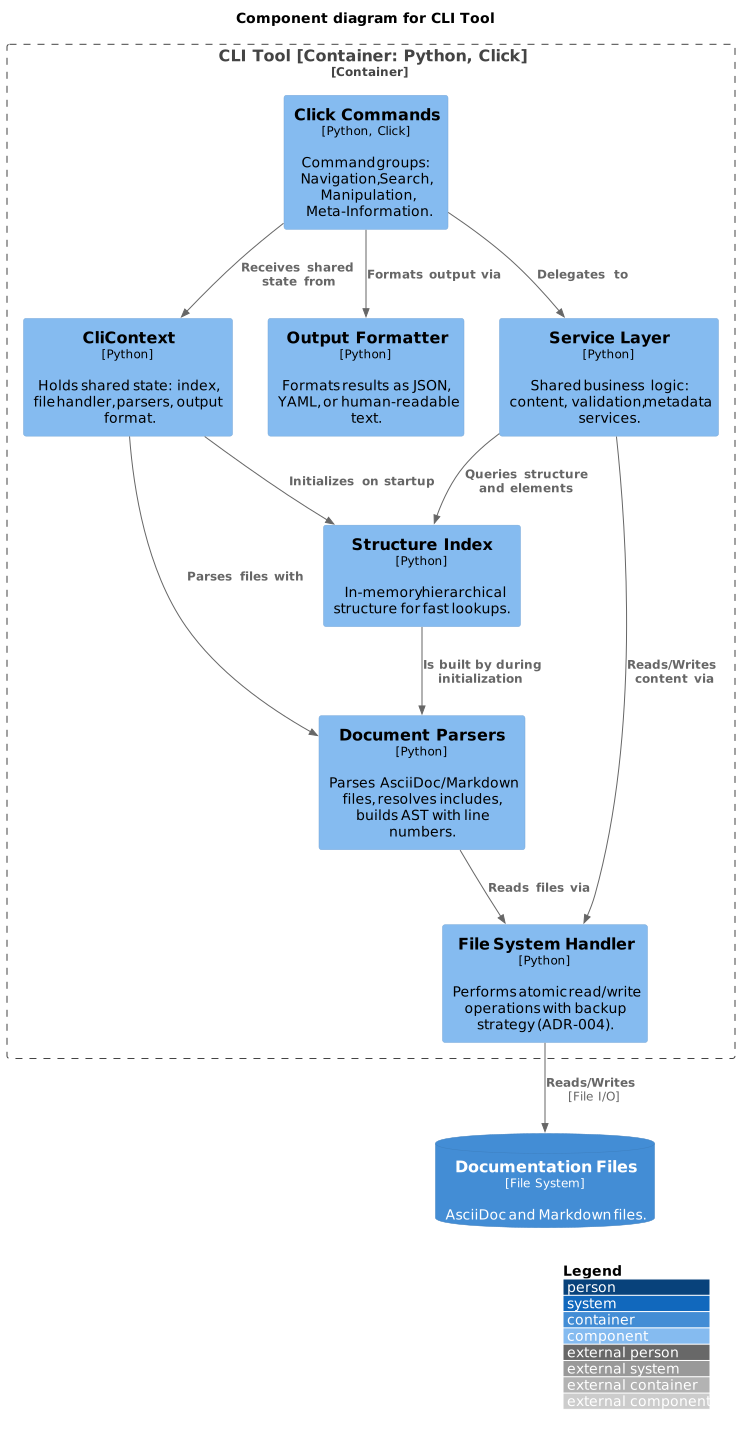
Level 3: Components of the CLI
The CLI tool (dacli) provides the same documentation operations as the MCP Server, accessible via command-line. It shares the core components (parsers, index, file handler) and adds a presentation layer for terminal output.
| Group | Commands |
|---|---|
Navigation |
|
Search & Elements |
|
Manipulation |
|
Meta-Information |
|
Document Parser Architecture
Both the MCP Server and CLI containers use the same "Document Parsers" component. Internally, it contains two independent parser implementations with distinct architectures, sharing utility functions via parser_utils.
| Aspect | AsciiDoc Parser | Markdown Parser |
|---|---|---|
File Discovery |
Follows |
Scans folder hierarchy ( |
Structure Source |
Heading levels ( |
Heading levels ( |
Include Support |
Full recursive resolution with cycle detection |
None (folder hierarchy replaces includes) |
Metadata |
Document attributes ( |
YAML frontmatter |
Unique Feature |
Attribute substitution in paths, source mapping across includes |
Numeric prefix sorting ( |
Key classes:
-
AsciidocStructureParser — Parses
.adocfiles. Delegates to an include resolver (recursive, with circular-include detection) and an attribute handler (:attr:substitution in text and include paths). -
MarkdownStructureParser — Parses
.mdfiles by scanning folder hierarchies. Supports YAML frontmatter for metadata. -
parser_utils — Shared functions:
slugify,strip_doc_extension,find_section_by_path,collect_all_sections.
For the internal structure of each parser (Level 4: Code), see the component specifications:
-
AsciiDoc Parser Specification — includes state machine diagram, include resolution algorithm, and data models
-
Markdown Parser Specification — includes state machine diagram, folder hierarchy rules, and data models
Component Responsibilities
The following table maps components to the MCP tools:
| Component | Responsibility | MCP Tools |
|---|---|---|
MCP Tools / CLI Commands |
Expose all functionality via MCP protocol or command line |
get_structure, get_section, get_sections_at_level, search, get_elements, get_metadata, validate_structure, update_section, insert_content, get_dependencies |
Service Layer |
Shared business logic for content manipulation, validation, metadata |
(Internal - used by both CLI and MCP) |
Document Parsers |
Parse AsciiDoc/Markdown, resolve includes, track line numbers |
(Internal - used during initialization) |
Structure Index |
In-memory index for fast lookups of sections and elements |
(Internal - supports all read operations) |
File System Handler |
Atomic file read/write operations with backup strategy |
(Internal - supports write operations, ADR-004) |
Data Models
The following core data models are used across components (see API Specification for details):
-
SectionLocation - File path and line range for a section
-
Section - Hierarchical document section with metadata
-
Element - Typed content element (table, code, diagram)
-
SearchResult - Search hit with context and relevance score
-
Metadata - Document or section metadata
-
ValidationResult - Structure validation outcome
Feedback
Was this page helpful?
Glad to hear it! Please tell us how we can improve.
Sorry to hear that. Please tell us how we can improve.