# Install dependencies and run MCP server
uv sync
uv run dacli-mcp --docs-root /path/to/docs

# Or use CLI directly
uv run dacli --docs-root /path/to/docs structure

# Configure in MCP client (e.g., Claude Desktop)
# ~/.config/claude/claude_desktop_config.json
{
  "mcpServers": {
    "dacli": {
      "command": "uv",
      "args": ["run", "dacli-mcp"],
      "cwd": "/path/to/dacli",
      "env": {
        "PROJECT_PATH": "/path/to/documentation"
      }
    }
  }
}
Deployment View
This chapter describes the infrastructure and environment for dacli.
Deployment Strategy
The application is designed to be lightweight and self-contained, in line with its constraints (no external services). Two deployment strategies are supported:
Local Development / MCP Integration
For local development and MCP client integration, the server runs directly via uv:
Docker Deployment
For containerized environments, the application can be packaged into a Docker container:
FROM python:3.12-slim

# Install uv
COPY --from=ghcr.io/astral-sh/uv:latest /uv /usr/local/bin/uv

WORKDIR /app
COPY pyproject.toml uv.lock ./
RUN uv sync --frozen --no-dev

COPY src/ ./src/

# MCP server uses stdio transport, no port needed
CMD ["uv", "run", "dacli-mcp"]|
Note
|
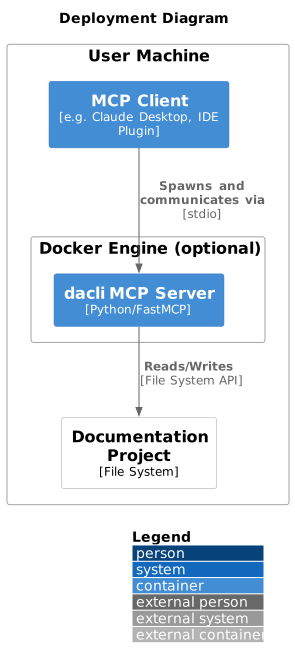
The MCP server communicates via stdio (standard input/output), not HTTP. The container is typically invoked by an MCP client that manages the stdio streams. |
Production Environment
For production use, dacli runs as a subprocess managed by the MCP client. The typical deployment involves:
Feedback
Was this page helpful?
Glad to hear it! Please tell us how we can improve.
Sorry to hear that. Please tell us how we can improve.