Building Block View
This section decomposes docToolchain v4 into its static building blocks at three levels of detail. The key structural change from v3: Gradle Orchestration and the compiled Core Module are removed. The architecture simplifies to two layers plus an ecosystem of companion tools.
Level 1: Whitebox Overall System
|
Tip
|
Source of truth (architecture-as-code). This Level-1 view is also modelled as a versioned Bausteinsicht JSONC model at |
- Motivation
-
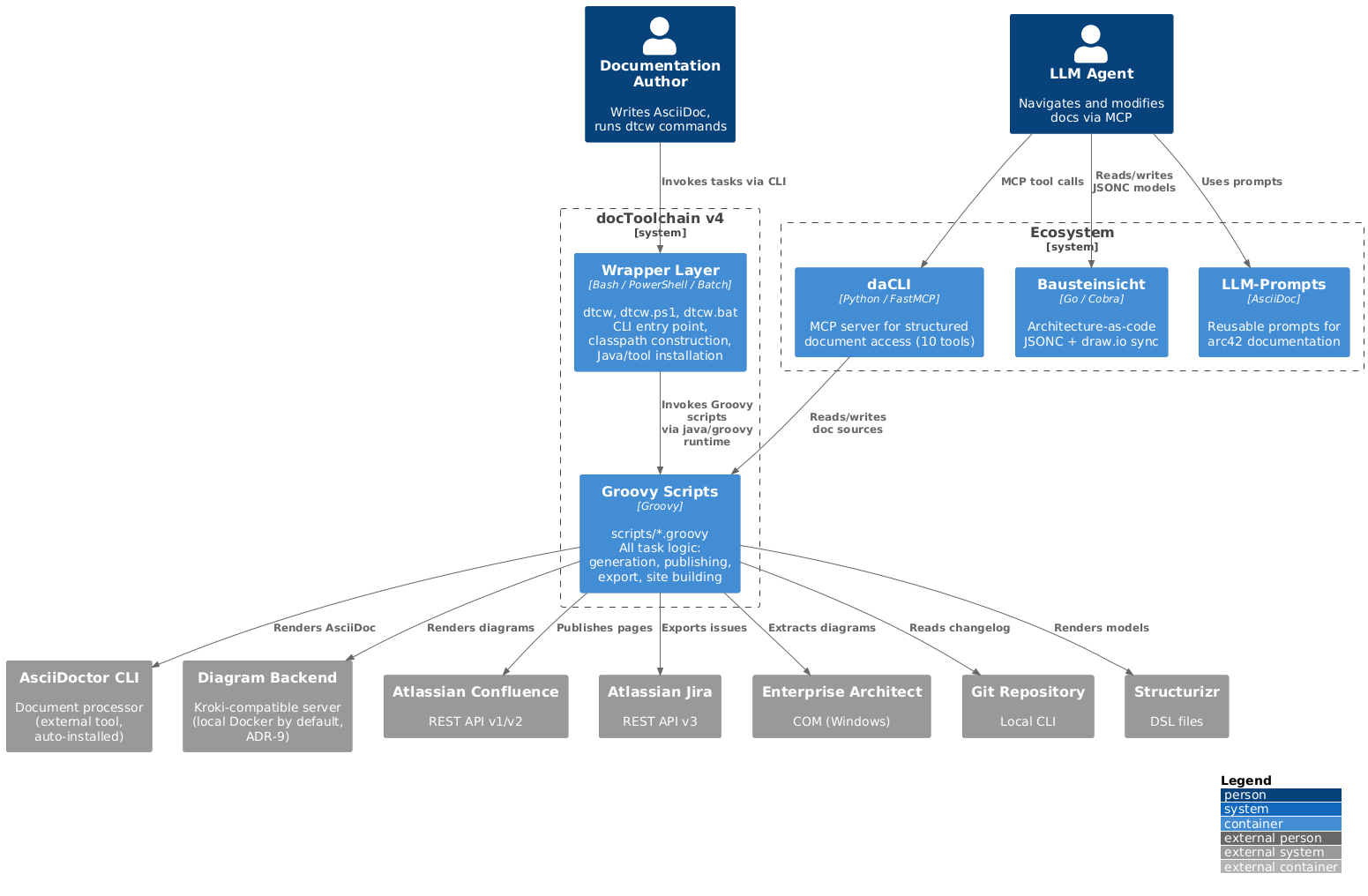
v4 simplifies from four layers (Wrapper → Gradle → Script Plugins → Core Module) to two layers (Wrapper → Scripts). The Gradle orchestration layer and the compiled Core Module are eliminated. Business logic returns to scripts. Companion tools (daCLI, Bausteinsicht, LLM-Prompts) handle LLM integration as an ecosystem rather than embedding it into docToolchain itself.
|
Note
|
This Level-1 view is a container zoom: it shows the two internal building blocks (Wrapper, Groovy Scripts) and the external systems they call at runtime — AsciiDoctor, Confluence, Jira, and the diagram rendering backend (Kroki, ADR-9). The remaining Chapter 3 context actors (Enterprise Architect, Git, Structurizr) are reached through the same The ecosystem tools differ in lifecycle: daCLI is exercised at runtime (the LLM-edit scenario S3 in Chapter 6 calls it). Bausteinsicht and LLM-Prompts are design-time companion tools — they are used by authors/LLMs while writing documentation; docToolchain core never invokes them at runtime. They are shown for ecosystem context only. |
- Contained Building Blocks
| Building Block | Responsibility | Interface | Location |
|---|---|---|---|
Wrapper Layer |
Cross-platform CLI entry point. Constructs classpath from |
CLI: |
|
Groovy Scripts |
All task logic: document generation (AsciiDoctor invocation), site generation (custom SSG), Confluence publishing, Jira export, changelog extraction, and all other features. Each script is a self-contained unit that runs without compilation. |
Task entry points: one |
|
daCLI (Ecosystem, runtime) |
MCP server providing 10 tools for structured document access: navigation, search, section-level read/write, validation. Separate Python process communicating via stdio. |
MCP over stdio ( |
Separate repository ( |
Bausteinsicht (Ecosystem, design-time only) |
Architecture-as-code tool. JSONC models with bidirectional draw.io sync. Exports PlantUML/PNG for embedding in AsciiDoc. Used by authors/LLMs at design time; not invoked by docToolchain core at runtime. |
CLI with |
Separate repository ( |
LLM-Prompts (Ecosystem, design-time only) |
Reusable prompt collection for arc42 documentation: chapter generation, ADR creation, quality scenarios, risk assessment, stakeholder analysis. Used by authors/LLMs at design time; not invoked by docToolchain core at runtime. |
Prompt text (AsciiDoc) consumed by an LLM; no runtime API. |
Separate repository ( |
Level 2: Whitebox Groovy Scripts
The scripts are organized into functional groups. Unlike v3 (where scripts were Gradle task definitions applied via apply from:), v4 scripts are standalone Groovy files invoked directly.
| Category | Scripts | Purpose |
|---|---|---|
Document Generation |
|
Core document generation. Calls AsciiDoctor CLI (external tool, ADR-6) for rendering. Replaces the |
Site Generation |
|
Custom Groovy-based static site generator ( |
Atlassian Integration |
|
Confluence publishing (with smart MD5-based update detection) and Jira data export. Contains the Confluence client hierarchy (V1/V2) and Jira client/converter logic formerly in |
External Tool Export |
|
Extract diagrams and models from external tools. EA/PPT/Visio are Windows-only (VBScript). |
Data Import/Export |
|
Import data from Excel, convert Markdown, extract Git metadata, run Pandoc conversions. |
Utilities |
|
Supporting tasks: aggregate includes, fix encodings, validate HTML, download templates. |
Configuration |
|
Loads |
Level 3: Whitebox Atlassian Integration
The Atlassian integration scripts contain the richest business logic. In v3 this was the compiled core/ module; in v4 it returns to script form.
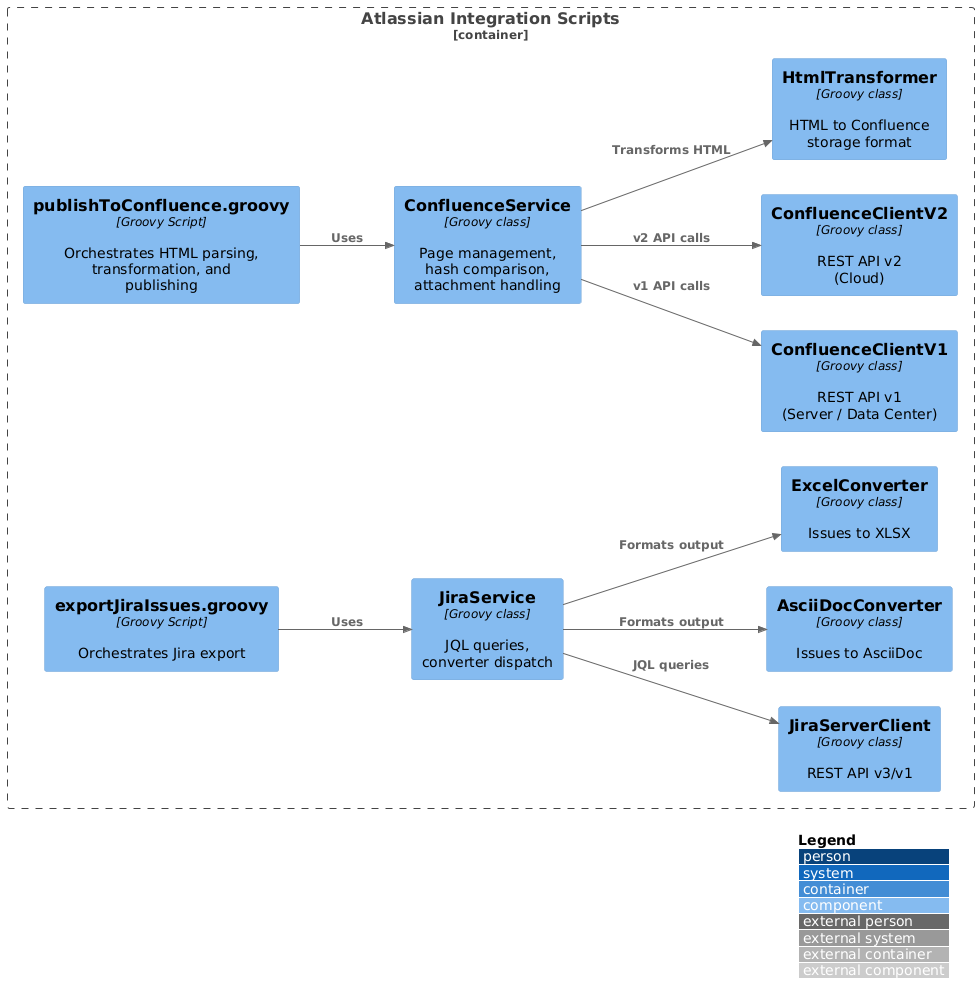
The key difference from v3: these classes are not compiled into a Shadow JAR. They are Groovy source files loaded at runtime. The script entry point (publishToConfluence.groovy) loads helper classes from a shared lib/ directory or via inline GroovyClassLoader.
Feedback
Was this page helpful?
Glad to hear it! Please tell us how we can improve.
Sorry to hear that. Please tell us how we can improve.