Failed to generate image: PlantUML preprocessing failed: [From <input> (line 30) ]

@startuml
start
:Author runs **./dtcw generateHTML**;

:dtcw detects execution environment
(local / docker / sdk);

if (Java installed?) then (yes)
else (no)
  if (Headless mode?) then (yes)
    :Print error: "Java not found.\nRun: ./dtcw local install java";
    stop
  else (no)
    :Prompt user to install Java;
    if (User accepts?) then (yes)
      :Download and install JDK;
    else (no)
      stop
    endif
  endif
endif

if (docToolchain installed?) then (yes)
else (no)
  :Download and install docToolchain;
endif

:Construct classpath from lib/ directory;
:Invoke: java -cp <classpath>
groovy.ui.GroovyMain
^^^^^
 Syntax Error? (Assumed diagram type: activity)

@startuml
start
:Author runs **./dtcw generateHTML**;

:dtcw detects execution environment
(local / docker / sdk);

if (Java installed?) then (yes)
else (no)
  if (Headless mode?) then (yes)
    :Print error: "Java not found.\nRun: ./dtcw local install java";
    stop
  else (no)
    :Prompt user to install Java;
    if (User accepts?) then (yes)
      :Download and install JDK;
    else (no)
      stop
    endif
  endif
endif

if (docToolchain installed?) then (yes)
else (no)
  :Download and install docToolchain;
endif

:Construct classpath from lib/ directory;
:Invoke: java -cp <classpath>
groovy.ui.GroovyMain
scripts/generateHTML.groovy;

:Script loads docToolchainConfig.groovy
via ConfigSlurper;

if (Config file exists?) then (yes)
else (no)
  :Print error:
  "docToolchainConfig.groovy not found";
  stop
endif

if (inputFiles configured?) then (yes)
else (no)
  :Print warning:
  "No inputFiles configured";
  stop
endif

:Create output directory (build/html5/);

while (More inputFiles?) is (yes)
  :Read AsciiDoc source file;
  if (File exists?) then (yes)
    :Invoke AsciiDoctor JVM
    with imageDirs, attributes;
    if (AsciiDoc processing succeeds?) then (yes)
      :Write HTML to build/html5/;
    else (no)
      :Print error with file name
      and line number;
      :Continue with next file;
    endif
  else (no)
    :Print warning:
    "File not found: <path>";
    :Continue with next file;
  endif
endwhile (no)

:Print summary:
"Generated N files in build/html5/";
:Exit code 0;
stop
@enduml
docToolchain v4 — Specification
.1. Use Cases
.1.1. UC-1: Generate HTML Documentation
Description
A documentation author converts AsciiDoc source files to HTML output using the docToolchain CLI.
Actors
-
Documentation Author (primary)
-
DevOps Engineer (CI/CD context)
Preconditions
-
AsciiDoc source files exist in the configured
inputPath -
docToolchainConfig.groovylists at least one input file withhtmlformat
Activity Diagram
Acceptance Criteria
Feature: Generate HTML Documentation

  Scenario: Successful HTML generation
    Given a project with docToolchainConfig.groovy
    And inputFiles contains [file: 'manual.adoc', formats: ['html']]
    And the file src/docs/manual.adoc exists
    When I run ./dtcw generateHTML
    Then the exit code is 0
    And the file build/html5/manual.html exists
    And the HTML contains the rendered content of manual.adoc

  Scenario: Fast execution without Gradle overhead
    Given docToolchain is already installed locally
    And Java is available
    When I run ./dtcw generateHTML on a 50-page project
    Then the first AsciiDoc processing starts within 3 seconds
    And the total execution completes within 10 seconds

  Scenario: Missing input file
    Given inputFiles contains [file: 'missing.adoc', formats: ['html']]
    And the file src/docs/missing.adoc does not exist
    When I run ./dtcw generateHTML
    Then a warning "File not found: missing.adoc" is printed
    And the exit code is 0
    And other configured files are still processed

  Scenario: Invalid AsciiDoc syntax
    Given inputFiles contains a file with invalid AsciiDoc syntax
    When I run ./dtcw generateHTML
    Then an error message with file name and line number is printed
    And the exit code is 0
    And other configured files are still processed

  Scenario: No Java installed, headless mode
    Given Java is not installed
    And DTC_HEADLESS is set to true
    When I run ./dtcw generateHTML
    Then the exit code is non-zero
    And the message contains "Java not found"

  Scenario: Auto-install Java
    Given Java is not installed
    And the terminal is interactive
    When I run ./dtcw generateHTML
    And I accept the Java installation prompt
    Then JDK is downloaded and installed to $HOME/.doctoolchain/jdk/
    And generateHTML proceeds normally after installation

  Scenario: v3 config backward compatibility
    Given a docToolchainConfig.groovy from a v3 project
    When I run ./dtcw generateHTML
    Then the output is identical to v3's output
    And no errors or warnings about deprecated config format are shown
.1.2. UC-2: Generate Microsite
Description
A documentation author generates a complete static documentation website from AsciiDoc sources using the custom Groovy-based site generator (replacing jBake).
Actors
-
Documentation Author (primary)
Preconditions
-
AsciiDoc source files with jBake-compatible metadata headers exist
-
micrositesection is configured indocToolchainConfig.groovy -
Groovy SimpleTemplate files exist in
src/site/templates/
Activity Diagram
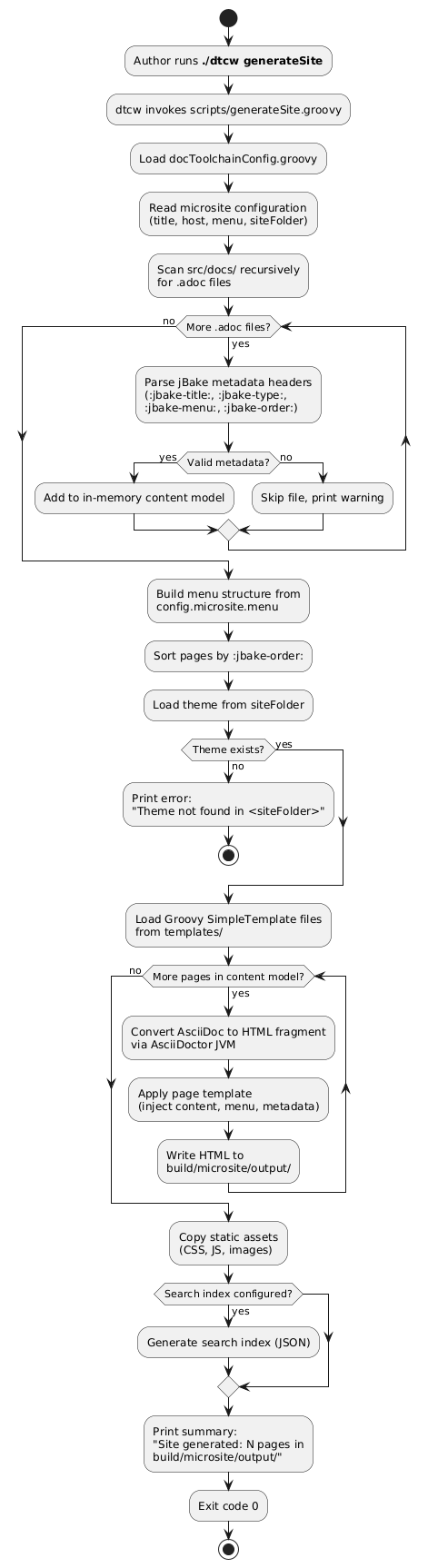
Acceptance Criteria
Feature: Generate Microsite

  Scenario: Successful site generation
    Given a project with AsciiDoc files containing jBake metadata headers
    And microsite is configured in docToolchainConfig.groovy
    And Groovy SimpleTemplate files exist in src/site/templates/
    When I run ./dtcw generateSite
    Then the exit code is 0
    And build/microsite/output/ contains HTML files for each page
    And each HTML file has navigation, header, and footer from templates
    And static assets (CSS, JS) are copied to the output directory

  Scenario: Apple Silicon compatibility
    Given I am running on macOS with Apple Silicon (ARM64)
    When I run ./dtcw generateSite
    Then the site is generated without errors
    And no JNI or native library errors occur

  Scenario: Modern responsive UI
    Given the site is generated with the default theme
    When I open a page in a desktop browser
    Then the layout is responsive
    And a dark mode toggle is available
    And full-text search is functional

  Scenario: jBake metadata backward compatibility
    Given AsciiDoc files use v3 jBake metadata headers
    And headers include :jbake-title:, :jbake-type:, :jbake-status:, :jbake-menu:, :jbake-order:
    When I run ./dtcw generateSite
    Then all files are processed correctly
    And menu order matches :jbake-order: values
    And page titles match :jbake-title: values

  Scenario: v3 Groovy SimpleTemplate compatibility
    Given Groovy SimpleTemplate files from a v3 project
    When I run ./dtcw generateSite
    Then the templates render without errors
    And template variables (content, config, published_date, etc.) are populated

  Scenario: Missing template directory
    Given src/site/templates/ does not exist
    When I run ./dtcw generateSite
    Then the exit code is non-zero
    And the error message says "Theme not found"

  Scenario: File without jBake metadata
    Given an AsciiDoc file without :jbake-title: header
    When I run ./dtcw generateSite
    Then the file is skipped with a warning
    And other files are processed normally
.1.3. UC-3: Publish to Confluence
Description
A documentation author publishes generated HTML pages to Atlassian Confluence with smart change detection.
Actors
-
Documentation Author (primary)
-
DevOps Engineer (CI/CD context)
Preconditions
-
HTML files exist in
build/html5/(user must rungenerateHTMLfirst) -
Confluence API endpoint and credentials are configured
-
Target Confluence space exists
Activity Diagram
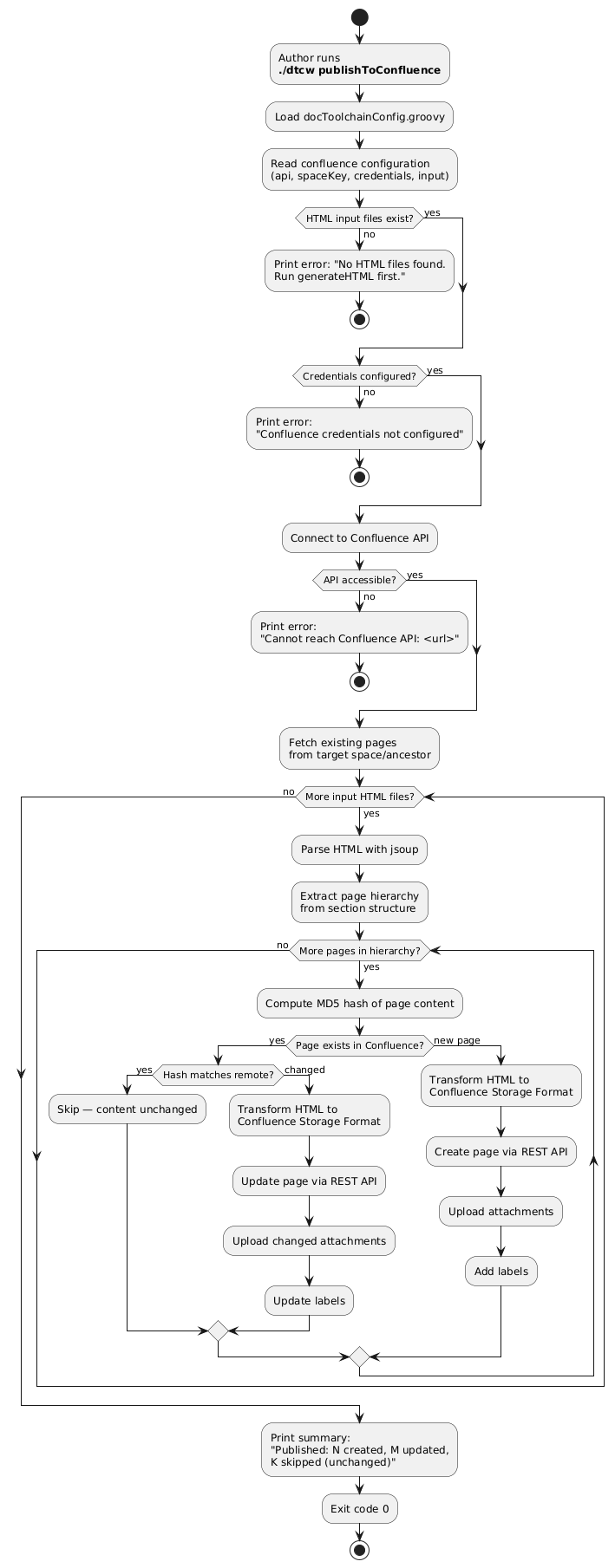
Acceptance Criteria
Feature: Publish to Confluence

  Scenario: Successful publish with changes
    Given generateHTML has been run
    And Confluence credentials are configured
    And the target space exists
    When I run ./dtcw publishToConfluence
    Then changed pages are created or updated in Confluence
    And unchanged pages are skipped
    And the summary shows counts for created, updated, and skipped pages

  Scenario: Idempotent publish (no changes)
    Given the same documentation was published previously without changes
    When I run ./dtcw publishToConfluence
    Then no Confluence page versions are created
    And the summary shows all pages as "skipped (unchanged)"

  Scenario: Missing HTML input
    Given build/html5/ does not exist or is empty
    When I run ./dtcw publishToConfluence
    Then the exit code is non-zero
    And the error says "No HTML files found. Run generateHTML first."

  Scenario: Invalid credentials
    Given Confluence credentials are incorrect
    When I run ./dtcw publishToConfluence
    Then the exit code is non-zero
    And the error indicates authentication failure

  Scenario: Confluence API unreachable
    Given the configured Confluence API URL is unreachable
    When I run ./dtcw publishToConfluence
    Then the exit code is non-zero
    And the error includes the API URL
.1.4. UC-4: Export Jira Issues
Description
A documentation author exports Jira issues to AsciiDoc or Excel format for inclusion in documentation.
Actors
-
Documentation Author (primary)
Preconditions
-
Jira API endpoint and credentials are configured
-
At least one export entry with JQL query is defined
Activity Diagram
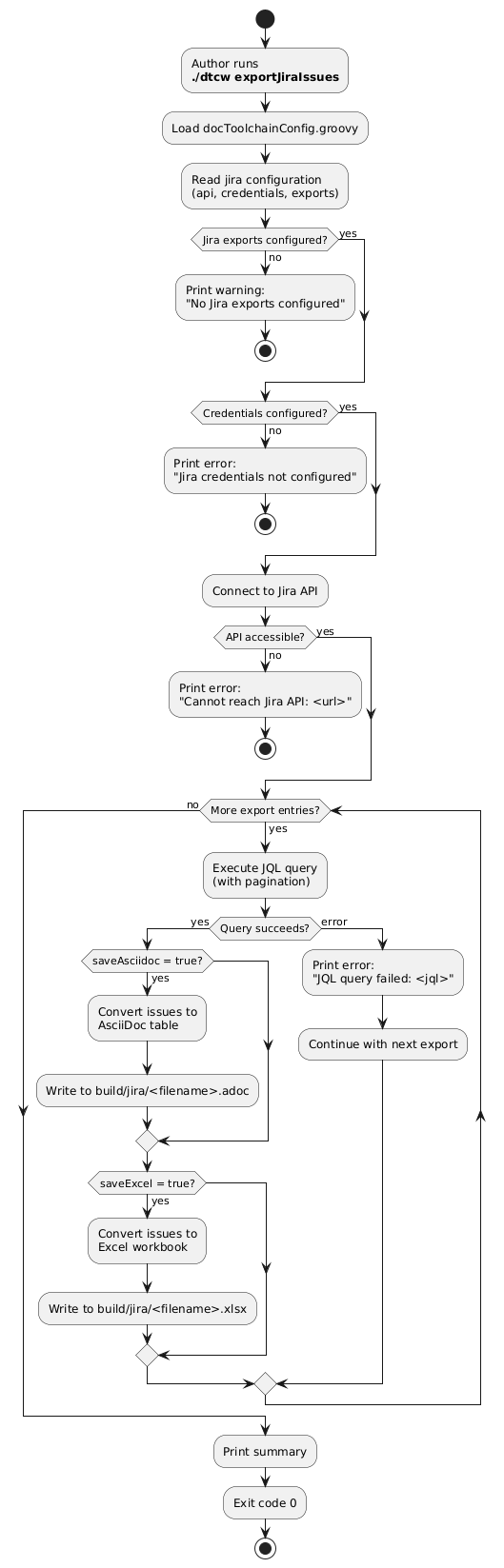
Acceptance Criteria
Feature: Export Jira Issues

  Scenario: Successful export to AsciiDoc
    Given Jira API credentials are valid
    And exports contains a JQL query that returns results
    And saveAsciidoc is true
    When I run ./dtcw exportJiraIssues
    Then build/jira/<filename>.adoc contains an AsciiDoc table with issues

  Scenario: Successful export to Excel
    Given Jira API credentials are valid
    And exports contains a JQL query that returns results
    And saveExcel is true
    When I run ./dtcw exportJiraIssues
    Then build/jira/<filename>.xlsx contains a workbook with issues

  Scenario: JQL query returns no results
    Given a JQL query that matches no issues
    When I run ./dtcw exportJiraIssues
    Then the output file is created with headers but no rows
    And the exit code is 0

  Scenario: Jira API unreachable
    Given the configured Jira API URL is unreachable
    When I run ./dtcw exportJiraIssues
    Then the exit code is non-zero
    And the error includes the API URL
.1.5. UC-5: LLM Navigates Documentation via daCLI
Description
An LLM agent accesses docToolchain-managed documentation through daCLI’s MCP server to read, search, and modify content.
Actors
-
LLM Agent (primary, via MCP client)
-
Documentation Author (starts daCLI)
Preconditions
-
daCLI is installed and running:
dacli-mcp --docs-root src/docs/ -
AsciiDoc source files exist in the docs root
-
LLM client supports MCP protocol
Activity Diagram
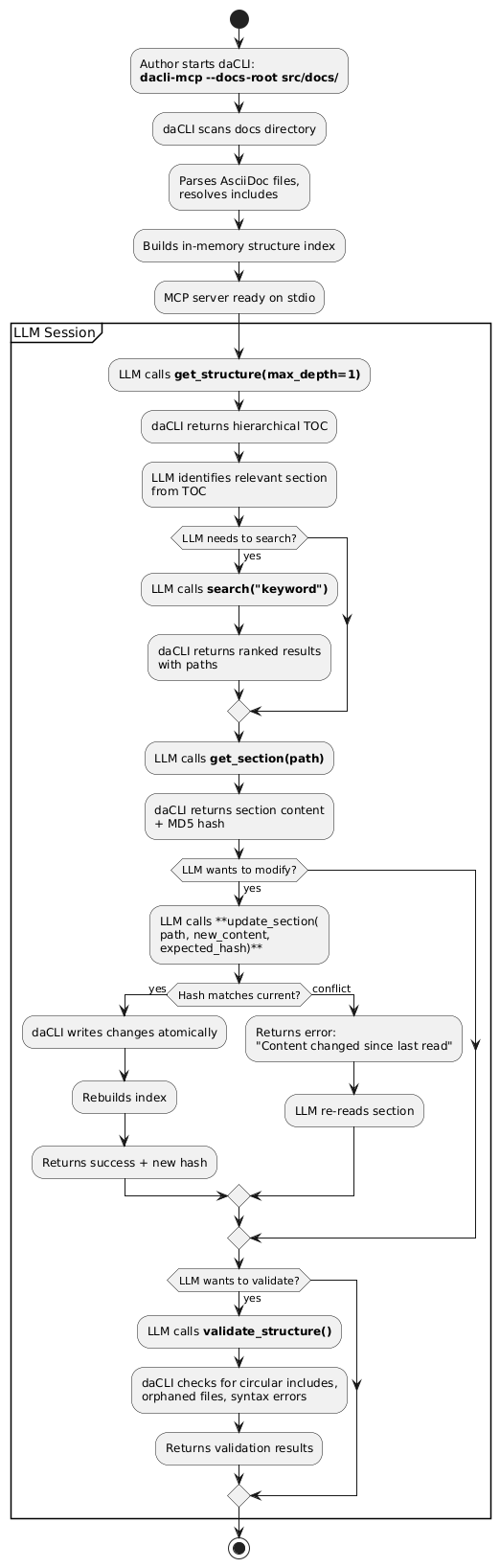
Acceptance Criteria
Feature: LLM Navigates Documentation via daCLI

  Scenario: Efficient navigation
    Given daCLI is running with docs-root pointing to a 50-page project
    When an LLM calls get_structure, then search, then get_section
    Then the LLM locates the target section in at most 3 tool calls
    And total token usage is under 10k (vs. 100k for reading all files)

  Scenario: Section modification with optimistic locking
    Given an LLM has read a section and received its hash
    When the LLM calls update_section with the correct expected_hash
    Then the section is updated atomically
    And a new hash is returned
    And the source file on disk reflects the change

  Scenario: Concurrent modification conflict
    Given an LLM has read a section and received hash "abc123"
    And another process has modified the same section
    When the LLM calls update_section with expected_hash "abc123"
    Then the update is rejected with a conflict error
    And the original content is preserved

  Scenario: Structure validation
    Given a documentation project with a circular include
    When an LLM calls validate_structure
    Then the result contains a warning about the circular include
    And the warning identifies the files involved
.1.6. UC-6: Add New Feature (Contributor Workflow)
Description
A contributor adds a new export feature to docToolchain by creating a single Groovy script.
Actors
-
Contributor / Developer
Preconditions
-
docToolchain v4 source code is checked out
-
Java is installed
Activity Diagram
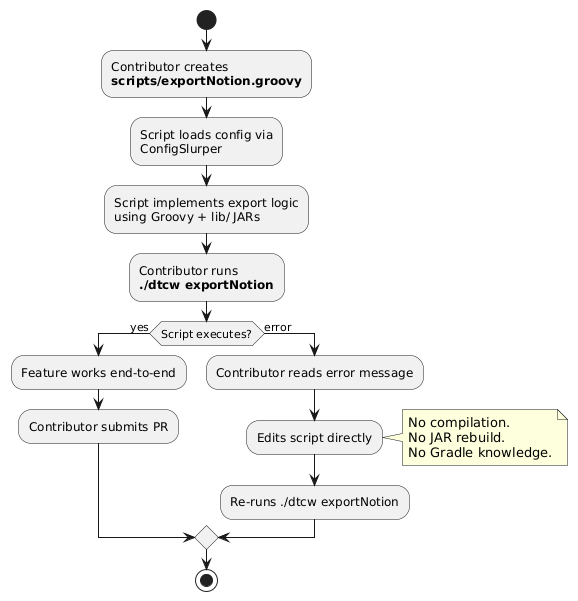
Acceptance Criteria
Feature: Add New Feature as Contributor

  Scenario: Script-first development
    Given a contributor creates scripts/exportNotion.groovy
    When the contributor runs ./dtcw exportNotion
    Then the script executes without any compilation step
    And no files other than the script need to be modified

  Scenario: Fast feedback loop
    Given a contributor modifies scripts/exportNotion.groovy
    When the contributor re-runs ./dtcw exportNotion
    Then the modified script executes within 5 seconds of invocation
    And the changes are reflected immediately

  Scenario: Script discovery
    Given scripts/exportNotion.groovy exists
    When a user runs ./dtcw tasks
    Then exportNotion appears in the task list
Feedback
Was this page helpful?
Glad to hear it! Please tell us how we can improve.
Sorry to hear that. Please tell us how we can improve.